Packshot sur fond blanc
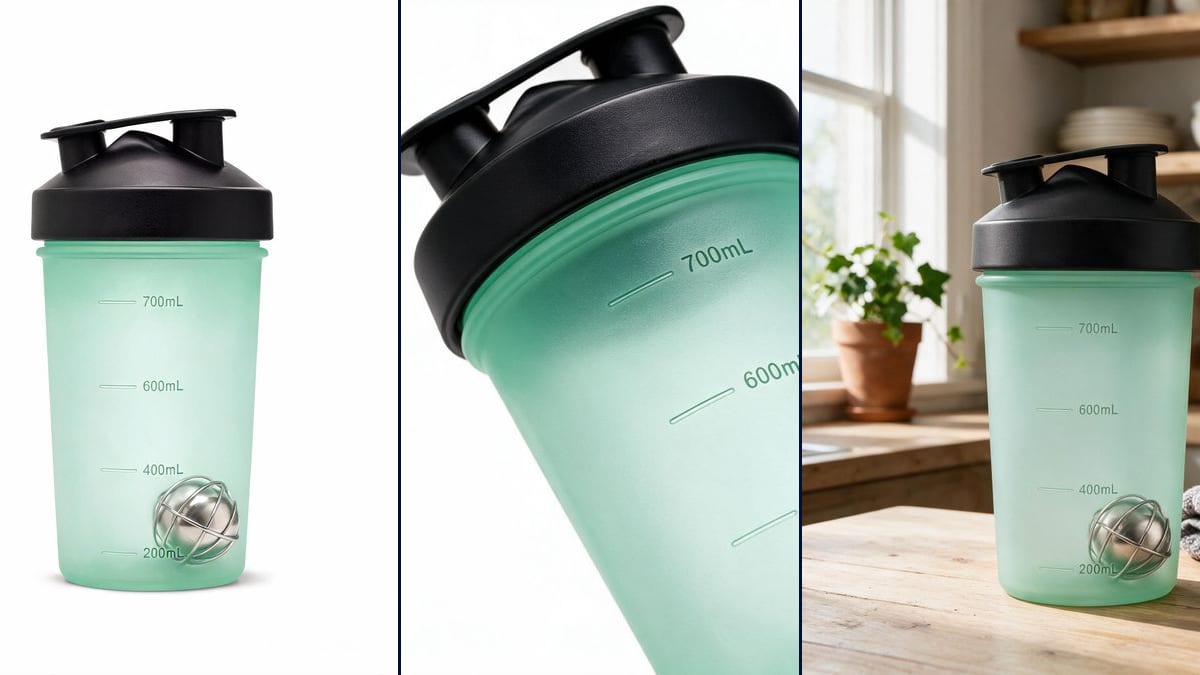
Le visuel obligatoire de toute fiche produit : produit centré, fond blanc sans raccord, ombre de contact discrète. La fiche Référence tient la forme et l'étiquette, la direction artistique tient le studio.
Transformez 2 ou 3 photos de votre produit en shooting complet : packshot fond blanc, vue trois-quarts, macro de détail, mise en situation, et une vidéo de rotation studio.
 Démo interactive
Vrai workflow, résultats réels. Déplacez-vous et zoomez librement.
Utiliser ce workflowCe workflow est le vrai template : une seule fiche produit alimente les 4 visuels et la vidéo de rotation. Explorez chaque node pour voir son prompt.
AI product photography: a complete e-commerce shoot for 46 cents (no studio)
En bref
Un studio photo produit facture le shooting complet plusieurs centaines d'euros. Ce workflow part de votre fiche produit (une description précise et 2 ou 3 photos sous des angles différents) et en tire les quatre visuels que demande une fiche e-commerce : packshot fond blanc, trois-quarts, macro de détail et mise en situation.
La fiche Référence est la clé de la cohérence : chaque node Image la mentionne par @, le modèle reçoit vos vraies photos et reproduit votre produit, pas un produit générique qui lui ressemble. La vidéo de rotation part ensuite du packshot généré, comme sur un plateau tournant de studio.
Seedream 5 Pro est le modèle de référence pour la fidélité produit ; Flux 2 Pro est une belle alternative pour les rendus les plus léchés. Pour aller plus loin, créer sa première image IA pose les bases, et le node Caméra détaillé dans la doc affine les angles.
Ce sont les fichiers du workflow ci-dessus, tels que les modèles les ont produits, sans retouche. Le point de départ est indiqué quand il y en a un.
Point de départ
Rendu
Vendeurs e-commerce, marketplaces et marques qui ont besoin d'une série de visuels cohérents par produit.
Deux ou trois photos nettes du vrai produit sous des angles différents, et sa description précise : matière, couleur, finitions.
Décrivez votre produit dans la fiche
Matière, couleur, finitions, et 2 ou 3 photos sous des angles différents. Plus la fiche est précise, plus les quatre visuels restent fidèles au vrai produit.
Lancez les quatre visuels
Packshot, trois-quarts, macro, mise en situation : chaque node a son prompt déjà écrit, que vous pouvez ajuster (fond, ambiance, surface).
Générez la vidéo de rotation
Le packshot alimente le node Vidéo : cinq secondes de rotation studio, parfaites pour une fiche produit ou une story.
Déclinez pour chaque canal
Dupliquez un node, changez le format (1:1 pour la boutique, 9:16 pour les stories) et regénérez : la fiche produit reste la même, la cohérence aussi.
Le même canvas, réglé pour des besoins différents : chaque variante tient en deux ou trois lignes de prompt à changer.
Le visuel obligatoire de toute fiche produit : produit centré, fond blanc sans raccord, ombre de contact discrète. La fiche Référence tient la forme et l'étiquette, la direction artistique tient le studio.
Les surfaces brillantes recomposent les reflets : ajoutez une vue de trois quarts dans la fiche et vérifiez le texte de l'étiquette sur le rendu. C'est là que se voit un packshot généré trop vite.
Le node macro du template s'occupe du détail : gravure, fermoir, matière. Demandez une profondeur de champ très courte, c'est ce qui donne le rendu de catalogue plutôt que de photo de téléphone.
Le même produit dans une scène : sur une table de petit déjeuner, dans une salle de bain, en extérieur. Une seule fiche Référence alimente le packshot et la mise en situation, donc le produit reste exactement le même.
Le node Vidéo fait tourner le produit ou approche la caméra, pour vingt six crédits avec Kling 2.5 Turbo. C'est le plan qui manque à la plupart des fiches, et celui qui tient l'attention sur une page produit.
Une description écrite donne un produit voisin, jamais le vôtre. Les photos de la fiche Référence sont la seule source de vérité, la description ne sert qu'a rattraper ce que la photo rend mal.
Le modèle réécrit alors le texte, souvent avec des fautes. Ajoutez une macro nette de l'étiquette dans la fiche, ou masquez la et posez le logo au montage.
Une fiche produit se lit comme une série. Le node Direction artistique porte le studio pour tous les visuels : c'est ce qui distingue un catalogue d'une collection d'essais.
Le modèle travaille à partir de vos photos envoyées en référence. Sur les produits aux formes simples et aux étiquettes lisibles, la fidélité est très bonne ; vérifiez toujours les textes imprimés avant publication.
Les quatre visuels et la vidéo de rotation reviennent à moins d'un euro au total, prix affichés node par node avant chaque génération.
Oui, les visuels générés sur votre compte sont utilisables commercialement, boutique comme publicités.
Oui, deux ou trois photos suffisent, prises au téléphone sur une table. Elles remplissent la fiche Référence, et tout le reste, studio, lumière, mise en situation, est généré autour.
Oui, y compris en image principale tant que le visuel représente fidèlement le produit vendu. C'est le sens de la fiche Référence : le produit reste le vôtre, seul le studio est synthétique.
Quarante six crédits pour quatre visuels et une vidéo de cinq secondes, soit environ quarante six centimes par référence. Un catalogue de cent produits reste sous les cinquante euros.
Le workflow mannequin invisible est mieux adapté : il rend le vêtement porté sans personne, ce que la chaîne packshot ne fait pas.
Photo produit IA : le shooting e-commerce complet
Utiliser ce workflowCompte gratuit, sans carte bancaire. Le workflow s'ouvre pré-rempli dans votre canvas.
 Seedream 5 Pro
 Flux 2 Pro
 Nano Banana