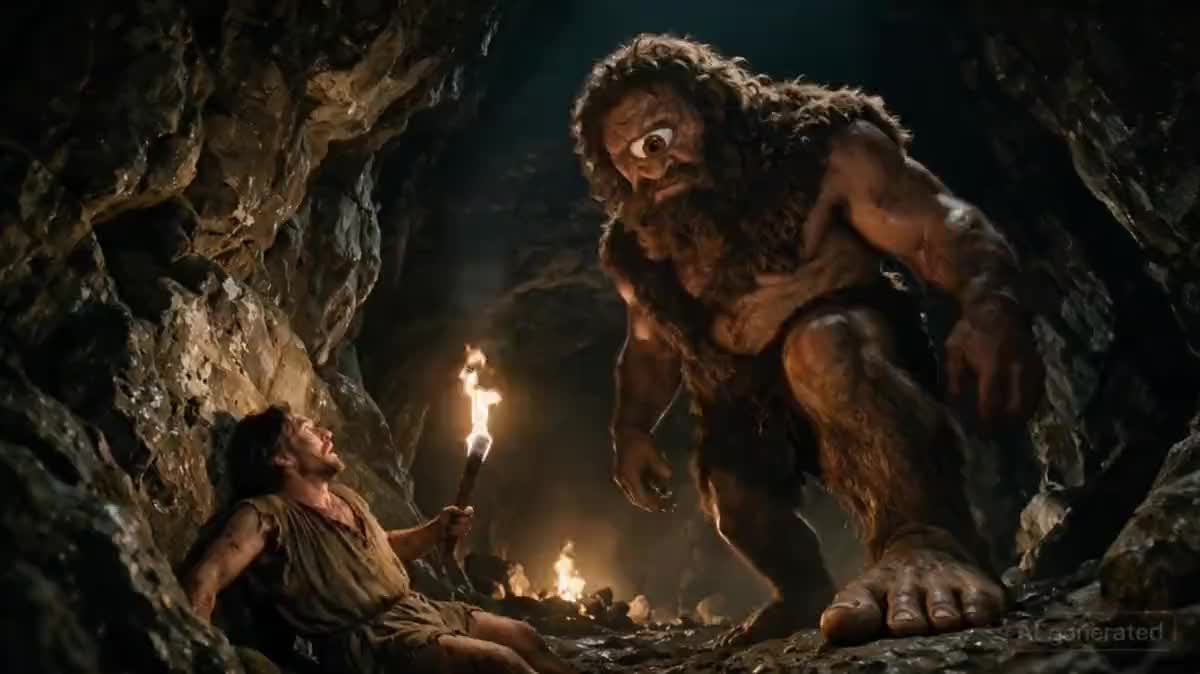
Trois photos de vous suffisent pour vous retrouver plaqué contre un rocher pendant qu'un cyclope vous cherche. Le node Caméra tourne l'image fixe et la vidéo avec la même optique.
Démo interactive
Vrai workflow, résultats réels. Déplacez-vous et zoomez librement.
Ce workflow est le vrai template : la fiche de référence porte le visage, le node Caméra alimente l'image ET la vidéo. Déplacez-vous dans le canvas et ouvrez les nodes.
En bref
Vous fournissez
1 fiche de référence (photos et description) · un texte ou un brief
Ce que le workflow produit
1 image en 16:9 · 1 vidéo de 10 s en 720p, format 16:9
Structure du canvas
6 nodes reliés par 4 liaisons
Modèles câblés
Seedream 5 Pro, Kling V3
Coût d'un passage complet
environ 308 crédits, soit 3,08 €
Compte
La démo se voit sans compte ; générer demande un compte gratuit, crédits d'essai compris
Se mettre en scène dans une épopée, un film noir ou une scène de science fiction demande deux choses que les générateurs classiques traitent mal ensemble : votre visage doit rester le vôtre, et le plan doit ressembler à du cinéma plutôt qu'à un portrait posé. Ce workflow sépare les deux et les câble.
Le visage vit dans une fiche Référence à trois angles, invoquée par @ dans le prompt : le modèle reçoit vos vraies photos et vous replace dans le décor sans vous transformer. La mise en scène vit dans un node Caméra, avec sa focale, son ouverture, son angle et son mouvement. Ce node alimente l'image fixe et la vidéo, donc les deux sont tournées avec la même optique, ce qu'un prompt répété à la main ne garantit jamais.
Seedream 5 Pro compose le plan à partir de la fiche, et Kling V3 l'anime sur dix secondes avec le son. Ce choix n'est pas anodin : les modèles Seedance refusent les premières images pouvant contenir une personne réelle, ce qui exclut tout plan photoréaliste avec un visage. Le guide garder un personnage cohérent explique comment photographier sa fiche, et diriger la caméra détaille les réglages.
Rendus réels de la démo
Ce sont les fichiers du workflow ci-dessus, tels que les modèles les ont produits, sans retouche. Le point de départ est indiqué quand il y en a un.
Point de départ
MOIMOIMOI
Rendu
La scène générée : le héros en tunique déchirée plaqué contre un rocher dans la caverne du cyclopeGénéré avec Seedream 5 ProLa vidéo : le géant tourne la tête, avance d'un pas lourd, la caverne trembleGénéré avec Kling V3
Comment faire
1
Montez votre fiche
Trois photos : de face, de profil, de trois quarts. Lumière régulière, fond neutre, expression neutre. C'est cette fiche qui vous met dans le plan, pas une description.
2
Réglez la caméra
Le node Caméra porte la focale, l'ouverture, l'angle et le mouvement. Une contre-plongée en 35 mm à f/2 ne raconte pas la même chose qu'un 85 mm à hauteur d'oeil.
3
Décrivez la scène, pas votre visage
Le décor, la lumière, ce qui menace hors champ. Votre visage est déjà pris en charge par la fiche : le prompt sert à installer le monde autour de vous.
4
Animez dix secondes
Une seule prise, un mouvement lent, une action simple. Dix secondes est la longueur qui tient sans que le visage se déforme.
Variantes et cas d'usage
Le même canvas, réglé pour des besoins différents : chaque variante tient en deux ou trois lignes de prompt à changer.
Se mettre en scène en héros de film
Trois photos de vous dans la fiche Référence, un décor épique dans le prompt, et vous voilà dans le plan. Le node Caméra fait le reste : focale longue, contre plongée légère, lumière de fin de journée. C'est le cadrage, pas le décor, qui fait la différence entre un montage et une affiche.
Photo de profil épique pour les réseaux
Un plan poitrine suffit, en format carré. Demandez une lumière latérale marquée et un fond simple : sur une vignette de trente pixels, seul le contraste du visage se lit. Voir aussi le portrait professionnel pour la version sobre.
Cadeau d'anniversaire personnalisé
La personne fêtée en chevalier, en astronaute ou en héroïne de manga, imprimée en poster. Prévenez que la ressemblance dépend des photos fournies : trois angles bien éclairés valent mieux que dix selfies de face pris au même endroit.
Cosplay sans costume ni studio
Le costume est décrit dans le prompt, pas cousu. Décrivez la matière plutôt que le personnage sous licence : « armure de plaques patinée » donne un meilleur rendu, et évite de générer une copie d'un personnage protégé.
Intro animée de stream ou de chaîne
L'image devient une vidéo de dix secondes avec Kling V3 : la caméra recule, la cape bouge, le regard se lève. En cinq secondes le plan coûte moitié moins, et suffit largement à une intro de chaîne.
Erreurs fréquentes
Des selfies tous pris sous le même angle
La fiche Référence a besoin d'angles différents, pas de quantité. Face, profil, trois quarts, en lumière naturelle : c'est la condition pour que le visage tienne quand la scène change.
Un décor décrit plus longuement que le cadrage
Trois lignes de décor et rien sur la caméra donnent une image plate. L'inverse marche mieux : un décor en une phrase, un cadrage précis dans le node Caméra.
Vouloir tout changer en une génération
Costume, décor, lumière et pose modifiés d'un coup rendent impossible de savoir ce qui a amélioré ou cassé le rendu. Un changement à la fois, en gardant les versions côte à côte sur le canvas.
Oui, tant que la fiche contient plusieurs angles et une lumière neutre. C'est le nombre de points de vue, pas la qualité du matériel, qui fait la ressemblance.
Peut-on changer d'univers sans tout refaire ?
Oui, la fiche et le node Caméra restent en place : seuls le décor et l'action changent. Passer d'une caverne antique à un couloir de vaisseau spatial ne demande que de réécrire deux prompts.
Puis-je utiliser une photo de quelqu'un d'autre ?
Utilisez uniquement des photos de vous ou de personnes qui vous ont donné leur accord. Mettre en scène le visage d'un tiers sans son consentement n'est pas un usage acceptable.
Combien de photos faut-il de moi ?
Trois suffisent si elles montrent trois angles. Ajoutez en une quatrième si vous portez des lunettes ou une coupe très identifiable, et décrivez dans la fiche ce qui ne doit jamais changer.
Mes photos servent-elles à entraîner un modèle ?
Non. Elles sont jointes à la génération comme référence, le temps de l'appel, et restent dans votre bibliothèque. Rien n'est réutilisé pour un entraînement.
Peut-on se mettre en scène à deux ?
Oui, avec deux fiches Référence mentionnées dans le même prompt. Comptez plus d'essais : les modèles gèrent moins bien deux visages simultanés qu'un seul, et les plans larges passent mieux que les gros plans.
Combien coûte une scène complète ?
L'image tient à cinq crédits, la vidéo de dix secondes avec Kling V3 à 303, soit environ trois euros pour le canvas entier. En descendant la vidéo à cinq secondes, le plan revient à un euro soixante, affiché sur le bouton avant de générer.
 Seedream 5 Pro
 Kling V3
 Nano Banana