La tenue fond du haut vers le bas en liquide brillant, et la nouvelle se solidifie à sa place. La transition des reels mode, calculée entre une première et une dernière frame. Démo complète visible sans compte.
Démo interactive
Vrai workflow, résultats réels. Déplacez-vous et zoomez librement.
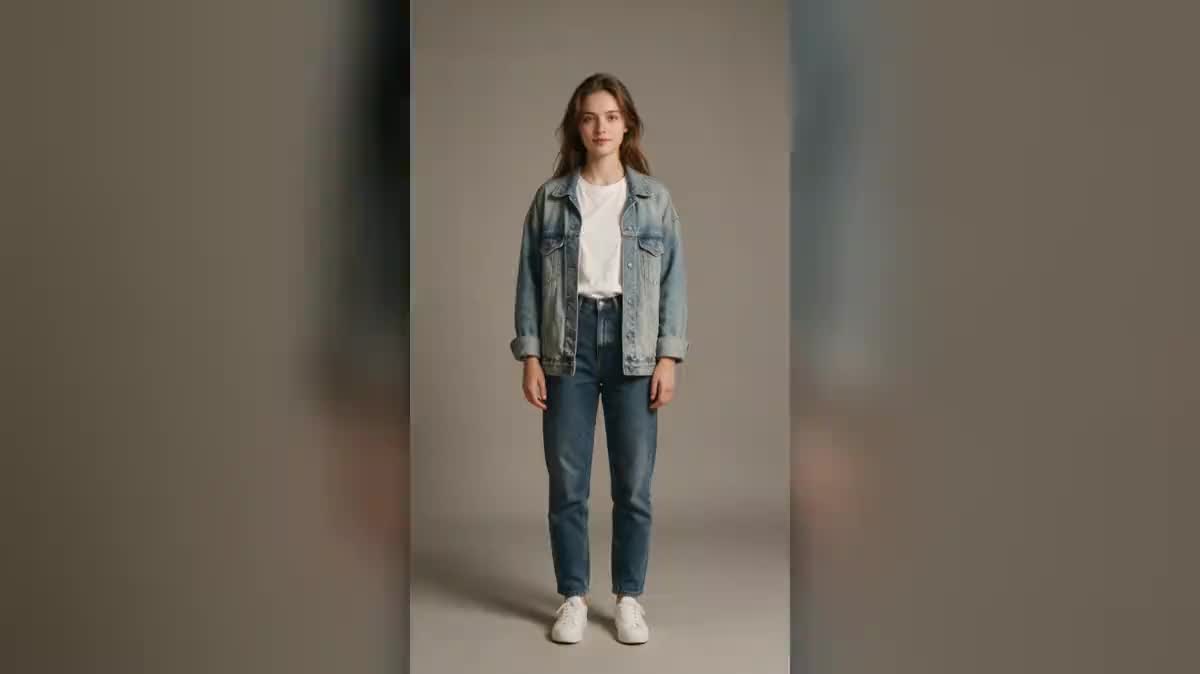
Les deux états sont là : la photo importée (tenue A), le rendu Flux Kontext (tenue B), et la vidéo qui fond de l'une à l'autre, première et dernière frame câblées. Ouvrez les nodes pour lire les consignes.
En bref
Vous fournissez
1 photo · un texte ou un brief
Ce que le workflow produit
1 image en 9:16 · 1 vidéo de 5 s en 1080p, format 9:16
Structure du canvas
6 nodes reliés par 5 liaisons
Modèles câblés
Flux Kontext, Kling V3
Coût d'un passage complet
environ 158 crédits, soit 1,58 €
Compte
La démo se voit sans compte ; générer demande un compte gratuit, crédits d'essai compris
L'effet melting est la transition mode du moment : le sujet fond comme de la cire colorée, les vêtements ruissellent en liquide brillant, puis le liquide remonte et se solidifie dans la nouvelle tenue. Sur un canvas, l'effet ne demande aucune retouche image par image : une photo, une édition, un câble.
La mécanique est celle de l'avant/après, appliquée au vêtement : la photo importée devient la PREMIÈRE frame de la vidéo, le rendu retouché la DERNIÈRE, et le modèle calcule la fonte entre les deux. L'édition est le point de précision du workflow : Flux Kontext ne change que la tenue, même personne, même pose, même fond. Si la pose bouge entre les deux frames, la transition saute au lieu de fondre.
La vidéo tourne sur Kling V3, cinq secondes en 9:16 avec l'audio généré, le ruissellement s'entend. Le guide personnage cohérent explique pourquoi la fidélité au sujet se joue dans les entrées du modèle, et le calculateur donne le prix du clip avant de créer un compte.
Rendus réels de la démo
Ce sont les fichiers du workflow ci-dessus, tels que les modèles les ont produits, sans retouche. Le point de départ est indiqué quand il y en a un.
Point de départ
TENUE A
Rendu
La tenue B générée sur la même personne : tailleur noir, même pose, même fondGénéré avec Flux KontextLa transition : les vêtements fondent comme de la cire et la nouvelle tenue prend leur placeGénéré avec Kling V3
Comment faire
1
Importez la photo en pied
La tenue A, cadrée en pied, fond uni, pose simple face caméra. La fonte a besoin du corps entier et d'un peu de sol : le liquide doit avoir un endroit où s'accumuler.
2
Décrivez la tenue B, et rien d'autre
La consigne d'édition remplace le vêtement et verrouille tout le reste : même personne, même visage, même pose, même fond, même lumière. C'est la règle qui fait tenir la transition.
3
Vérifiez les deux frames
La photo est câblée en première frame, le rendu en dernière. Si le rendu a bougé, pose décalée ou fond changé, relancez l'édition avant de payer la vidéo : la fonte ne rattrape pas un désaccord entre les deux états.
4
Générez la fonte
Le prompt vidéo décrit le mouvement de matière : fonte du haut vers le bas, liquide qui ruisselle et s'accumule, puis remonte et se solidifie. Cinq secondes, caméra fixe, audio activé.
Variantes et cas d'usage
Le même canvas, réglé pour des besoins différents : chaque variante tient en deux ou trois lignes de prompt à changer.
Relooking avant/après
Le jean-baskets fond vers le tailleur : la transition raconte le relooking mieux qu'un montage cut. Coiffeurs, stylistes et coachs en image tiennent là leur format signature, à partir d'une seule photo client. La consigne d'édition ne touche qu'aux vêtements, le visage reste exactement le même.
Lancement de collection
La pièce de la saison passée fond vers la nouvelle : même mannequin, même pose, seule la collection change. Décliné sur trois silhouettes, l'effet fait une campagne de lancement complète. Le photoshoot IA fabrique les poses de départ si la collection n'est pas encore shootée.
Maillot d'équipe et merch
Le maillot domicile fond vers l'extérieur, le tee-shirt de la tournée vers la nouvelle date : l'annonce de merch la plus efficace est celle où l'ancien produit devient le nouveau sous les yeux. Gardez le fond neutre : le liquide doit rester la seule chose qui bouge.
Costume d'époque et cosplay
Le streetwear fond vers l'armure, la robe moderne vers la tenue 1900 : le grand écart entre les deux tenues fait la valeur du clip. Plus les deux états sont éloignés, plus la fonte impressionne, tant que la personne et la pose ne bougent pas d'un pixel.
Au-delà du vêtement : objet, pièce, logo
La mécanique première/dernière frame transforme n'importe quel sujet : un salon qui fond vers sa version rénovée à la place du home staging classique, un packaging vers son nouveau design, un logo vers son rebranding. Seul l'élément à transformer doit changer entre les deux images.
Erreurs fréquentes
Changer la pose en même temps que la tenue
Si le rendu édité a déplacé un bras ou tourné la tête, le modèle ne peut plus fondre : il coupe ou déforme. La consigne d'édition doit verrouiller la personne, la pose, le fond et la lumière, et ne libérer que le vêtement.
Décrire la fonte dans la consigne d'édition
Chaque prompt a son rôle : l'édition fabrique l'état final net, la vidéo raconte la fonte. Une image de fin déjà fondue ou dégoulinante prive le modèle vidéo de sa cible, et la transition se termine en flaque au lieu de se solidifier.
Cadrer trop serré
La fonte a besoin du corps entier et d'un peu de sol : le liquide ruisselle vers le bas et doit avoir un endroit où s'accumuler avant de remonter. Un cadrage buste coupe le mouvement à mi-course et l'effet perd sa logique.
Pourquoi passer par une édition plutôt que par deux photos ?
Parce que la transition exige la même personne dans la même pose au pixel près, et que deux prises de vue réelles ne le garantissent jamais. L'édition Flux Kontext ne touche qu'aux vêtements : tout le reste est identique par construction.
Peut-on quand même utiliser deux vraies photos ?
Oui : remplacez le node Image par un second node Média et câblez-le en image de fin. Prenez les deux photos sans bouger l'appareil ni le sujet, sur trépied idéalement : le moindre écart de cadrage se voit dans la fonte.
L'effet marche-t-il ailleurs que sur des vêtements ?
Partout où deux états du même sujet existent : un packaging qui fond vers sa nouvelle version, une pièce qui fond vers sa rénovation, un logo vers son rebranding. La règle reste la même : seul l'élément à transformer change entre les deux frames.
Pourquoi ma transition saute au lieu de fondre ?
Presque toujours parce que les deux frames ne s'accordent pas : pose décalée, fond changé, cadrage différent. Vérifiez le rendu édité avant de générer la vidéo, et relancez l'édition tant que seul le vêtement diffère de la photo.
Quels modèles vidéo acceptent une image de fin ?
Kling V3, le choix du template, mais aussi Seedance 2.5 et Veo 3.1 Fast. Le canvas montre le câble « image de fin » uniquement sur les modèles qui le supportent.
Combien coûte une transition complète ?
L'édition Flux Kontext coûte quelques centimes, la vidéo de cinq secondes autour d'un dollar : comptez environ 1,30 $ le clip fini, son compris. Le calculateur détaille le coût exact du workflow avant de créer un compte.
Peut-on enchaîner plusieurs tenues dans un même reel ?
Oui, en cascade : le rendu de la tenue B devient la première frame de la transition suivante, vers une tenue C. Chaque segment reste un clip de cinq secondes, le montage les enchaîne, et la personne ne bouge jamais entre deux fontes.
La transition marche-t-elle depuis une photo prise au téléphone ?
Oui, c'est l'usage type : une photo en pied, nette, fond simple, lumière homogène. Évitez les fonds chargés, la foule ou les contre-jours : tout ce qui bouge visuellement entre les deux frames se met à trembler pendant la fonte.
 Flux Kontext
 Kling V3
 Seedream 5 Pro