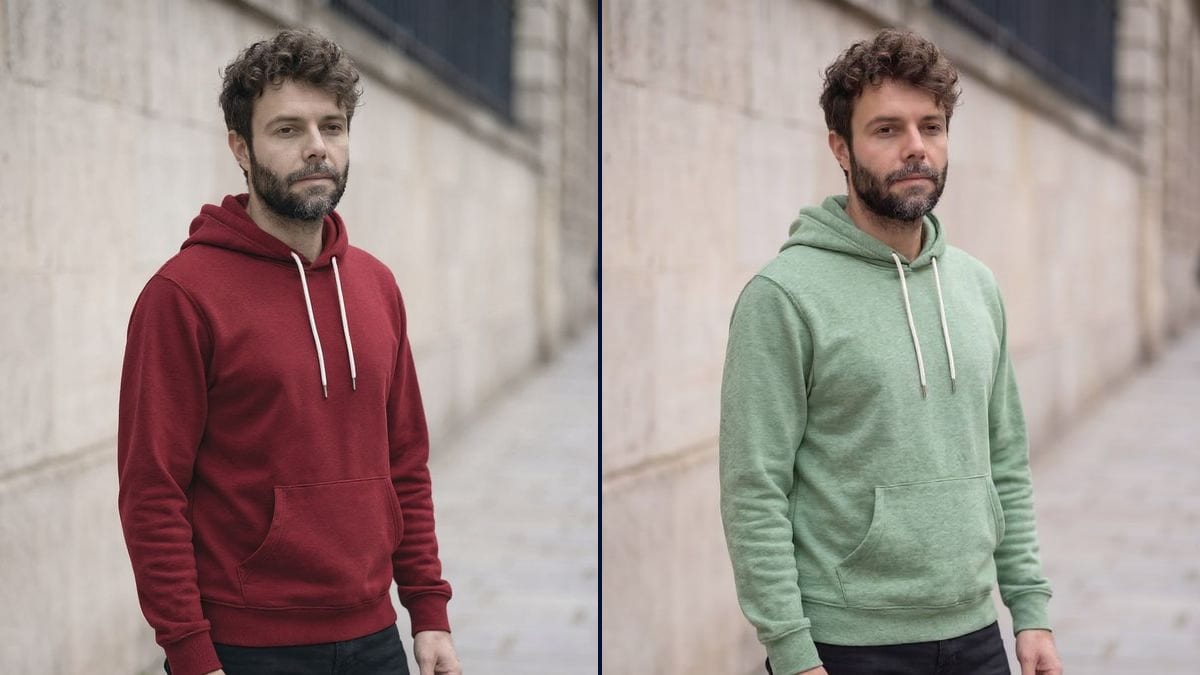
The product page in several colourways
One photo shoot, then the six catalogue colours on the same model: every swatch of the online shop opens its real photo, with the same folds and the same light.
A photo of a worn garment, recoloured in two shades, same cut, same folds, same model. Every colourway of a product page without a new shoot. The workflow is shown here, no account needed.
Real workflow: Frank in a heather grey hoodie on a street, then the same hoodie in burgundy and in sage green. Folds, seams, pocket and white drawstrings do not move, only the colour changes.
At a glance
A brand that sells a garment in six colourways pays for six photo shoots, or shows one colour and a row of swatches. This workflow starts from a single photo of the worn garment and recolours it in the shades you choose, with the same cut, the same folds and the same model.
The hard part is changing ONLY the fabric. A model that recomposes the image returns another hoodie, another face, another street. Flux Kontext changes the colour while keeping the geometry to the pixel: same seams, same pocket, white drawstrings kept, only the shade changes.
The second hard part is the shade: describe it like a swatch, and say what it is not. To dress a model from a flat photo, see the worn garment; for a packshot, the product photo. The two colourways cost twelve credits.
These are the files of the workflow above, exactly as the models produced them, unretouched. The starting point is shown when there is one.
Starting point
Render
Fashion brands, online shops, print on demand creators and stylists who want to show a garment in several colours without new photos.
A sharp photo of the garment, worn or flat, in soft light, and the shades described like swatches.
Photograph the worn garment in good light
Soft daylight, the whole garment visible, no harsh reflections. Folds and texture read clearly, and the new colour keeps them.
Describe the colour like a swatch
Muted burgundy, greyish sage, deep navy: a shade with its nuance. Add what it is not, "not bright red", "not mint".
Name what keeps its colour
Drawstrings, zip, buttons, labels, contrast stitching. Without this list they take the fabric's new shade.
Compare the details
Folds, seams, pocket: they prove it is the same garment. If a detail changed, run the render again.
The same canvas, tuned for different needs: each variation is two or three lines of prompt away.
One photo shoot, then the six catalogue colours on the same model: every swatch of the online shop opens its real photo, with the same folds and the same light.
A brand sees its piece in four shades before ordering the fabric, compares the renders side by side, and picks the one that goes into production without paying for dyed prototypes.
A vintage shop or a second-hand seller shows what a re-dyed jacket would look like, stating clearly in the listing that it is a simulation and not the item shipped.
The print on demand creator shows the same embroidered hoodie in every colour the supplier offers, for the product page, ads and posts, without ordering a sample per shade.
The stylist or the shopper sees an outfit in another colour before buying it or having it made, right on their own photo, with their silhouette and their light.
A club, a charity or a company tests its colours on a hoodie or polo before the group order, and lets the team vote on realistic renders.
It returns another garment on another person. A colourway only works if everything else is identical: Flux Kontext keeps the geometry.
"Green" gives a saturated apple green. A swatch shade with its nuance, and what it is not, gives a sellable colourway.
Drawstrings, buttons, zips and labels change with the fabric if the prompt does not protect them.
On a shop, say the colour is indicative: a customer who receives another shade sends the item back.
Yes: duplicate a Text node and an Image node and wire the same photo. Each extra colourway costs six credits.
A flat colour changes cleanly. A pattern asks more: Flux Kontext can add it, but check that it follows the folds of the fabric.
Not enough to replace a swatch: a screen distorts shades. The render shows the colourway, the real dye is checked in hand.
Twelve credits, six per render on Flux Kontext. Each extra colour on the same photo costs six credits.
Because it changes a colour while keeping the geometry to the pixel, measured on facades, a car and wall paint: same garment, same person.
In the demo, yes: same face, same pose, same street. Only the hoodie fabric changes.
One garment per prompt works best: name the one that changes and say the others keep their colour.
Yes, the same prompt works on a garment laid flat or on a hanger, as long as it is sharp and well lit.
Change the colour of a garment in a photo with AI
Use this workflowFree account, no card required. The workflow opens pre-filled in your canvas.
 Flux Kontext
 Nano Banana Pro
 GPT Image 2.5 Sunburst
 Seedream 5 Pro