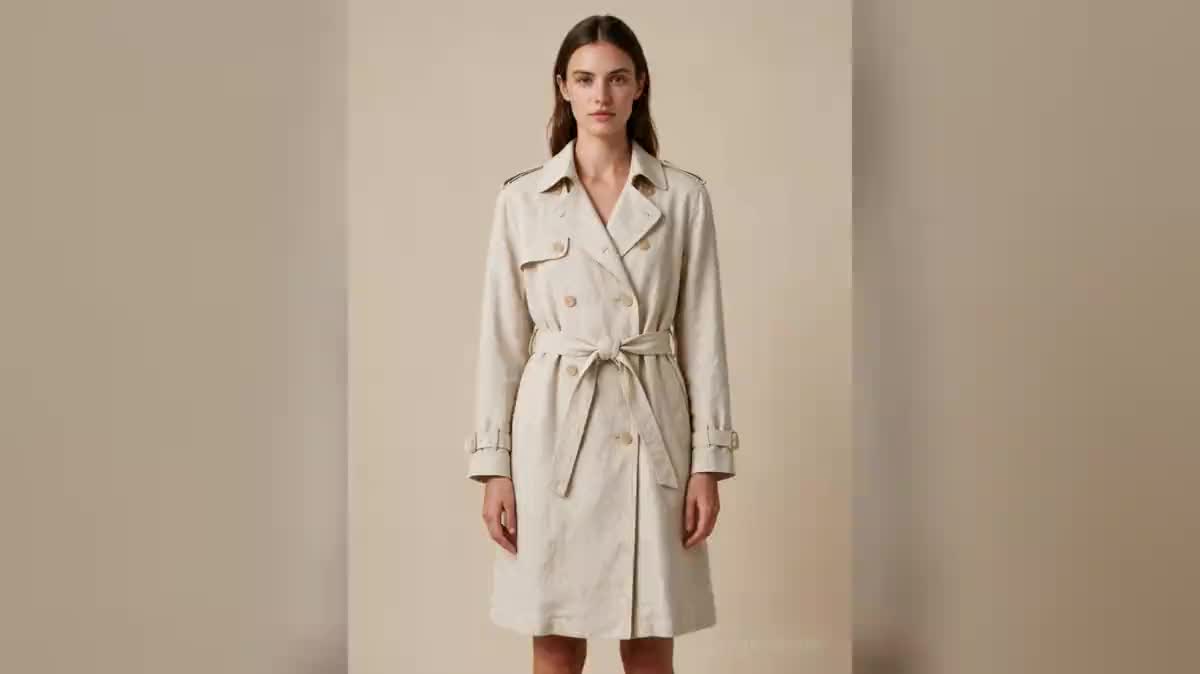
Collection lookbook
Three silhouettes, one model, one studio: the basis of a lookbook. The Reference card holds the model, the Style node holds light and setting, so the three images read as a series rather than three tests.
Produce a full fashion shoot from one piece: the same model in several poses, a shared art direction, a fabric close-up and a runway walk video.
The real Lookbook template: the Style node enforces the same art direction on all three visuals, and the front pose feeds the walk video.
At a glance
A successful fashion shoot is all about consistency: same model, same light, same backdrop across the series. This workflow gets it from a single Style node wired into all three visuals: change the art direction once (backdrop, palette, light) and the whole series follows.
The Reference card holds the piece to showcase: your photos of the garment, flat-lay or on a hanger, are enough. The model wears it front-facing, three-quarter, then in a fabric close-up; the walk video starts from the first pose for a runway feel.
Seedream 5 Pro holds textile textures remarkably well; the video runs on Kling 2.5 Turbo, fast and affordable. To keep the same model across several series, building a consistent character shows how to turn them into a reusable Reference card.
These are the files of the workflow above, exactly as the models produced them, unretouched. The starting point is shown when there is one.
Starting point
Render
Fashion brands and designers who want a consistent series around one piece without renting a studio.
Add your piece to the card
Photos of the garment (flat-lay, packshot or worn) plus a description of fabric and cut. The card is @-mentioned in every pose.
Set the art direction
The Style node describes the studio: backdrop, light, palette. It is wired into all three visuals, so the series stays consistent by default.
Generate the poses
Front, three-quarter, fabric close-up. Adjust one pose without touching the others, or duplicate a node for an extra pose.
Animate the walk
The front pose becomes a 5-second video: the model walks towards the camera, the fabric moves naturally.
The same canvas, tuned for different needs: each variation is two or three lines of prompt away.
Three silhouettes, one model, one studio: the basis of a lookbook. The Reference card holds the model, the Style node holds light and setting, so the three images read as a series rather than three tests.
The cost of a shoot is the studio, the model and the photographer. Here a production day becomes an afternoon on a canvas, at forty-one credits for three images plus a video.
Every piece shot on the same virtual model, in the same studio: consistency is what makes a shop credible. See also virtual try-on to start from your real garments.
Switch the Style node to a late-day exterior, concrete and raking light. The model does not move: that is the point of separating the person from the setting.
The same canvas serves upstream: generate ten moods before cutting any fabric. A generated moodboard costs under two euros and can be shown to a workshop or an investor.
Without a shared Reference card, each image invents a face. A collection presented by three different people loses all readability.
For a real piece, use a product card with your photos. Written description suits a moodboard, not a catalogue.
In fashion, the setting serves the drape and the material. A busy background makes the cut impossible to judge, which is the only reason the image exists.
Yes: add a Reference card with their multi-angle photos and mention it in the pose prompts, as in the virtual try-on workflow.
That is Seedream 5 Pro's strong suit: linen, knits and grained leather come out very well. The fabric close-up in the workflow exists precisely to check.
Three visuals and a 5-second video come to less than a euro, with each node showing its price before generating.
That is the weak spot of image models. Favour hands-in-pockets or arms-down poses, and regenerate rather than retouch: five credits cost less than half an hour of correction.
Yes, with written consent: image rights apply to generated photos like any other. Many brands prefer a consistent virtual model, which depends on no contract.
The renders suit the web and an A4 print. For a poster or a large-format catalogue, run the file through an upscaler before printing.
Forty-one credits for three images and a five-second video, about forty cents. Ten silhouettes come to under five euros of credits.
AI photoshoot: a fashion shoot without a studio
Use this workflowFree account, no card required. The workflow opens pre-filled in your canvas.
 Seedream 5 Pro
 Kling 2.5 Turbo
 Flux 2 Pro