Category
Create a video with AI: short films, documentaries, avatars and faceless videos
These workflows produce a complete video, not a single shot: a script written by a Text node, shot images, generated videos, a voice-over and an edit at the end of the chain. The short film, the cut-paper documentary, the faceless YouTube video and the talking avatar all follow this logic.
Every page shows the whole canvas, from text to edit, and the demo's actual renders. The edit happens in the browser, for free; only generations are billed, at the price shown on each node.
What you can do here
- Start a YouTube channel without filming yourself
- Turn an idea into a three-shot short film
- Make a photo or a virtual presenter speak
- Keep the same character from one shot to the next
- Assemble script, shots, voice and edit on one canvas
The tools in this category 28 tools
Video from Santa
Their name, said by Santa
Santa, in his workshop, talks to your child, calls them by name and mentions their letter. Lips in sync with the voice, thirteen seconds. The whole workflow is visible without an account.


 Interactive demo
Personalised birthday video
Their photo, their candles, their applause
One photo of the birthday person, and the AI shows them blowing out their candles at home, applause included. A surprise to send on the day. Workflow visible here, no account needed.

 Interactive demo
Meditation video
The landscape, the voice, the bed, edited
A calm landscape in a loop, a guided meditation read in a calm voice and an ambient bed, edited into a video ready to publish. The workflow is shown here, no account needed.
Interactive demoVertical mini-series
Two shots, two lines, one cliffhanger
Your character's reference sheet becomes the first episode of a vertical mini-series: two spoken shots, the same face, a cliffhanger. The workflow is shown here, no account needed.
 Interactive demo
3x3 storyboard to video
Nine drawn panels, one film
Your hand-drawn nine panel storyboard grid becomes nine film stills, then a fifteen second film that follows the panels in order. Workflow visible here, no account needed.
Interactive demoSix shot grid to video
Six stills, twelve seconds of film
Six written beats become a grid of six film stills, then twelve seconds of video playing the six shots in order. Workflow visible here, no account needed.
Interactive demo2x2 grid to video
Four stills, ten seconds of film
Four written beats become a grid of four film stills, then ten seconds of video playing the four shots in order. Workflow visible here, no account needed.
Interactive demoThe opening title sequence
The background lives, the letters hold
Two title cards in the same typography, animated by Wan 3.0 without a single letter moving, faded together. Workflow visible here, no account needed.
Interactive demoYour storyboard animatic
The film in draft, with its rhythm
Your storyboard panels on a timeline, two key panels animated in pencil and a scratch voice-over: the film in draft, with its rhythm. Workflow visible here, no account needed.
 Interactive demo
 New
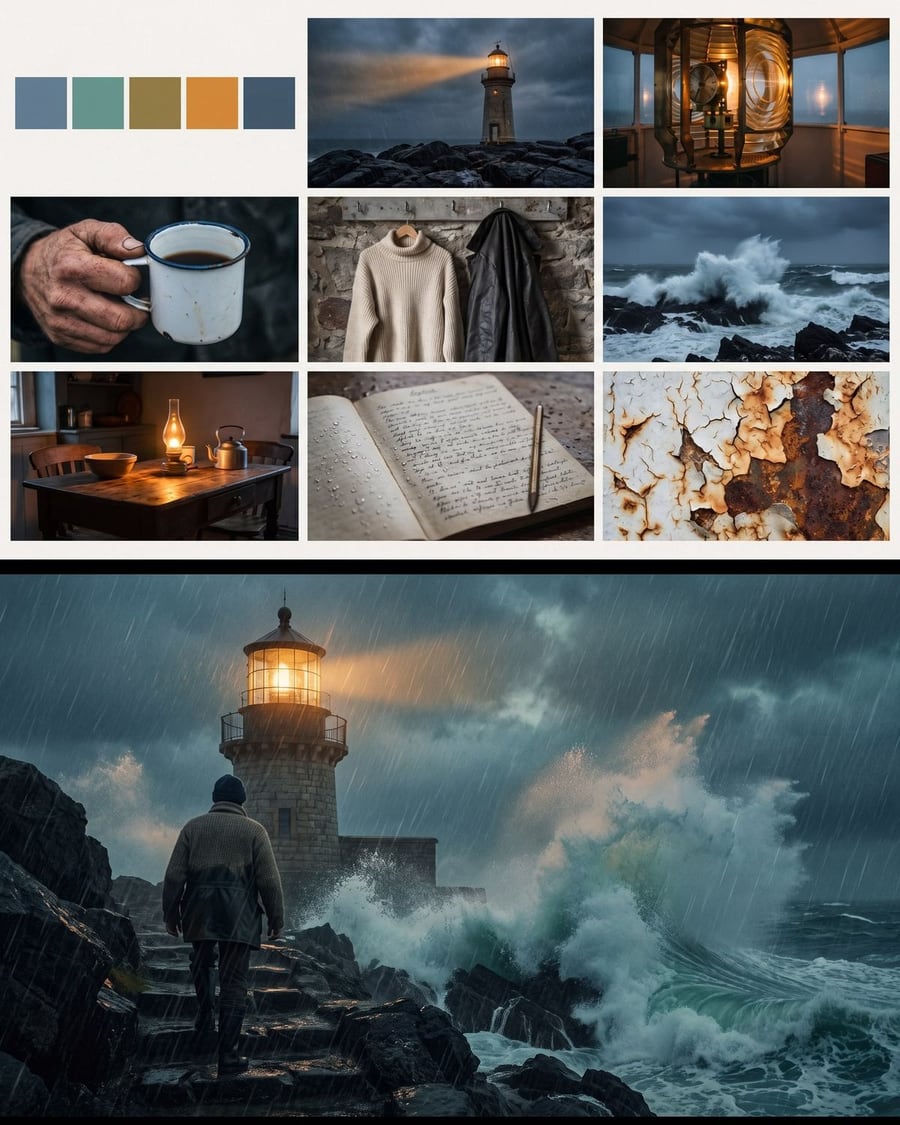
NewA film mood board
Nine references, then the first image
Your pitch becomes a mood board of nine references, palette, light, materials and costumes, then the film's first image in that mood. Workflow visible here, no account needed.
Interactive demo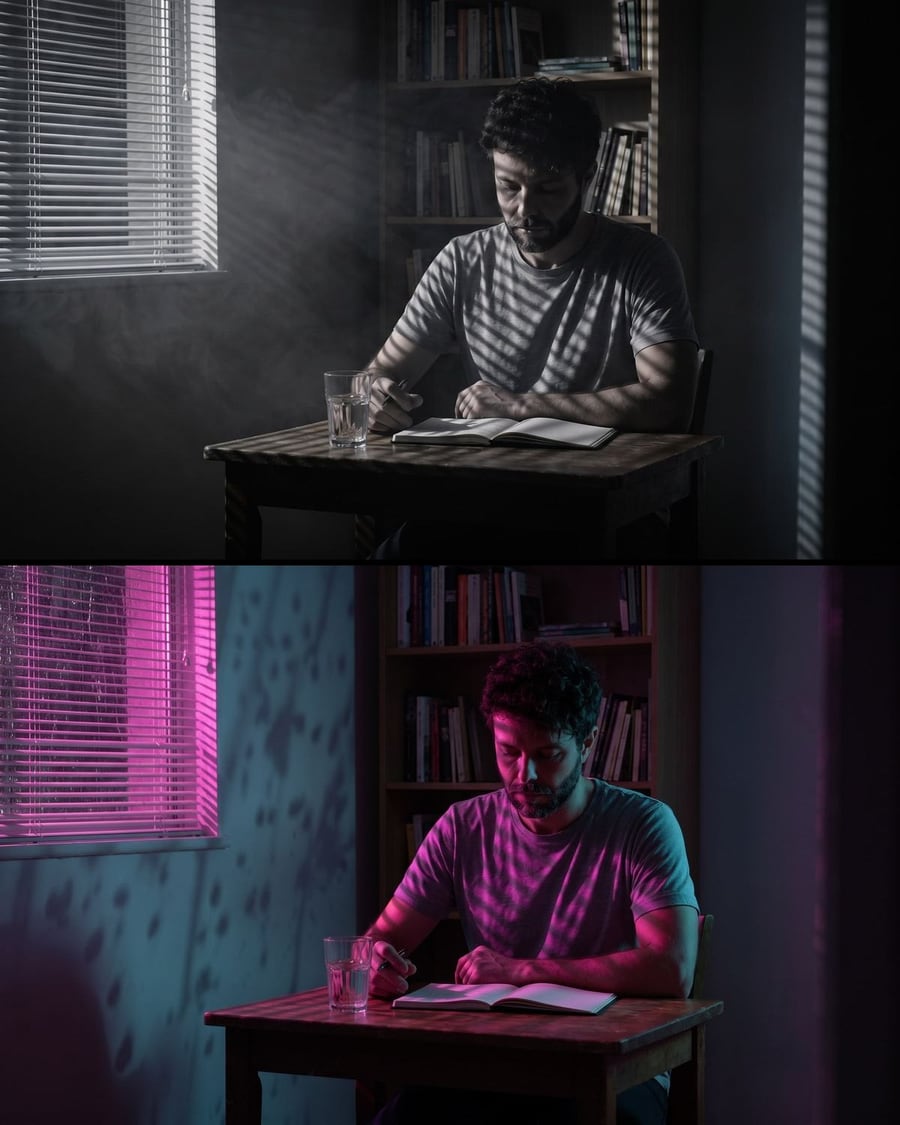 New
NewThe lighting test
The same shot, two lights
A flatly lit shot becomes two lighting proposals, film noir and neon night, without moving the set or the actor. Workflow visible here, no account needed.
Interactive demoYour place in miniature
The place, its model, then the camera
A photo of a place becomes a miniature diorama standing on a table, same facades, then a five second video. Workflow visible here, no account needed.
Interactive demoA film trailer
A pitch goes in, twelve seconds come out
Your pitch feeds two Text nodes that write the shots, Nano Banana Pro makes the images, Wan 3.0 animates them, and the Montage lays in the title card and the music. Workflow visible here, no account needed.
 Interactive demo
 New
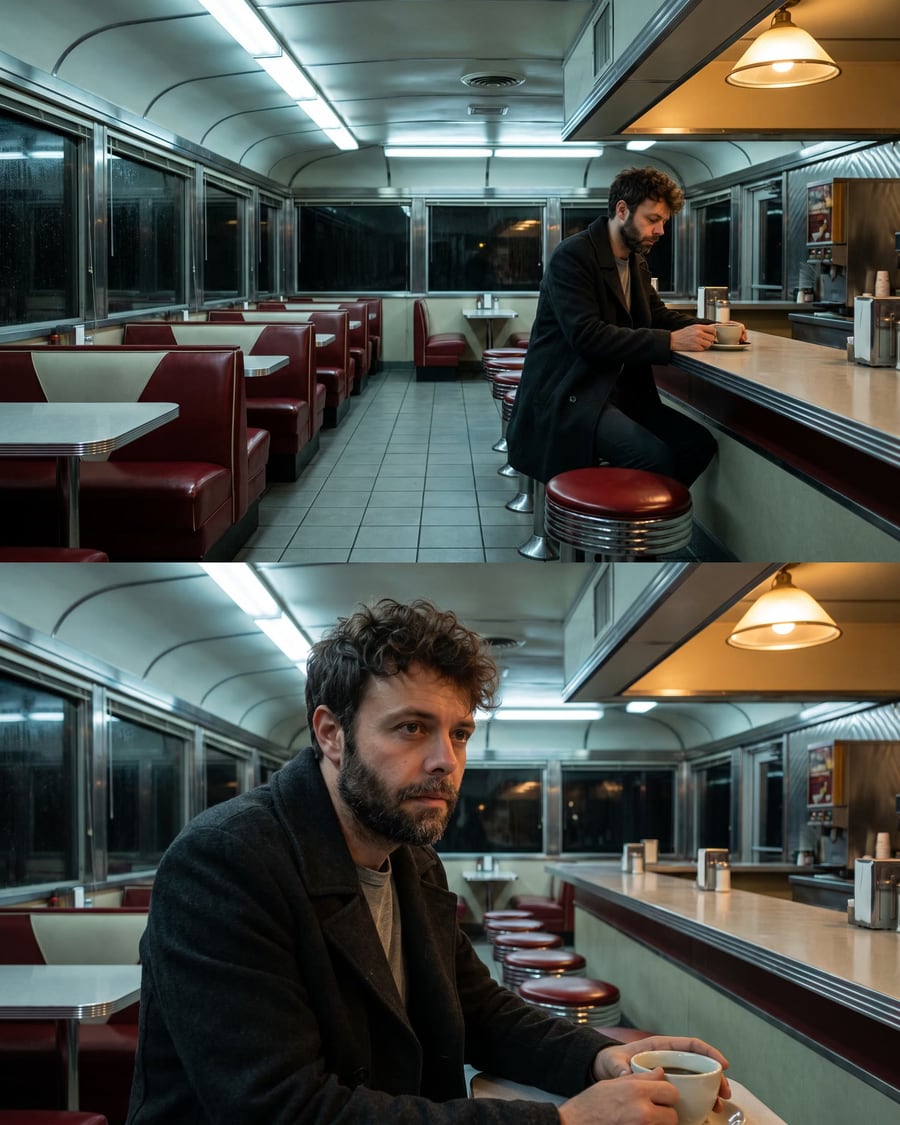
NewScene coverage
Two shot sizes that cut together
Your actor's sheet gives a wide shot, and the wide shot becomes the reference for the close up: same man, same coat, same light. Workflow visible here, no account needed.
Interactive demo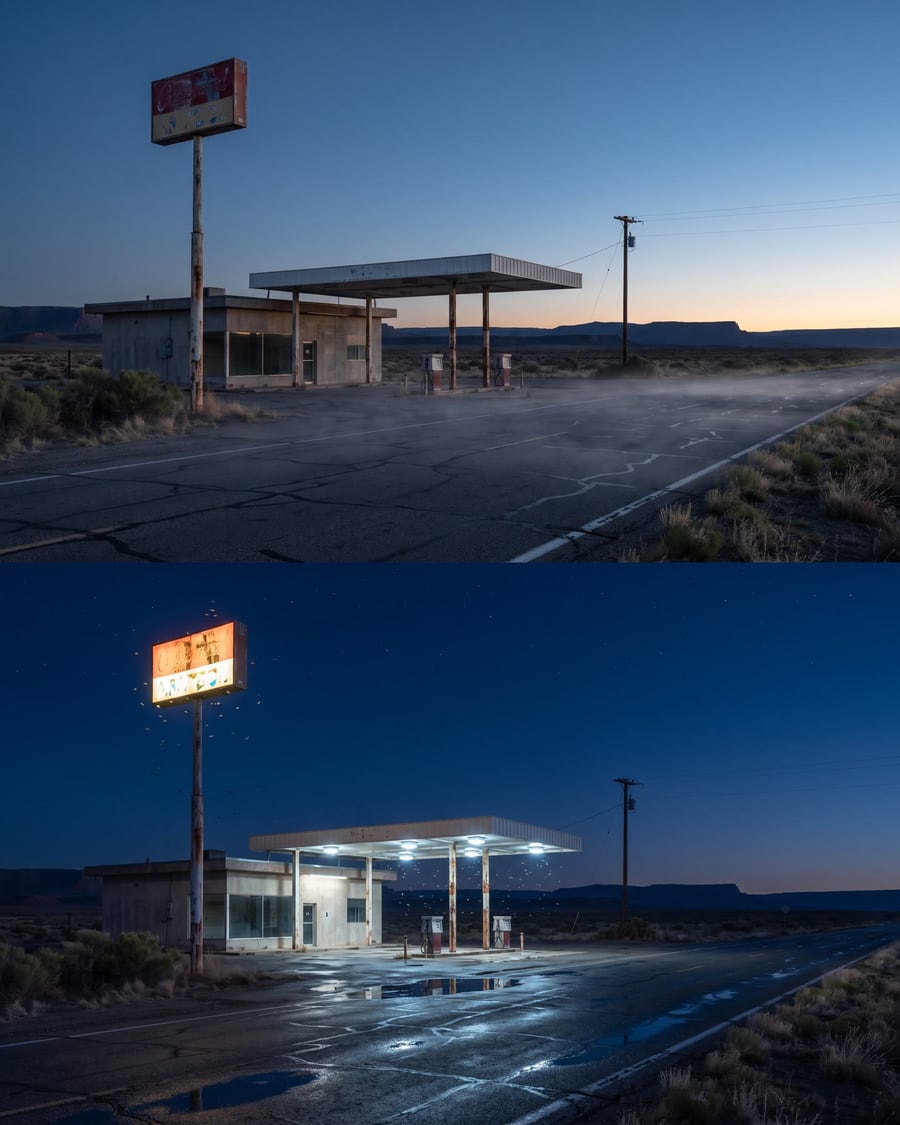 New
NewLocation scouting
The same place, two hours of the day
A Text node describes the place, Nano Banana Pro photographs it at dawn, a second node rephotographs exactly the same spot at night. Workflow visible here, no account needed.
Interactive demoFrom previz to final shot
The camera is already set
Your grey previz goes into two Seedance 2.5 nodes through the video port and comes back as live action, with the same camera move and two different worlds. Workflow visible here, no account needed.
Interactive demo New
NewStoryboard from a chapter
Six pencil panels, in story order
A chapter in PDF dropped on the canvas: one Text node writes a short bible, six others each write one panel in story order, and Flux 2 Klein draws them as pencil sketches, grey wash, no text. The board to show before shooting, for about thirty credits. The whole workflow is visible without an account.
 Interactive demo
Book trailer
Four shots, one voice, thirty seconds
A chapter or a synopsis in PDF dropped on the canvas: one Text node writes the voice-over, four others each write one shot, the shots are drawn then animated in seven seconds, a voice reads them, a music bed carries them, and the montage cuts thirty seconds of trailer together. The demo starts from an original chapter. The whole workflow is visible without an account.
Interactive demoScreenplay to film
Every scene shot, dialogue included
Drop your screenplay PDF on the canvas: a Text node writes the visual bible, the characters are drawn as sheets, every scene gets its director's prompt, its first frame and its Wan 3.0 video with the dialogue performed, and the montage cuts the film together. The demo shoots an original three-scene screenplay. The whole workflow is visible without an account.
Interactive demoTalking photo
Your photo says your text
A face photo and a text read by a catalog voice: InfiniTalk makes the person speak, lips, blinks and head movements included. The video lasts as long as the voice. The whole workflow is visible without an account.
 Interactive demo
One idea, one short film
GPT-6 Astra writes, Veo shoots
One idea enters the canvas, GPT-6 Astra turns it into three shot prompts in the language of cinema, and Veo 3.1 Lite shoots them with their sound. The full workflow is visible without an account, with the edited film.
 Interactive demo
Paper documentary
One minute told in cut paper
Build the one minute documentaries that loop across social feeds: cut-paper sets, a new shot every two seconds, generated voice-over. The whole workflow is visible here, no account needed.
Interactive demoClay animation
A sculpted rhyme, same character throughout
Create those children's videos in modelling clay: sculpted characters, plain background, a cut every two and a half seconds. The character sheet keeps the same hero from first shot to last.
Interactive demoChild's drawing
The felt-tip monster becomes a figurine
Your child's felt-tip monster becomes a figurine on a studio background, then it moves. The instruction is one sentence: correct nothing, keep the uneven legs and the crooked eyes.
Interactive demoDrone video
You draw the path, the camera follows
Draw a red line on a photo, the model reads it as a drone flight path and flies along it. Ten seconds of aerial move from a single still, with no drone and no flight clearance.
Interactive demoFaceless video
Script, voice and edit in one go
The full pipeline of an explainer channel: a subject in, a script written by a language model, a voice over, three shots and a ten second edit. Visible here without an account.
Interactive demoTalking avatar
It says your text, voice included
A synthetic presenter says your script to camera, with their voice. Veo 3.1 generates image and speech together, so the lips land right. The workflow is visible here, without an account.
Interactive demoPet portrait
Your dog as a court portrait
The family dog becomes a court portrait, then a scene, then it blinks. The reference sheet keeps its own muzzle. The workflow is visible here, without an account.
Interactive demoFrequently asked questions
How much does a complete video cost?
It depends on the number of shots and their length. Each page shows the real cost of its demo, read from the template, and the price appears on every node before you click. The edit itself is free.
Can I replace the demo's subject with my own?
Yes: every workflow opens in your canvas with its instructions. You change the subject, the script or the character sheets, and rerun the nodes concerned.