The dog portrait to frame
The best photo of the family dog becomes a graphite drawing, printed on letter or A4 paper and framed in the hallway, like a commission from a portrait artist.
Your photo becomes a graphite pencil drawing and a colored pencil drawing, same faces, same scene, real paper grain. To print, frame or give. Workflow shown here, no account needed.
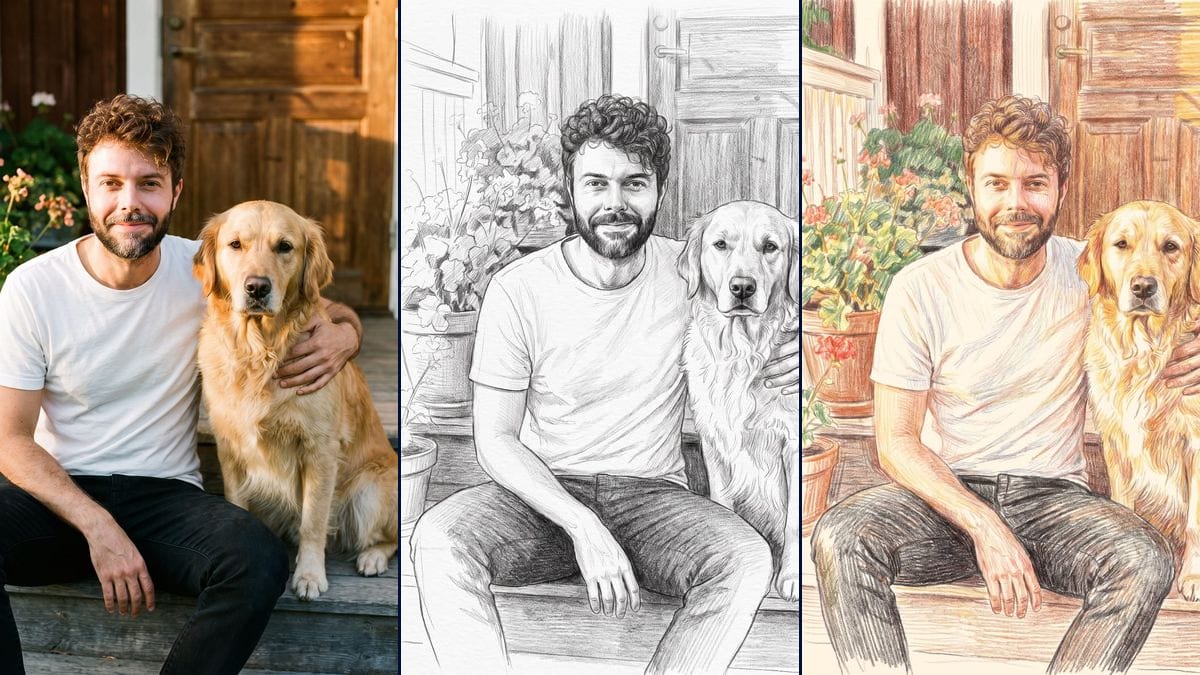
Real workflow: a photo of a man sitting on porch steps with his golden retriever becomes a cross-hatched graphite pencil drawing, then a colored pencil drawing in the golden light. Same face, same dog, same pose.
At a glance
A portrait drawn from a photo is the gift people frame: the family dog, the grandparents, a couple, a child. This workflow takes one photo and makes two drawings from it, one in graphite pencil, one in colored pencil, with the hatching, the grain and the white of the paper of a drawing made by hand.
The hard part is staying a drawing without losing the photo. A "sketch" filter keeps the photo and adds lines; a poorly guided model draws a lovely different scene. The prompt describes what the artist's hand does, then everything that does not move: the faces, the animal, the pose, the setting. Nano Banana Pro keeps the features of the photo without anyone describing them.
For a painting rather than a drawing, see photo to painting; for a cartoon look, photo to anime; for the reverse, sketch to photo. Both drawings cost thirty-eight credits.
These are the files of the workflow above, exactly as the models produced them, unretouched. The starting point is shown when there is one.
Starting point
Render
People who want to give or frame a drawn portrait, pet owners, families, and artists looking for a reference to study.
A sharp photo, and the medium you want: graphite pencil, colored pencil, charcoal or ink.
Pick a sharp photo
Well-lit faces, front or three-quarter view, no motion blur. A phone photo is enough.
List what does not move
The people, the animal, the pose, the setting, the framing. That list is what keeps your photo inside the drawing.
Choose the medium
Graphite pencil in black and white, or colored pencil in light layers. One node per medium, the same photo wired to both.
Print it or give it
Upscale the drawing before printing, then frame it or send it as a card.
The same canvas, tuned for different needs: each variation is two or three lines of prompt away.
The best photo of the family dog becomes a graphite drawing, printed on letter or A4 paper and framed in the hallway, like a commission from a portrait artist.
A photo of the grandchildren together on the sofa, drawn in colored pencil and slipped into a frame for the holidays or a birthday.
The wedding day photo or a trip photo, redrawn in pencil for an anniversary, softer than a photo print.
The front of the house you are selling or leaving, drawn in graphite with its shutters and garden, to keep a memory you can hang on the wall.
An amateur artist starts from the graphite render to study values, hatching and shadow placement before redrawing the scene by hand.
A colored pencil drawing of the family instead of a photo, at the top of a holiday card or an announcement, softer and more personal.
"Dark-haired man, beard" and the model draws another dark-haired bearded man. Name the people in the photo without describing their features.
"Realistic" brings the photo back: you get a grey image with no line work. Ask for hatching, blended graphite and the white of the paper.
Without those words, the graphite keeps traces of the photo's colors, a tint on the skin or the fur, and stops looking like pencil.
A drawing printed large shows its pixels in the fine lines. Run it through the Enhance node before printing.
Yes: in the demo, the same face, hair and beard as in the photo, on both drawings. The prompt never describes the features.
Yes: the golden retriever in the demo keeps its coat, its head and its pose. A cat, a horse or a dog alone are drawn the same way.
Yes: swap the medium in the prompt, charcoal on grey paper, pen and ink, red chalk, and keep the list of what does not move.
Thirty-eight credits, nineteen per drawing on Nano Banana Pro. A third medium on the same photo costs nineteen credits more.
On the same photo, Kontext made a graphite close to coloring book line art and repainted the black jeans blue; Nano shaded with hatching and kept the scene.
The format of the photo, here a vertical 3:4. For a square or landscape frame, set the node's format or start from a photo framed that way.
Yes: the demo has two, a man and his dog. For a group, list each person by their place in the photo, without describing faces.
The drawing comes from your photo: print it and give it freely. For a photo someone else took, ask them before selling it.
Turn a photo into a pencil drawing with AI
Use this workflowFree account, no card required. The workflow opens pre-filled in your canvas.
 Nano Banana Pro
 Flux Kontext
 GPT Image 2.5 Sunburst
 Topaz Precision