The scattered family
Grandparents, children and grandchildren living in three countries brought together in a holiday photo, for thirty eight credits and no plane ticket.
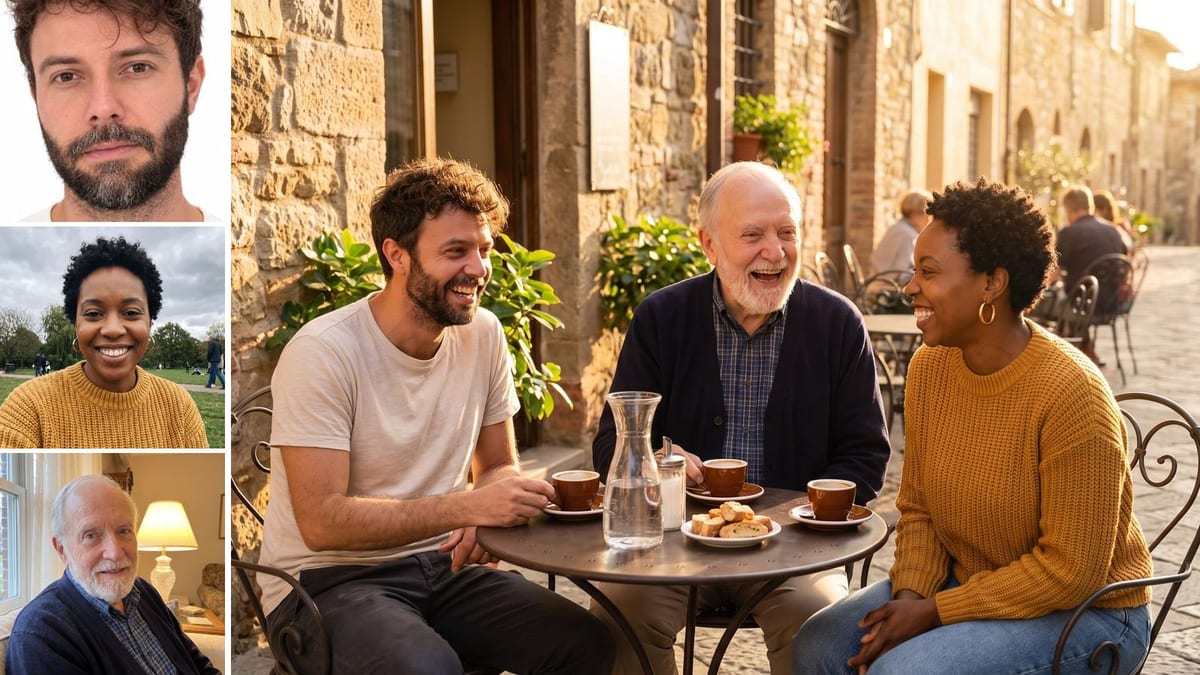
Three portraits taken separately become a single group photo, café terrace then ceremony, with all three faces recognisable. Workflow visible here, no account needed.
Real workflow: three portraits each taken on their own, white background, park, living room, then all three together at a café terrace and in a ceremony photo in a garden. The same faces in every image.
At a glance
Someone is always missing from the family photo: a grandfather far away, a friend abroad, a brother who could not come. This workflow starts from portraits taken separately and turns them into one photo where everyone is together, at a café terrace, then as a ceremony photo.
The hard part is keeping three faces at once, under one light and at the same scale. The prompt names each person by their photo and by two distinctive signs, and requires that all be recognisable. On the demo, all three hold on both photos.
The photo can then become a greeting card or a painting. The two group photos cost thirty eight credits.
These are the files of the workflow above, exactly as the models produced them, unretouched. The starting point is shown when there is one.
Starting point
Render
Scattered families, couples getting married, remote teams and friends who want a photo together when they could not meet.
One sharp portrait per person, from the front, and two distinctive signs for each.
One sharp portrait per person
From the front or three quarter, well lit, no sunglasses, one person per photo. Backgrounds and lighting can all differ.
Name each person by their photo
The first, the second, the third, with two signs each: beard, hairstyle, earrings. That is what stops the model from mixing faces.
Pick a simple scene
A terrace, a garden, a living room: a scene where three people fit naturally in the frame, at the same distance from the lens.
Check every face
Compare each person with their portrait before sharing. If a face slipped, rerun the image: it is a family photo, likeness comes first.
The same canvas, tuned for different needs: each variation is two or three lines of prompt away.
Grandparents, children and grandchildren living in three countries brought together in a holiday photo, for thirty eight credits and no plane ticket.
A loved one who could not come added to the group photo, in the same light as the others, for the couple's album.
A team that has never all met brought together in an office or offsite photo, for the careers page or the annual report.
Someone who has passed away brought together with their family in a sober photo, presented as a tribute image and shared with those who knew them.
Friends scattered far apart brought together at the café terrace of their youth, for a class anniversary or a reunion invitation.
The group photo then becomes an illustrated greeting card, with the whole family finally together.
The model no longer knows who is who and mixes the faces. One person per photo, cropped on them.
Without a beard, a hairstyle or earrings mentioned, three faces melt into three strangers. Two signs per person, tied to their photo.
In a very wide shot, faces are small and get lost. A terrace, a garden, a waist-up framing.
It is a composed photo. For a tribute or an album, say so: nobody should take it for a moment that happened.
Three or four give the most reliable result. Beyond that, faces in the back get small and alike: make two group photos.
Yes, with a sharp photo of them. Choose a sober scene and say so in the prompt; it is a tribute image, present it as such.
Yes: give the existing group photo as the first reference and the portrait of the person to add as the second, with the prompt to insert them.
Thirty eight credits, nineteen per photo on Nano Banana Pro. A third scene with the same people costs nineteen more credits.
Because it keeps faces from several reference photos at once, measured here on three people, and unifies the light across very different portraits.
On the demo, all three are recognisable on both photos, ages and distinctive signs included. Fidelity depends mostly on how sharp the portraits are.
3:2 in 2K, the format of a group photo. A square or vertical format can be picked in the node settings.
No. Use photos of people who agree to appear together, and never pass off a meeting that did not happen.
Put several people in one photo with AI
Use this workflowFree account, no card required. The workflow opens pre-filled in your canvas.
 Nano Banana Pro
 GPT Image 2.5 Sunburst
 Seedream 5 Pro