The family card
A card the family sends to the whole list, grandparents included, and that everyone keeps: thirty eight credits for two cards, far less than a photo session.
Your family photo becomes two illustrated cards, Christmas then New Year, with the same faces and a hand lettered message. Workflow visible here, no account needed.
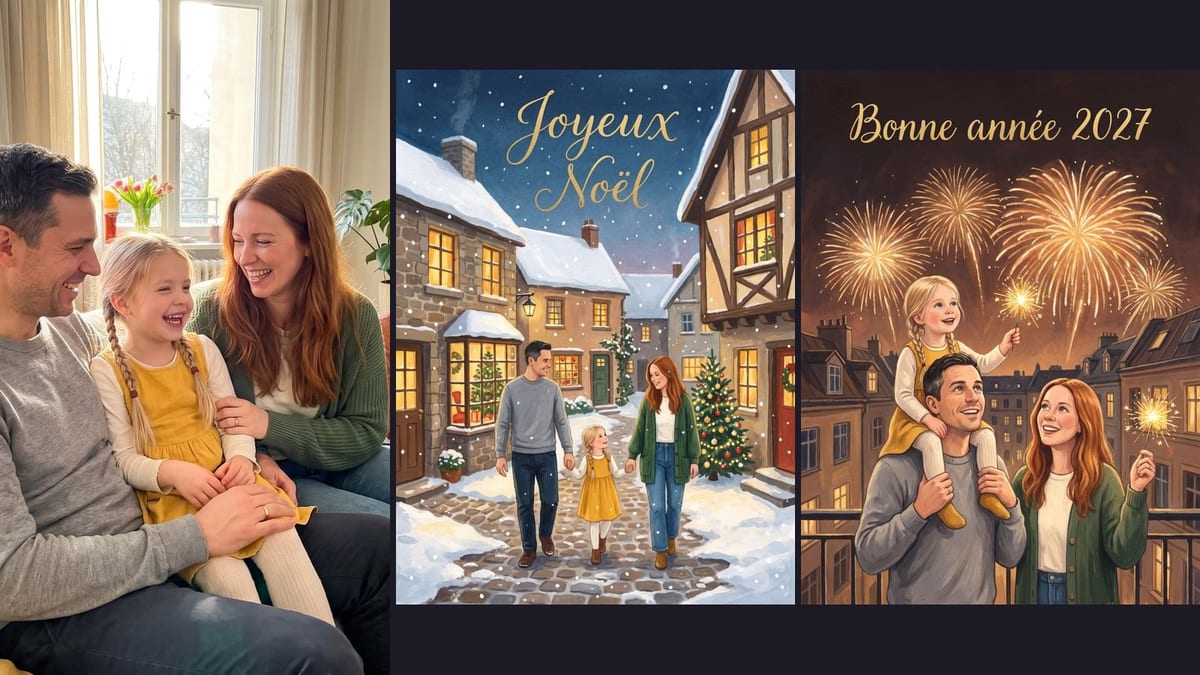
Real workflow: the photo of a family on a sofa, then two gouache painted cards, a snowy street for Christmas and a balcony under fireworks for the New Year. The same family in all three images.
At a glance
A greeting card with your own family drawn inside gets kept, where a shop card ends up recycled. This workflow starts from a family photo taken on a phone and turns it into two illustrated cards: a Christmas scene in a snowy village, then a New Year one under fireworks.
The hard part is likeness. Illustrating a family often means drawing another family. The prompt keeps the faces, hairstyles, ages and clothing colours, and names them one by one. The message is written between quotes, nothing else, to avoid an invented signature.
The cards print or send as they are, and the same photo can also become a painting or bring absent loved ones together with the group photo. The two cards cost thirty eight credits.
These are the files of the workflow above, exactly as the models produced them, unretouched. The starting point is shown when there is one.
Starting point
Render
Families, couples, shopkeepers and companies who want a greeting card in their own image, without a designer.
A sharp family photo, a few words describing each person and a short message.
Give a photo where everyone is sharp
Faces from the front or three quarter, well lit, no sunglasses. A blurry photo gives a family that does not look like yours.
Name what makes each person
A hairstyle, a hair colour, a garment: the prompt lists them for each person, and the model uses them to recognise them.
Pick the scene and the style
Snowy street, balcony, fireplace; gouache, watercolour, paper cut. The same style on both cards, they go together.
Write a short message
"Merry Christmas", "Happy New Year 2027", maybe your names. Between quotes, and nothing else: an image model writes short messages well.
The same canvas, tuned for different needs: each variation is two or three lines of prompt away.
A card the family sends to the whole list, grandparents included, and that everyone keeps: thirty eight credits for two cards, far less than a photo session.
The team photographed at the office becomes an illustrated card to send to clients, more personal than an agency card with a logo.
Two people, a scene that suits them, a short message: a young couple's first greeting card, or a wedding anniversary one.
The baker and the team in front of the shop, as a Christmas illustration: a card to slip into bags and to put up in the window.
The family dog or cat on the card, recognisable too, named in the prompt like the other members of the family.
One card per season with the same family, the same style, and the last one as a greeting card: an illustrated calendar to give.
Blurred or shadowed faces give a drawn family that does not look like you. A sharp photo, daylight.
Without named signs, the model keeps the idea of a family, not yours. Hairstyles, hair colours, clothes, for each person.
A whole poem on the card multiplies typos. A short message on the image, the rest handwritten on the back.
One card in gouache and the other in 3D do not go together. The same style written in both prompts.
Yes: the cards come out in 2K at 3:4 portrait, which online card printing services accept. Leave a margin, the edge gets trimmed when cut.
Change the scene and the message: birthday, Mother's Day, Eid, Hanukkah, Lunar New Year. The rest of the workflow does not change.
Yes: add their photo as a second reference and name them in the prompt, as when you bring loved ones together in one photo.
Thirty eight credits, nineteen per card on Nano Banana Pro. A third card, for another holiday, costs nineteen more credits.
Because it keeps faces from a reference photo and writes a short message without mistakes, as measured on stickers, the trading card and here on three people at once.
On the demo, yes: same hairstyles, same ages, same colours on both cards. The sharper the photo, the closer the illustration.
On the demo, "Joyeux Noël" and "Bonne année 2027" are exact. Proofread before printing, especially a rare first name.
With their consent, yes: it is a lovely gift. A card with the faces of people who did not ask for it, no.
Make a greeting card with your photo and AI
Use this workflowFree account, no card required. The workflow opens pre-filled in your canvas.
 Nano Banana Pro
 GPT Image 2.5 Sunburst
 Seedream 5 Pro