Before a wrap
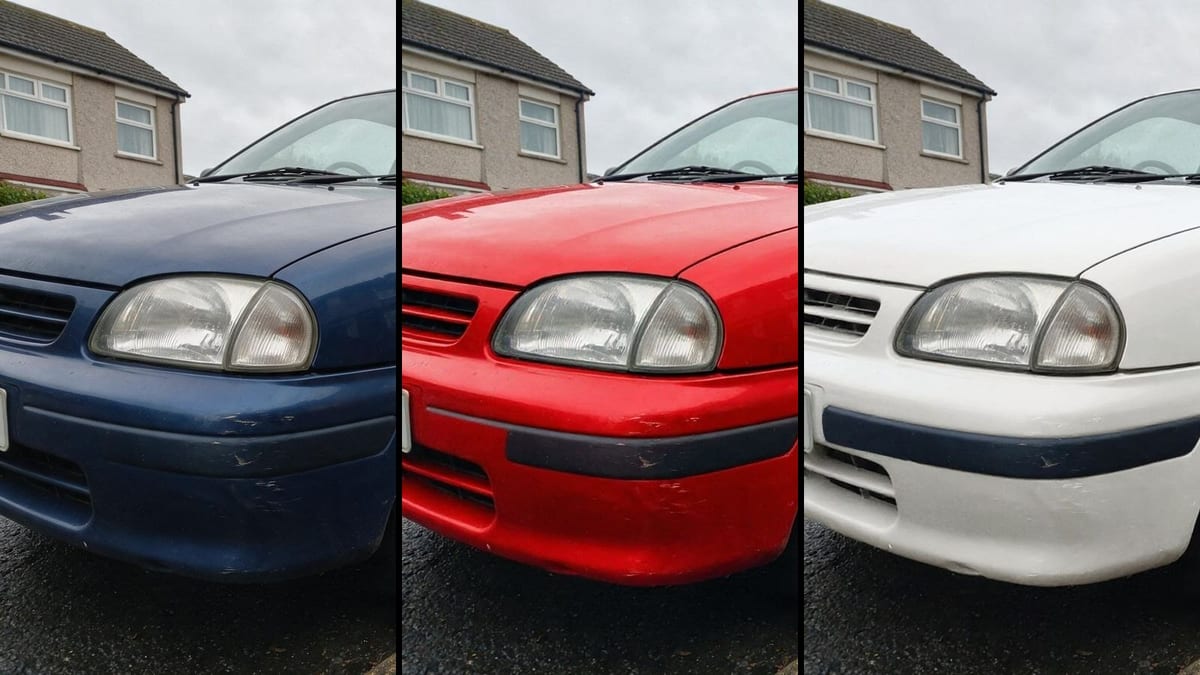
Three film colours tested on the real car, in the real street, before paying several hundred euros: twelve credits for two colours.
Your car photo with the body repainted in two colours, same car and same setting. To choose a wrap or a respray. Workflow visible here, no account needed.
Real workflow: an old blue hatchback parked in a wet street, then the same car in metallic red and pearl white. Hubcaps, scratches and street do not move.
At a glance
A wrap or a respray costs a lot and is quickly regretted. This workflow starts from a phone photo of your car and shows it in two colours, in your street, with your wheels and your small marks, before signing the quote.
The hard part is that it has to be your car. A model that recomposes the image returns a brand new, perfect car on another background: pretty, and useless. Flux Kontext repaints while keeping the geometry pixel perfect: same body, same scratches, same street, only the colour changes.
The prompt specifies what keeps its colour, chrome, rubber, glass, otherwise the black bumper takes on the colour. To sell the car afterwards, see listing photos. The two colours cost twelve credits.
These are the files of the workflow above, exactly as the models produced them, unretouched. The starting point is shown when there is one.
Starting point
Render
Drivers, wrap installers, body shops and companies who want to see a colour on the real car before paying.
A three quarter photo of the car in daylight, and the colours to test with their finish.
Photograph the car from three quarters
Front and side visible, in overcast daylight: reflections are soft and the colour reads. Full sun creates reflections that mislead about the colour.
Name the colour and its finish
Metallic red, pearl white, matte grey, glossy British racing green: the finish matters as much as the colour. It is what changes how reflections render.
Say what keeps its colour
Chrome, rubber, glass, headlights, plates. Without this list, black bumpers or tinted windows take on the new colour.
Compare the details
Hubcaps, scratches, mirrors: they prove it is your car. If one of them changed, rerun the image.
The same canvas, tuned for different needs: each variation is two or three lines of prompt away.
Three film colours tested on the real car, in the real street, before paying several hundred euros: twelve credits for two colours.
The professional shows the client two proposals on a photo of their own car, during the quote, instead of a chart of films.
A collector car seen in its original colour or a period colour, before launching a full respray.
A van or a company car tested in brand colours, before ordering the livery for the whole fleet.
Showing a buyer what a respray would look like, stating clearly that it is a simulation and not the current state.
Seeing your first car in the colour you always wanted, for fun, with no commitment.
It returns a new car without your marks, on another background. The test only counts if it is your car: Flux Kontext keeps the geometry.
Without a prompt, black bumpers, trims or windows take on the colour. List what keeps its colour.
Hard reflections distort how the colour reads. An overcast sky gives soft reflections, like a showroom.
In a sale listing, a car repainted in a photo must be flagged as a simulation. Otherwise it misleads the buyer.
Yes, by describing each area: black roof and mirrors, fir green body. The clearer the areas on the car, the cleaner the render.
Yes, in another prompt: Flux Kontext changes the described wheel while keeping the rest. Make one variant for the colour and another for the wheels.
Not enough to pick a reference: a screen distorts colours. The render picks the colour family, the body shop's sample decides.
Twelve credits, six per render on Flux Kontext. A third colour on the same photo costs six more credits.
Because it repaints while keeping the geometry pixel perfect, as measured on façades: the car, the street and the framing stay those of your photo.
On the demo, yes: same hubcaps, same headlights, same scratches, same wet street. Only the body changes.
Yes, by saying so: "satin matte grey, no glossy reflections". Matte shows mostly in the reflections, the prompt must describe them.
The same prompt works: name the painted parts and those that keep their colour. The more small parts a vehicle has, the more the list matters.
Change your car's colour in a photo with AI
Use this workflowFree account, no card required. The workflow opens pre-filled in your canvas.
 Flux Kontext
 Nano Banana Pro
 GPT Image 2.5 Sunburst
 Seedream 5 Pro