The child's bedroom
Three soft colours tested on the real bedroom, with the bed and the wardrobe, before choosing with the child: twelve credits for two colours, far less than one tin too many.
Your room photo with the walls repainted in two colours, furniture, floor and window unchanged. To pick a colour before buying the paint. Workflow visible here, no account needed.
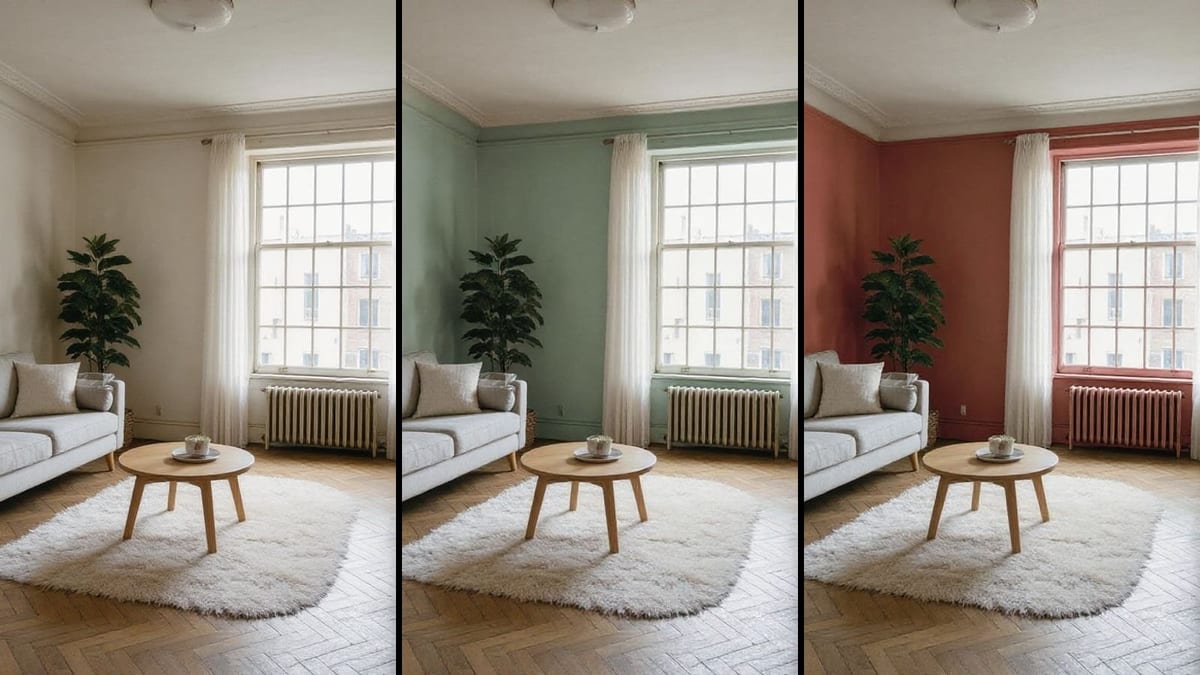
Real workflow: a living room with white walls, then the same room in greyish sage green and dusty clay pink. Sofa, rug, parquet and window do not move a pixel; only the white radiator followed the pink wall.
At a glance
Picking a wall colour from a three centimetre chip often means regretting it once the room is painted. This workflow starts from a phone photo of your room and shows it repainted in two colours, with your furniture, your floor and your light, before buying a single litre.
The hard part is changing ONLY the walls. An image model that "redoes the decor" moves the sofa, changes the floor or reframes the room, and you are no longer comparing two colours. Flux Kontext repaints while keeping the geometry pixel perfect: same sofa, same parquet, same window, only the colour changes.
The second hard part is the shade: describe it as greyed or dusty, and say what it is not. To redo the whole room, see home staging or the kitchen. The two colours cost twelve credits.
These are the files of the workflow above, exactly as the models produced them, unretouched. The starting point is shown when there is one.
Starting point
Render
People repainting, owners, estate agents and painters who want to pick a colour before buying the paint.
A daylight photo of the room, and the colours to test described with their undertone.
Photograph the room in daylight
The whole room, from the front, no flash: the colour is judged in your light. An evening photo under a yellow bulb distorts every colour.
Describe the shade like a paint chart
Greyish sage green, slate blue, clay pink: a soft colour with its undertone. Add what it is not, "not mint", "not saturated", or the model pushes the colour.
List what must not move
Furniture, floor, window, ceiling, mouldings: the prompt names them. Flux Kontext keeps them, and the list stops it from painting the ceiling with the walls.
Check the small items
Radiator, skirting, sockets: anything the colour of the wall can be repainted with it. On the demo, the white radiator turned pink.
The same canvas, tuned for different needs: each variation is two or three lines of prompt away.
Three soft colours tested on the real bedroom, with the bed and the wardrobe, before choosing with the child: twelve credits for two colours, far less than one tin too many.
A single coloured wall behind the sofa or the headboard, the others stay white: you see at once whether the accent warms the room or crushes it.
An agent shows a buyer what a dated room would become in a current colour, stating clearly that it is a simulation.
Picking a neutral, durable colour for a rental, by comparing two greys or two beiges in the room's real light.
A shop, a café or a practice tests its wall colour before closing a week for the works, and chooses from an image.
The professional shows the client two colour proposals on the photo of their room, during the quote, instead of handing over a paint chart.
Measured: the model pushes the colour and delivers a bright mint green. Describe the greyed or dusty undertone, and what the colour is not.
A yellow bulb or a flash distorts every colour. Daylight, no flash, is the only light that tells you anything about the colour.
Without a prompt, the model may paint the ceiling or mouldings with the walls. Say what stays white.
A screen never renders paint exactly. The image picks the colour family, the sample on the wall decides.
Never quite: a screen and a photo distort colours. Use the render to pick a colour family, then test a sample on the real wall.
Yes: name the wall in the prompt, "only the wall behind the sofa", and ask for the others to stay white. That is the accent wall idea.
The same logic exists outdoors with the façade simulation, which changes render, shutters and joinery while keeping the house.
Twelve credits, six per render on Flux Kontext. A third colour on the same photo costs six more credits.
Because it repaints while keeping the geometry pixel perfect, as measured on façades: other models recompose the room, move a piece of furniture or change the framing.
On the demo, yes: sofa, rug, parquet, window, frames. Only the radiator, white like the wall, was repainted with the pink wall: check such details.
Yes, describe the pattern instead of the colour. A small, regular pattern holds better than a large design, which the model simplifies.
The format of your photo, 4:3 here. A vertical photo gives a vertical render, the framing does not change.
Test a paint colour on your walls with AI
Use this workflowFree account, no card required. The workflow opens pre-filled in your canvas.
 Flux Kontext
 Nano Banana Pro
 GPT Image 2.5 Sunburst
 Seedream 5 Pro