The small online shop
Each new piece is photographed flat on the table, then worn on a white background for the product page: no studio to rent, no model to pay for the day.
A photo of a garment laid flat and a photo of a model become a white background product shot and a worn photo outdoors, the garment intact. The workflow is shown here, no account needed.
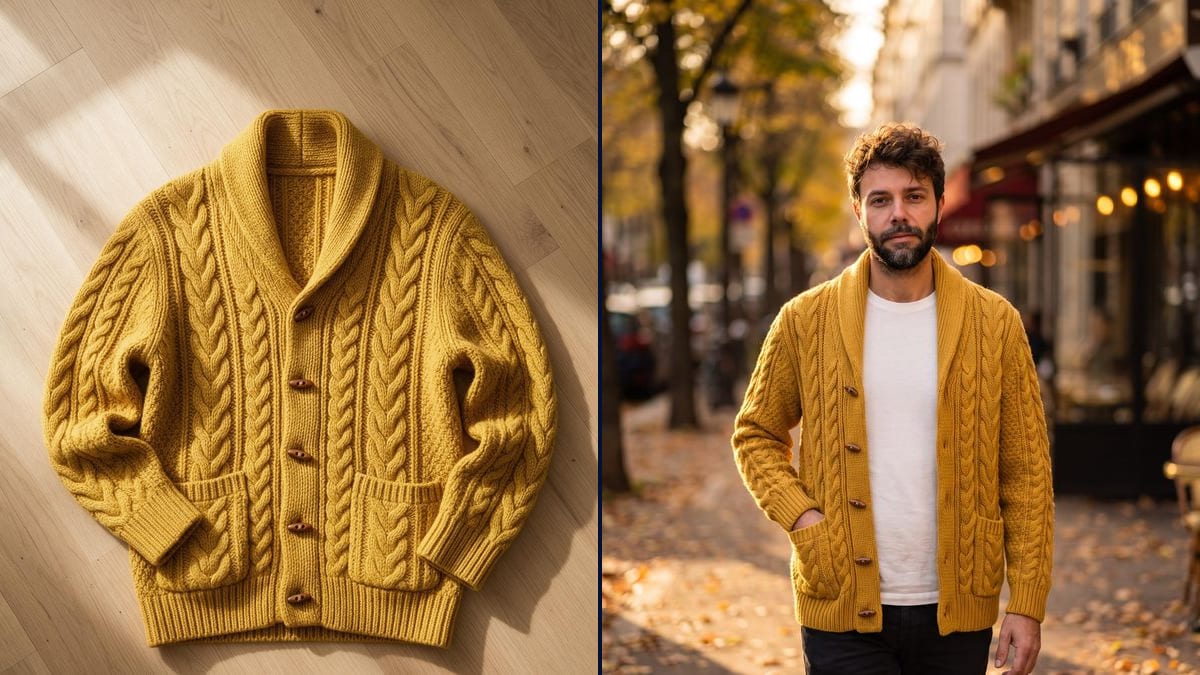
Real workflow: a mustard yellow cardigan photographed flat on a wooden floor, then worn by Frank on a white background and in an autumn street. Five buttons, two pockets and the cable knit are kept.
At a glance
A garment photographed flat sells less than a worn one: you see neither the fit, nor the drape, nor the length. But a model and a shoot cost too much for every piece of a small shop. This workflow starts from the flat photo and a photo of a model, and returns the white background product shot, then the worn photo outdoors.
The hard part is keeping THE garment as it goes from flat to volume. Nano Banana Pro receives both photos in the same node; the prompt names the first as the garment and the second as the model, and counts the details, buttons, pockets, knit. A named detail is a kept detail.
To add colourways afterwards, see change the colour of a garment; for a garment on a shop mannequin, the ghost mannequin. The two photos cost thirty-eight credits.
These are the files of the workflow above, exactly as the models produced them, unretouched. The starting point is shown when there is one.
Starting point
Render
Online shops, resellers, fashion brands and makers who photograph their pieces flat and want to show them worn.
A flat photo of the whole garment in good light, and a front photo of the model, or a description.
Photograph the garment perfectly flat
From above, whole, smoothed out, in daylight. Buttons, pockets and texture must be readable: that is what the model copies.
Add the photo of the model
A sharp photo of the person, from the front, or a reference sheet. Without a photo, describe the model in the prompt and cut the wire.
Count the garment's details
Number of buttons, pockets, collar, length, pattern. The prompt writes them down, and the render keeps them.
Check before publishing
Count the buttons and compare the colour with the flat photo. An invented detail on a product page means a returned order.
The same canvas, tuned for different needs: each variation is two or three lines of prompt away.
Each new piece is photographed flat on the table, then worn on a white background for the product page: no studio to rent, no model to pay for the day.
A pre-loved garment shown worn gives an idea of drape and length, as long as the real photo stays in the listing too so the buyer sees its actual condition.
A collection's prototypes, laid flat at the office, become worn photos for the presentation lookbook shown to buyers, well before the final photo shoot.
The finished crochet or knitted piece, photographed flat, is shown worn to sell it online or to illustrate the page of the pattern being sold.
A wholesaler who only receives flat photos from suppliers turns them into consistent worn visuals, ready for resellers to use in their own shops.
The worn photo outdoors, in autumn light, feeds a social media post or ad, from the same flat photo as the product page, without a new shoot.
The model copies what it sees: crushed folds become flaws, an angle distorts the length.
Without "five buttons, two pockets", the count changes. Counting is the only guarantee.
Ask for one single photograph with no insets: the first versions placed blurred close-ups of the knit around the model.
A real person's face does not go on a product page without their permission.
No: a photo of yourself, of someone who agrees, or a description in the prompt is enough. For a real person, ask for their consent.
The same recipe works: change the model photo and describe the size you want. The garment stays the one in the flat photo.
Yes, with a flat photo of the back and a prompt that says "back view". Each view needs its own photo of the garment.
Thirty-eight credits, nineteen per render on Nano Banana Pro. A third view costs nineteen more.
It holds two photos at once, the garment and the face, when the prompt names each by its rank. Measured on the demo and on the group photo template.
In the demo, yes: same yellow, five buttons, two pockets, cable knit. Still count the details before publishing.
Yes, in the prompt: three quarter, hands in pockets, seated. Keep a simple pose on the product page, where the garment must read clearly.
The same recipe works for any piece: describe the length, the cut and the details visible on the flat photo.
Put a flat lay garment on a model with AI
Use this workflowFree account, no card required. The workflow opens pre-filled in your canvas.
 Nano Banana Pro
 Flux Kontext
 GPT Image 2.5 Sunburst
 Seedream 5 Pro