Before going to the optician
Four shapes tested on your own face in the evening, at home: you arrive at the optician already knowing whether round or rectangular suits you.
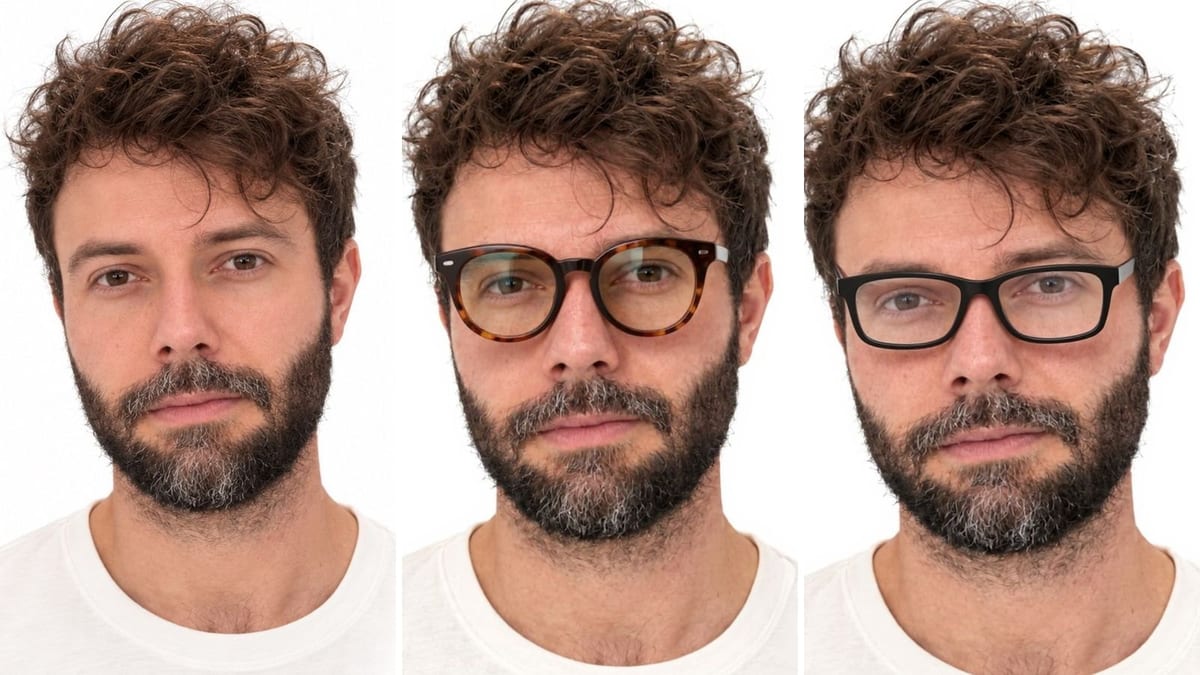
Your selfie with two different frames, face, hair and light unchanged. To pick a shape before going to the optician. Workflow visible here, no account needed.
Real workflow: a front selfie on a white background, then the same with a round tortoiseshell frame and with a rectangular black frame. The face does not change a pixel.
At a glance
Choosing frames online means guessing what they will look like on your face. At the optician you try twenty and forget the third. This workflow starts from a front selfie and shows you with two different frames, side by side, to settle on a shape before you go.
The hard part is keeping YOUR face. A model that recomposes the image smooths the skin and changes the gaze, and you judge frames on someone else. Flux Kontext places the frame and touches nothing else: same expression, same beard, same light.
The prompt fixes what gives an edit away: width matched to the temples, fit on the nose, clear lenses. For a whole style, see virtual try-on and hairstyles. The two frames cost twelve credits.
These are the files of the workflow above, exactly as the models produced them, unretouched. The starting point is shown when there is one.
Starting point
Render
Glasses wearers, opticians and online eyewear shops who want to see a frame on a real face.
A front selfie, well lit, without glasses, and a description of the frames to try.
Take a front selfie, without glasses
Face straight, well lit, looking at the lens, no glasses to start with. The model places the frame on that very face, without retouching it.
Describe the frame like an optician
Round, rectangular, cat eye shape; acetate or metal; tortoiseshell, matte black, gold. Never a brand: describe what you see.
Give the size and the fit
Width matched to the temples, resting on the bridge of the nose, clear lenses with a faint reflection. That is what makes the try-on believable.
Compare side by side
Two frames, two images, the same face: the shape that suits you shows at once. Add an Image node for a third.
The same canvas, tuned for different needs: each variation is two or three lines of prompt away.
Four shapes tested on your own face in the evening, at home: you arrive at the optician already knowing whether round or rectangular suits you.
The professional shows a busy customer three frames on their photo while they wait for their lenses, and guides the real try-on.
A product page gains an image of the frame worn on a face, without a photo shoot for every reference in the catalogue.
Frame, hairstyle and outfit tested together, with hairstyles and virtual try-on, for a change of style before an event.
Aviator, cat eye, round tinted: the shape that suits the face before ordering, especially when you cannot try them in a shop.
A creator tests several glasses for their on screen character, and picks the ones that read best in a thumbnail.
The model replaces an existing frame badly: reflections, marks and shadows stay. Starting photo without glasses.
A brand tells the model nothing about the shape, and raises a rights issue. Shape, material, colour: that is what counts.
Without a prompt, the frame can come out too big or crooked. Width matched to the temples, resting on the nose.
In profile or a tight three quarter, the frame sits badly and the try-on cannot be compared. A front selfie, looking at the lens.
It is a simulation of shape and colour, not a measurement. It helps pick a family of frames; trying them on at the optician confirms the size.
Yes: describe tinted lenses, their colour and opacity. Say whether the eyes should stay visible behind the lenses.
Take them off for the starting photo: the model replaces an existing frame badly, reflections and nose marks included.
Twelve credits, six per frame on Flux Kontext. A third frame on the same photo costs six more credits.
Because it changes one thing while keeping the photo pixel perfect: the face, the beard and the light stay yours, which is the point of a try-on.
On the demo, yes: same expression, same hair, same beard, same background, on both try-ons. Only the frame is added.
The format of your selfie, 3:4 here. A tight crop on the face helps judge the frame.
With their consent, yes, for instance to advise a relative. Not on the photo of someone who did not ask for it.
Try on glasses on your photo with AI
Use this workflowFree account, no card required. The workflow opens pre-filled in your canvas.
 Flux Kontext
 Nano Banana Pro
 GPT Image 2.5 Sunburst
 Seedream 5 Pro