The Amazon listing
The two secondary images that answer questions before they are asked, capacity, material, size, for eighteen credits per product and no designer.
Your product photo becomes two listing images: four selling points written around the product, then its dimensions, product unchanged. Workflow visible here, no account needed.
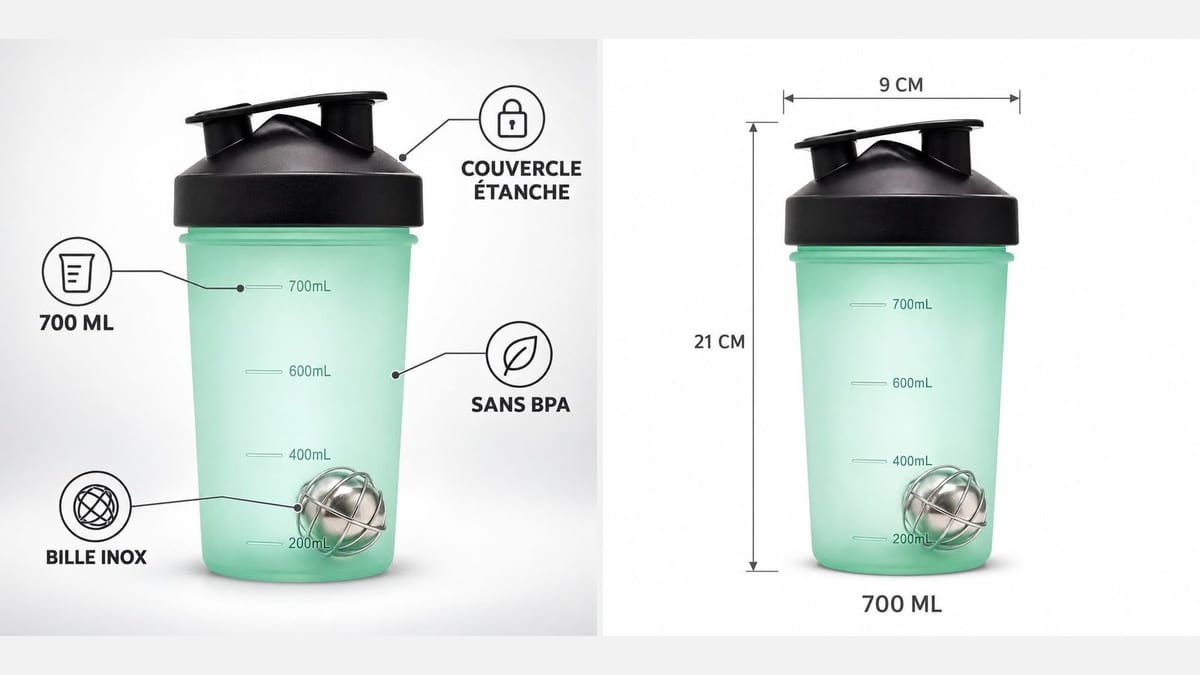
Real workflow: the photo of a shaker bottle on a white background, then the infographic of four selling points and the dimensions image. The product is the one in the photo, the labels are exact.
At a glance
On Amazon, Etsy or your own shop, a listing's second image often makes the sale: the product with its selling points written around it, then its dimensions. Usually that is an hour of layout software per product. This workflow starts from your photo on a white background and delivers both images at once.
The first hard part is the product: it must stay exactly the one in the photo, otherwise the image misleads the buyer. GPT Image 2.5 Sunburst places it without redrawing it, markings included. The second is the text: four short labels between quotes, nothing else, on a light background where Sunburst writes without mistakes.
The packshot comes first with product photos, the lifestyle shot with background replacement. The two listing images cost eighteen credits.
These are the files of the workflow above, exactly as the models produced them, unretouched. The starting point is shown when there is one.
Starting point
Render
Amazon and Etsy sellers, brands and online shops who want listing images without layout software.
A sharp photo of the product on a white background, its four selling points in a few words and its real dimensions.
Start from a white background packshot
The whole product, sharp, from the front, on a white or very light background. That is the image the model places, and its flaws end up in the infographic.
Write four short selling points
A number, a material, a feature, a benefit: two or three words each, between quotes. A whole sentence becomes unreadable as a thumbnail.
Give the real dimensions
Height, width, capacity, measured on the product. The model writes them as given: an invented measurement on a listing is a guaranteed return.
Compare the product with the photo
Same shape, same colour, same markings. If a detail moved, rerun the image: it is the check that prevents a complaint.
The same canvas, tuned for different needs: each variation is two or three lines of prompt away.
The two secondary images that answer questions before they are asked, capacity, material, size, for eighteen credits per product and no designer.
A maker highlights the handmade side, the material and the dimensions of each piece with the same layout, and the shop gains a professional look.
Every product in a range goes through the same prompt, and the catalogue keeps an identical presentation from one listing to the next.
The square infographic posts as is on Instagram or Pinterest, and says the product in one image rather than a paragraph of caption.
Before the first studio photos, the infographic from the photographed prototype serves the pre-order and the launch site.
The same selling points translated into four languages, same product, same layout: one listing per country without redoing the visual.
A product slightly different from reality misleads the buyer and earns a return. Sunburst places the product; still compare before publishing.
A sentence in a 300 pixel thumbnail cannot be read. Two or three words per point, in capitals, is what reads on a phone.
The model writes the numbers it is given. Approximate measurements on a listing cause disputes, measure the product.
Sunburst leaves black smears on dark flat areas, measured three times. Light background for text, that is this workflow's rule.
For secondary images, yes: infographics and dimensions are common there. The main image must remain the white background packshot, with no text, per the platform's rules.
Yes, they are words in the prompt. One version per market, same product, same layout: eighteen credits per pair of images.
Keep the background light: that is where Sunburst writes cleanly. A black product on white gives the best contrast for the labels.
Eighteen credits, nine per image on GPT Image 2.5 Sunburst at high quality. A third image, instructions or comparison, costs nine more credits.
Because it places a product without redrawing it and writes perfect text on a light background, for less than half the price. Nano Banana Pro remains the pick on dark backgrounds.
On the demo, all seven labels are exact, accents included. Still proofread each image, especially a long word or a unit.
Square, the format of marketplace secondary images. A 4:5 for Instagram can be set in the node settings.
Only if you have the right to use it, as for any listing. A photo of your own stock is safer and more faithful.
Make a product infographic with AI
Use this workflowFree account, no card required. The workflow opens pre-filled in your canvas.
 GPT Image 2.5 Sunburst
 Nano Banana Pro
 Seedream 5 Pro