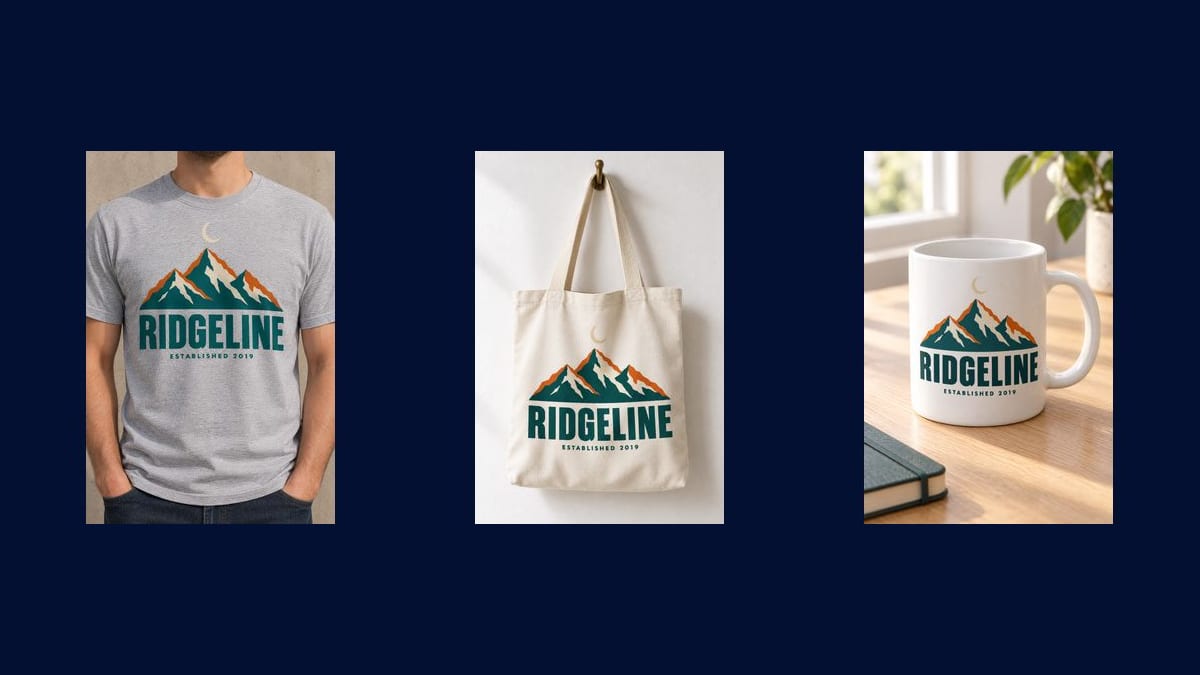
The worn t-shirt
The image that sells best, because it gives the scale of the drawing on a body. The demo's framing stops below the chin: the product stays the subject, not the model.
Your artwork goes into three Image nodes that place it on three print on demand products: a worn t-shirt, a tote bag, a mug. The drawing stays yours, pixel for pixel. Workflow visible here, no account needed.
The real workflow: the starting artwork wired to three GPT Image 2.5 Flare nodes, one product per node. The three mockups are the demo's own, with the same drawing on all three.
At a glance
A listing without a photo does not sell, and nobody orders a box of t-shirts to photograph a design that may never ship. This workflow builds the selling images from the only file you have: your drawing. It comes back printed on a worn t-shirt, on a hanging tote bag and on a mug, in three real set-ups.
The hard part is not the product, it is the ARTWORK. It has to stay exactly yours, at the same proportions, without being redrawn, and only distort the way a print distorts on fabric that folds. The three instructions repeat that sentence word for word, and it is what separates a mockup from an image "inspired by" your design.
The model is GPT Image 2.5 Flare at the standard tier, at three credits per mockup instead of nineteen with the most expensive model in the catalogue. On a workflow a seller reruns with every new design, that ratio counts for more than the last degree of finish. The three products cost nine credits.
These are the files of the workflow above, exactly as the models produced them, unretouched. The starting point is shown when there is one.
Starting point
Render
Print on demand sellers and designers who want to present a design on several products before listing it.
Give a flat artwork
Plain background, no drop shadow, no mockup already made, no frame. The model needs the drawing on its own: anything around it risks being printed with it on the t-shirt.
Describe the scene, not the drawing
Fabric colour, wall behind, light, camera angle. The drawing itself is never described: it is taken from the reference image, and that is precisely what you do not want reinterpreted.
Generate the three products
"Generate all" produces the t-shirt, the tote bag and the mug in one go. All three start from the same file, so the shop shows a consistent design from one listing to the next.
Change the design, rerun
Replace the artwork in the Media node and regenerate: the whole range is rebuilt in three clicks. That is where the canvas becomes a production line rather than a retouching tool.
The same canvas, tuned for different needs: each variation is two or three lines of prompt away.
The image that sells best, because it gives the scale of the drawing on a body. The demo's framing stops below the chin: the product stays the subject, not the model.
A product with a comfortable margin and very few returns, much in demand on independent shops. Canvas that sags slightly is enough to pass for a real photograph.
The gift object par excellence, and the hardest one to photograph at home. The render wraps the drawing round the ceramic, which a flat montage simply cannot do.
Three products carrying the same drawing give a coherent collection page on launch day, instead of one isolated listing that looks like a test.
Publish the mockups, watch what people click, and only have printed what draws interest. That is the real point of print on demand, and it needs images before stock.
If the object already exists and you have photographed it, product photography works on your photo instead of rebuilding a scene around a drawing.
A mockup given as input comes back as a t-shirt printed on a t-shirt. The starting file has to be the drawing on its own, flat, on a plain background.
The moment you describe it, the model believes it has to redo it, and it redoes it its own way. The instruction talks about the scene only and points to the file for the artwork.
A two millimetre line printed on a mug photographed at a three quarter angle ends up illegible or distorted. Keep the text large, or check the render very closely.
The colours on screen are not the printer's, and the fabric changes everything. The mockup sells the design, it does not sign off the production.
That is what the instruction demands and what the three demo renders show, where the same logo comes back intact on all three products. Always read the render: a model can damage a fine detail or a small line of text.
Yes, they are presentation images like the ones any mockup supplier sells. The guide on the rights on AI images sets out what that means for commercial use.
Duplicate a node and describe the product you want: sweatshirt, cap, phone case, poster, bum bag. Count three credits per extra product.
Nine credits, three per product, that is nine cents for the whole range. That is what makes it possible to redo the images with every new design without thinking about it.
On the three demo products, yes: soft light, a shadow cast on the wall, shallow depth of field for the mug. That level of staging is what separates a product listing from a montage.
Yes, write it in the instruction: heather grey, black, ecru, navy. Generate the best selling colours, they also serve as variants on the product listing.
No, and the demo deliberately frames below the chin. A face pulls the eye away from the product, and it raises image rights questions a seller would rather not handle.
Create it first in an Image node, the way the demo does with its mountain artwork, or start from the logo generator if what you are after is a brand.
Mockups for an online shop: your artwork on three products
Use this workflowFree account, no card required. The workflow opens pre-filled in your canvas.
 GPT Image 2.5 Flare
 Nano Banana Pro
 Flux Kontext