The one who never dared
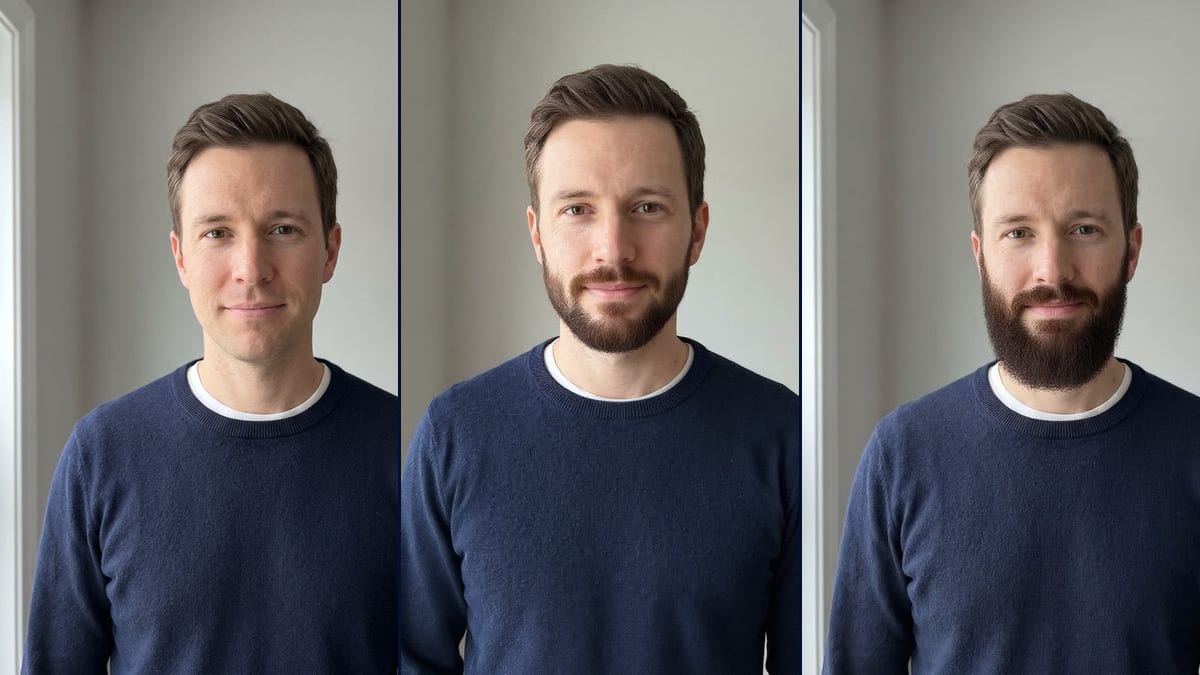
Clean-shaven forever, he wonders whether a beard would make him look older or more serious. Two pictures on his own portrait before committing to three weeks of growth.
Your clean-shaven portrait with a short groomed beard, then a full beard with a moustache, on the same face. Find out before waiting three weeks. Workflow visible here, no account needed.
Real workflow: a portrait of a clean-shaven man in a navy sweater, then the same man with a trimmed five-day beard and with a full beard joined to the moustache. Face, haircut and framing don't move.
At a glance
Growing a beard means three weeks of the itchy stage where it looks like nothing, only to find out at the end whether it suits you. This workflow shows you the result first: your clean-shaven portrait comes back with a short groomed beard, then with a full beard and moustache.
The hard part is keeping YOUR face. Many filters paste on a generic beard or retouch the features, and you end up comparing yourself to someone else. Flux Kontext adds the beard while keeping your face, haircut and sweater. The trap that remains is colour, and the demo shows how to hold it.
To test a haircut at the same time, start from the hairstyle changer; for frames, from the glasses try-on. Both beards cost twelve credits.
These are the files of the workflow above, exactly as the models produced them, unretouched. The starting point is shown when there is one.
Starting point
Render
Men wondering whether to grow a beard, barbers showing a trim before doing it, grooms-to-be and actors.
A front-facing, clean-shaven portrait, and the length, shape and shade of beard to try.
Take a clean-shaven portrait
Facing the camera, shaved close, in soft light, hair visible. A good phone photo is enough.
Describe the length
In days of growth or centimetres: five days, one centimetre, three centimetres. "A beard" on its own lets the model choose.
Name the shade
Ash brown, light chestnut, red, salt and pepper, and say what you rule out. This line is what makes the picture pass for real.
Show it to your barber
The barber sees the target shape, the cheek and neck lines, and tells you whether your growth can get there.
The same canvas, tuned for different needs: each variation is two or three lines of prompt away.
Clean-shaven forever, he wonders whether a beard would make him look older or more serious. Two pictures on his own portrait before committing to three weeks of growth.
The barber photographs the customer in the chair and shows two trims on his face. The choice takes a minute, with no misunderstanding about "short" or "full".
The date is set, the photos will last a lifetime. He compares a five-day beard and a full beard on a portrait, and starts growing at the right moment.
The part calls for a period beard. The actor and his agent see the look before deciding whether he grows it or goes with a fake one.
The first white hairs are showing in the beard. A well-trimmed salt and pepper version shows whether to keep it that way or stay shaved.
A brand of oils and trimmers shows on one model the styles its products help maintain, for its product pages and social accounts.
"Same colour as his hair" gave a black beard in the demo, "warm brown" a ginger one. Name a precise shade and rule out the others.
A beard is judged along the whole jaw. In profile or three-quarter view, the model invents the hidden half. Face the camera.
Stubble in the photo mixes with the new beard and muddies the result. Clean-shaven, the try-on is sharper.
Without a neckline or cheek line, the beard comes out scruffy. Add "clean neckline under the jaw" if you want a groomed beard.
No: same eyes, same nose, same mouth, same haircut, same clothes. Only the beard and moustache are added.
Yes: describe the shape in the prompt, short goatee, chevron moustache, thin chinstrap. One node per shape.
Yes to shorten it or change its shape. To see your face shaved, ask to "remove the whole beard, clean-shaven skin".
Twelve credits, six per render on Flux Kontext. A third shape on the same photo costs six more.
Because it changes one area of the picture and keeps the rest pixel for pixel: the face, the hair and the sweater stay yours, only the beard is added.
Not necessarily. Density and patchy areas vary from person to person. The picture shows the shape and length to aim for, not what your skin will produce.
Yes, for a role, a party photo or a joke. The same prompt works on any front-facing portrait.
Yes: duplicate the node and change the shade, chestnut, red, salt and pepper. Each try costs six credits.
Try on a beard on your photo with AI
Use this workflowFree account, no card required. The workflow opens pre-filled in your canvas.
 Flux Kontext
 Nano Banana Pro
 Seedream 5 Pro
 GPT Image 2.5 Sunburst