The e-commerce product page
The 360° video sits at the top of the product page, next to the photos: the buyer sees the product from every side, as in a shop, without a turntable or a studio.
The photo of your product becomes a packshot on a podium, then a five-second 360° video, shape and details kept. For a product page or an ad. The workflow is shown here, no account needed.
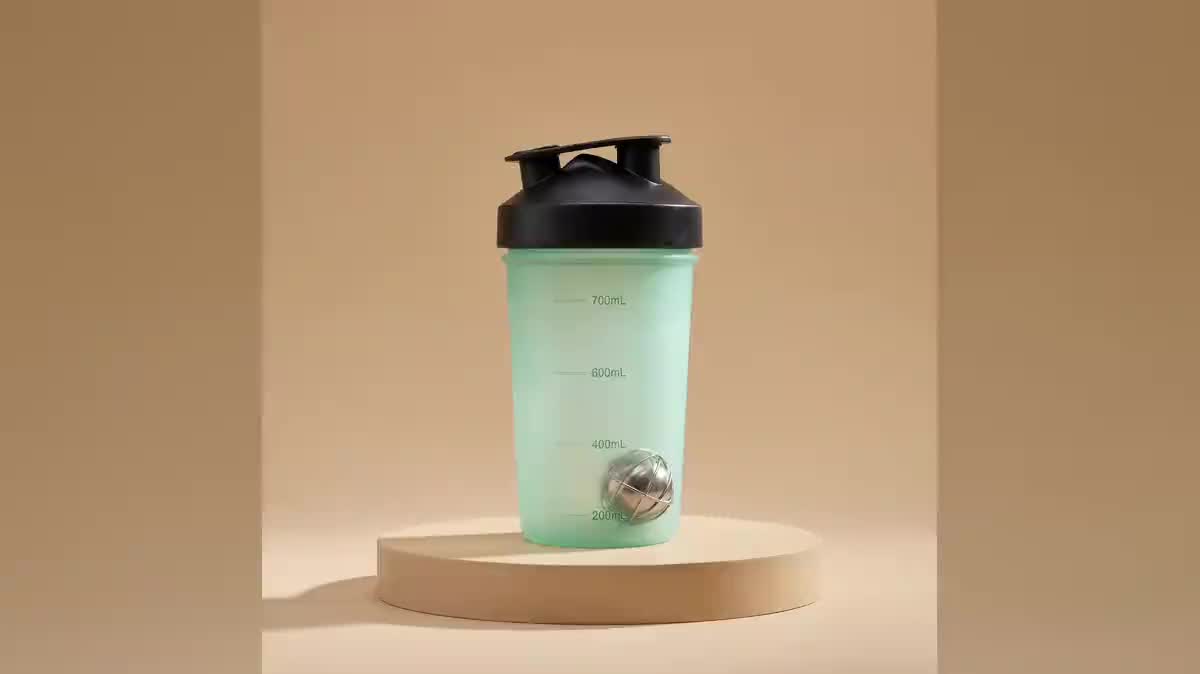
Real workflow: a mint green shaker photographed on a table, the same as a packshot on a sand podium, then five seconds of full rotation. Cap, markings and steel ball stay the same all the way round.
At a glance
A 360° video reassures the buyer: they see the product from every side, as in a shop. But it takes a turntable, a studio and an editor. This workflow starts from a simple photo of the product, makes a clean packshot on a podium, then a five-second video that goes all the way round it.
The hard part is the back of the product: a video model that has never seen it invents it, with a logo or text that does not exist. The packshot centred on a podium gives a clear axis, and the video prompt describes the back instead of leaving it open. In the demo, the shaker keeps its cap, markings and ball all the way round.
For a series of stills, see the product photo; for an ad with staging, the cinematic ad. The packshot and the turn cost seventy-nine credits.
These are the files of the workflow above, exactly as the models produced them, unretouched. The starting point is shown when there is one.
Starting point
Render
Online shops, marketplace sellers, brands and makers who want a product video without a turntable or a studio.
A sharp front photo of the product, and if possible a description of its back.
Photograph the product from the front
Whole, sharp, in soft light, label readable. A phone photo on a table is enough: the packshot redoes the background and the light.
Stand it on a centred podium
Plain background, round podium, space around the product. The prompt forbids adding or changing anything on the product.
Describe the back in the video prompt
Plain back, barcode, second label: say what should be seen. Otherwise the model invents a back that does not exist.
Check every side before publishing
Watch the video frame by frame as the back goes by. An invented logo on a product page misleads the buyer.
The same canvas, tuned for different needs: each variation is two or three lines of prompt away.
The 360° video sits at the top of the product page, next to the photos: the buyer sees the product from every side, as in a shop, without a turntable or a studio.
A short product video for Amazon, Etsy or a Shopify store, made from the photo already online, to enrich the listing without a new shoot.
The full turn in vertical 9:16 feeds a story or a social media ad, with the packshot as the first frame to catch the eye in the first second.
The prototype, photographed only once, is shown rotating in the announcement email, on the pre-order page and in the launch press kit.
A whole range becomes consistent 360° videos: same podium, same background, same rotation speed, for a brand catalogue that stays coherent from one product to the next.
A handmade ceramic, jewel or candle is shown from every angle on an online market, where the buyer cannot pick the object up.
The model has never seen the back: it invents it. Describe it or give a photo of the back as a reference.
Objects around the product turn with it or warp. The packshot on a plain background removes everything else.
A turn in two seconds blurs the details. Five seconds for one turn keep the label readable.
An invented logo or wrong text on a product page is misleading information. Look at every side.
On screen it is the same effect: a full turn of the product on a fixed background. The prompt asks for a steady orbit around the still product.
Yes: add the photo of the back as a reference image of the Video node and describe it. It is the safest for a product with a busy label.
The square of the demo works everywhere. Switch the packshot and the video to 9:16 for stories, 16:9 for a banner.
Seventy-nine credits: nineteen for the packshot on Nano Banana Pro, sixty for five seconds of Wan 3.0 in 720p.
It follows a camera movement prompt from a first frame well, at half the price of Seedance 2.5.
In the demo, yes: shape, cap, markings and steel ball kept all the way round.
Yes, by describing it in the packshot: plain white background and white podium. Keep a soft shadow, or the product seems to float.
It works, but reflections move during the rotation. Soft light and a plain background keep them discreet.
Create a 360° product video with AI
Use this workflowFree account, no card required. The workflow opens pre-filled in your canvas.
 Nano Banana Pro
 Wan 3.0
 Kling V3
 Seedance 2.5