The yearbook photo trend
The blue and purple laser backdrop portrait, the one in every 90s yearbook, redone with your face for social media.
Your selfie becomes a 1997 disposable camera photo and a school portrait on a laser backdrop, your face kept. The workflow is shown here, no account needed.
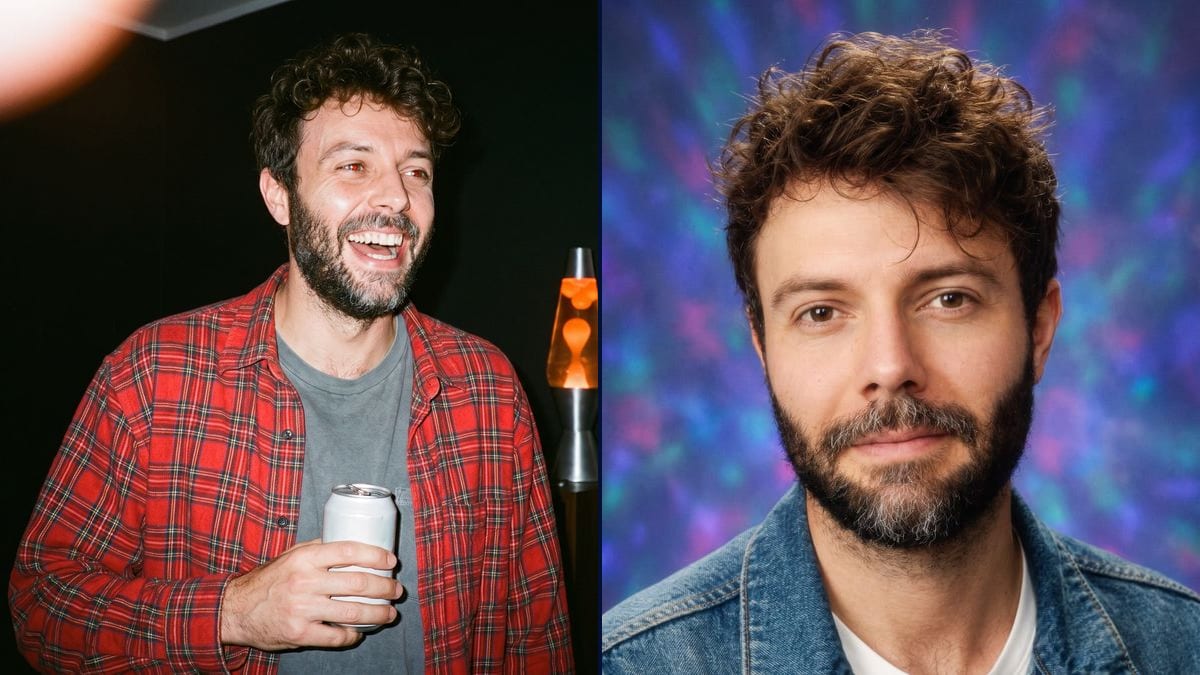
Real workflow: a selfie of Frank on white, then Frank at a 1997 party under the flash, orange date "'97 12 31", and in a school portrait on a blue and purple laser backdrop.
At a glance
The trend keeps coming back on social media: seeing yourself in a 90s yearbook photo, or at a party shot on a disposable camera, flash in the eyes and orange date in the corner. This workflow starts from a selfie and returns both photos, with your face and everything else from the era.
The hard part is changing the era without changing the person. Everything that makes the 90s is described, outfit, setting, flash, grain, laser backdrop; the face never is. In the demo, the big laugh under the flash had changed the face: the prompt now gives the selfie and the reference sheet.
For another style, see photo to anime or photo to painting. The two photos cost thirty-eight credits.
These are the files of the workflow above, exactly as the models produced them, unretouched. The starting point is shown when there is one.
Starting point
Render
Content creators, nostalgia lovers, themed party organisers and brands playing the retro card.
A sharp front selfie, and the era described through outfit and setting.
Give a sharp front selfie
Whole face, good light. It is what the model reuses in each period photo.
Describe the era, not the face
Flannel shirt, lava lamp, direct flash, grain, orange date: the era reads in the setting. The face comes from the selfie.
Forbid brands and writing
No band t-shirt, no branded can, no readable poster: the prompt says so, otherwise the model invents some.
Compare the face with the selfie
A big smile under the flash can change the features. If it does, add a second reference photo and run it again.
The same canvas, tuned for different needs: each variation is two or three lines of prompt away.
The blue and purple laser backdrop portrait, the one in every 90s yearbook, redone with your face for social media.
Guests shown in 1997 party photos for a themed birthday party, printed and hung on the wall or projected on a screen during the evening.
A 90s party invitation with the host's disposable camera photo, orange date included, to set the tone from the card.
A brand playing on nostalgia shows its whole team in 90s school portraits for a social campaign or for the about page of its website.
A band or a podcast that wants a retro look uses the flash party photo as the base of a cover or a poster.
A group of friends recreates the party photo they never took together back then, each starting from a selfie taken today.
"Brown eyes, square jaw" pushes the model to draw another face. The selfie is enough.
A real band t-shirt, a known can, a readable poster: the first version of the demo had one, the prompt forbids them.
Without the orange date, the photo looks like a recent photo with a filter. It is the detail that makes the era.
Transforming a friend's selfie and posting it is done with their consent.
The same recipe works: describe the outfits, the setting and the camera of the era, an 80s instant camera, a 2000s compact digital camera.
Yes, by wiring several selfies and naming each person by their photo, as in the group photo template.
In the demo, yes. Give the date in quotes and keep the format of cameras of the time, "'97 12 31".
Thirty-eight credits, nineteen per render on Nano Banana Pro.
It keeps a face from a reference photo and holds period details, orange date included, measured on the demo.
In the demo, yes, after adding the reference sheet as a second reference: the first render with the big laugh had changed the features.
Yes: ask for a black and white print with heavy grain, like a film of the time.
Yes: pink laser, green marble or grey blue gradient, describe your school's one.
Turn your photo into a 90s photo with AI
Use this workflowFree account, no card required. The workflow opens pre-filled in your canvas.
 Nano Banana Pro
 Seedream 5 Pro
 Flux Kontext
 GPT Image 2.5 Sunburst