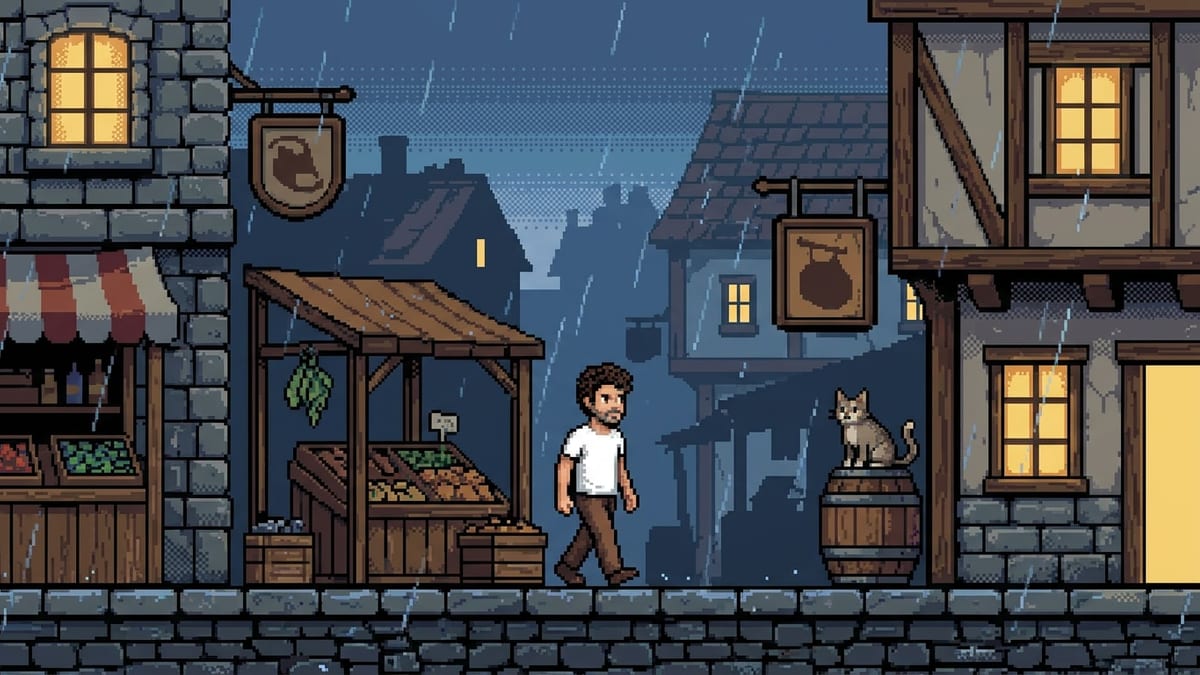
The character of an indie game
A solo developer can see their hero and their scene before paying an artist: the style gets chosen on two images rather than on a board of references borrowed from other games.
Your photo becomes a 16-bit character portrait, then that portrait becomes the reference for the game scene, same palette and same pixel size. Workflow visible here, no account needed.
Real workflow: a photo from the front, a pixel art character portrait, then a rainy market street in the same palette. Both images come from the demo.
At a glance
Pixel art takes patience and an eye: placing every pixel by hand is a craft. This workflow does not replace that craft, it gives the starting point: your face as a 16-bit character, and a scene that uses exactly the same palette.
The hard part is not the style, it is the GRID. An image model knows how to draw in a pixel art style and almost always returns a smooth high resolution image: blown up, it has neither a regular grid nor a short palette. The prompt has to demand large square pixels and forbid anti-aliasing, gradients and soft shading.
The choice of model is not an opinion. Measured on 21 September 2026, same photo and same prompt: Nano Banana Pro returns a grid that survives a nearest neighbour downscale, GPT Image 2.5 Flare holds too, and Seedream 5 Pro returns a smooth illustration. Both images cost thirty-eight credits.
These are the files of the workflow above, exactly as the models produced them, unretouched. The starting point is shown when there is one.
Starting point
Render
Indie game developers, players and illustrators who want a character and a scene that match before placing the first pixel by hand.
A sharp photo from the front in clear light: the model keeps only sixteen colours, a backlit shot leaves nothing to see.
Give a sharp photo from the front
The model simplifies a lot: a blurry photo or a dark three quarter angle gives an unrecognisable character, because only sixteen colours are left to say everything.
Demand the grid, forbid smoothing
Large visible square pixels, aliased edges, short palette, no anti-aliasing, no gradients. Without those bans you get a pretty illustration that is not pixel art.
Wire the portrait into the scene
The second node takes the portrait on its image port: that is what keeps the same pixel size and the same palette between the character and the scene.
Downscale with nearest neighbour
For a real sprite, downscale the render to the size you want with no interpolation. That downscale is what fixes the grid, and it happens outside the canvas.
The same canvas, tuned for different needs: each variation is two or three lines of prompt away.
A solo developer can see their hero and their scene before paying an artist: the style gets chosen on two images rather than on a board of references borrowed from other games.
A photo becomes a character portrait for a profile, a chat server or a player card, and it still looks like the person, which an automatic filter almost always misses.
Showing a street, a tavern, a forest in the same palette says an art direction faster than a document: the scenes compare because they share the grid.
The 16-bit portrait of someone you know, printed or set as a wallpaper, costs nineteen credits and lands well when it really looks like them.
A face in pixel art is recognisable at thirty pixels wide, where a cropped photo turns into grey mush.
The same character in a space station or a cyberpunk city: the palette changes, the grid stays, and the collectible figure does the same exercise as a real object.
This is the mistake that gives a smooth illustration. The model obeys the word style and not the grid: you have to write large square pixels, aliased edges, no anti-aliasing, no gradients.
Two separate generations give two pixel sizes and two palettes. The character does not sit in the scene, and the pair does not look like one game.
Backlight, glasses, half the face in shadow: sixteen colours cannot tell that. Clear light and an open face give a recognisable character.
A 1024 pixel image imitating the grid is not a game file. Without a nearest neighbour downscale the pixels are not aligned and the result will look blurry in engine.
Not directly. It is a high resolution image imitating the grid: for a sprite you have to downscale it with nearest neighbour to the size you want, then touch up a few pixels. The workflow does the drawing, not the integration.
You can ask for several poses in one image, but no model guarantees perfect alignment between cells. For a real sheet, generate the poses one by one with the portrait as a reference.
Whatever the model decides, roughly the equivalent of a 96 to 160 pixel wide grid. You fix it yourself with the downscale, which is also the moment to really cut the palette.
Thirty-eight credits, nineteen per image on Nano Banana Pro. One more scene costs nineteen credits, and keeps the palette if you wire the portrait back into it.
Nano Banana Pro, measured on 21 September 2026 on the same photo and the same prompt: its grid survives a nearest neighbour downscale. GPT Image 2.5 Flare holds too, with noisier dithering. Seedream 5 Pro returns a smooth illustration, which is not pixel art.
Yes, by writing the colours into the prompt, for instance a known game palette described in words. The model gets close without matching the codes: the final downscale is also there for that.
Ask for fewer colours and bigger pixels, naming the era you want. The shorter the palette, the more precise the prompt has to be about what must stay readable.
The renders are yours, under the terms of the service. If you start from someone's photo you need their consent, as with any image of that person.
Turn a photo into pixel art with AI
Use this workflowFree account, no card required. The workflow opens pre-filled in your canvas.
 Nano Banana Pro
 GPT Image 2.5 Flare
 Seedream 5 Pro