The leaving party
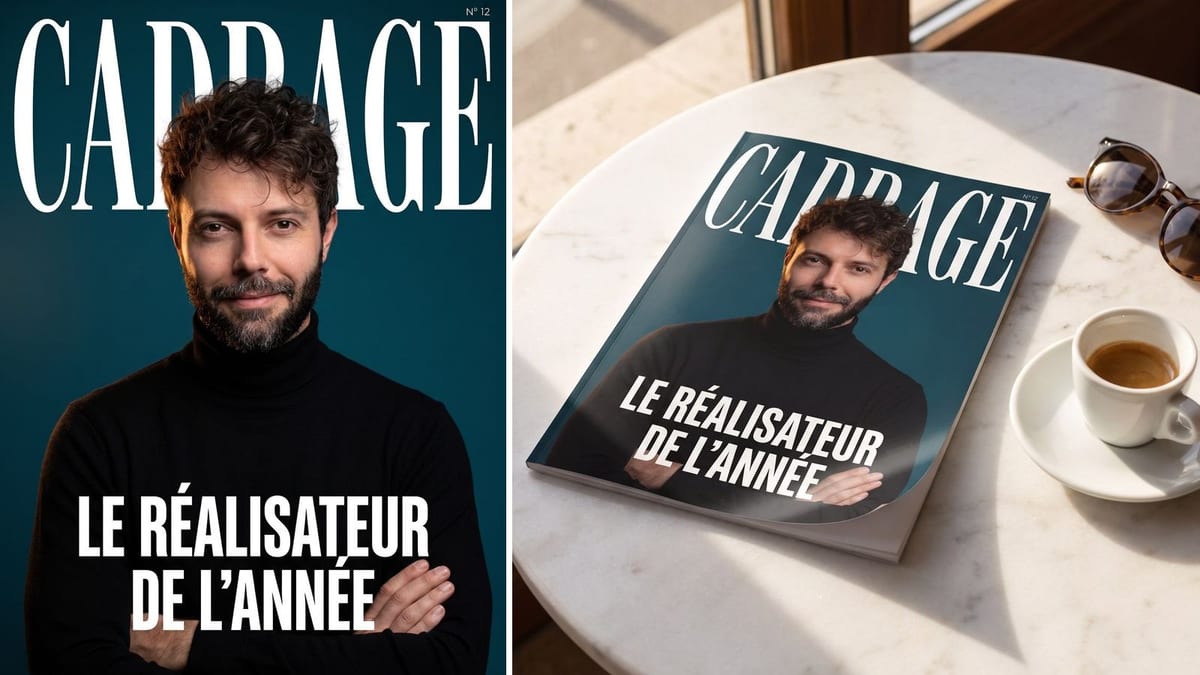
The cover of a colleague who is leaving, with a cover line that sums up their career in the team, printed and signed by everyone: thirty-eight credits and a keepsake that gets framed.
Your photo becomes a magazine cover with title, cover line and issue number, then a photo of the magazine on a café table. Workflow visible here, no account needed.
Real workflow: a photo from the front, the magazine cover with its studio portrait and three lines of text, then the printed magazine on a café table. Both images come from the demo, the second starts from the first.
At a glance
Being on a magazine cover is a colleague's leaving gift, a promotion announcement, a birthday joke or the front of a portfolio. This workflow does it in two images: your photo becomes a studio portrait on a cover, with the magazine title, a cover line and an issue number, then the same cover comes back printed, lying on a café table.
The first hard part is the text. A cover is full of words, and an image model happily invents them: subtitles, barcode, price. Here there are only three texts, written between quotes, with a ban on writing anything else, the rule learned on the trading card.
The second is the mockup's fidelity: the magazine photo starts from the rendered cover, wired into its image port, and its prompt forbids redrawing it. The magazine title is invented, because a real title is a trademark. Both images cost thirty-eight credits.
These are the files of the workflow above, exactly as the models produced them, unretouched. The starting point is shown when there is one.
Starting point
Render
Colleagues, families, freelancers and brands who want a magazine cover of themselves, without a designer.
A sharp photo from the front of a single person, plus the invented magazine title, a cover line and an issue number.
Give a sharp photo from the front
The cover portrait is recomposed in a studio, but it keeps your face: a blurry photo, a profile or sunglasses put someone else on the cover.
Invent the magazine title
A short word in capitals that is not a real magazine's name. That is a trademark, and a fake cover of a real title reads like fake news.
Keep it to three texts
The title, one cover line, one issue number. Every extra line is a chance of a typo, and a cover that breathes reads better as a thumbnail than a crowded one.
Wire the cover into the magazine photo
The image port of the second node receives the cover, and its prompt says "exactly the reference image". Compare: if a letter changes, redo the magazine photo, not the cover.
The same canvas, tuned for different needs: each variation is two or three lines of prompt away.
The cover of a colleague who is leaving, with a cover line that sums up their career in the team, printed and signed by everyone: thirty-eight credits and a keepsake that gets framed.
A new director or partner announced on a cover on the intranet or LinkedIn: far more noticed than a profile photo and a paragraph of text.
A cover line that fits the person, "the man who never missed a drink", and the cover becomes the invitation card or the printed cake topper.
A photographer, a coach or a consultant opens their presentation deck with their own cover: the positioning and the tone read in a second.
Every member gets a cover with the same magazine title and the same framing, and the series works as a team page for a careers site or an offsite.
A product or a founder on the cover of an invented magazine for a launch, with the poster for the large format version in the shop.
It is a trademark, and a doctored cover of a real title spreads like misinformation. Invent a title, the cover will be no less convincing.
Every extra line is a chance of a typo and one more text to read as a thumbnail. Three texts are enough to make a cover, and it breathes.
Without a ban, the cover gets a barcode, a price, a date and invented subtitles. Title, cover line, issue number, and nothing else.
Without the cover as a reference, the magazine on the table carries another cover, pretty and false. The cable between the two nodes is the whole workflow.
Yes: the cover comes out in 2K at 3:4, enough for a magazine sized print at an online printer. For a poster, run it through the sharpener.
Yes, one sentence of the prompt: studio portrait on a teal background here, but black and white, fashion, sport or business work too. Keep the three texts between quotes, the rest is up to you.
With their consent, yes: it is a much loved gift for a farewell or a birthday. Never make the cover of someone who did not ask for it, nor of a public figure.
Thirty-eight credits, nineteen per image on Nano Banana Pro. A second cover with another cover line costs nineteen more credits.
Because it keeps a face from a reference photo, writes short text without mistakes on a dark background and faithfully reproduces an image it is given: the three things this workflow asks for.
On the demo, all three texts are exact on the cover and on the magazine photo. A long or accented title can go wrong: proofread before printing.
The cover at 3:4, the magazine photo at 4:3, both in 2K. A taller format, closer to a real magazine, can be asked for in the prompt.
Yes, that is what it is for. Keep an invented magazine title and a cover line that does not read like real news, especially if the person on the cover is not you.
Make a magazine cover with your photo and AI
Use this workflowFree account, no card required. The workflow opens pre-filled in your canvas.
 Nano Banana Pro
 GPT Image 2.5 Flare
 Seedream 5 Pro