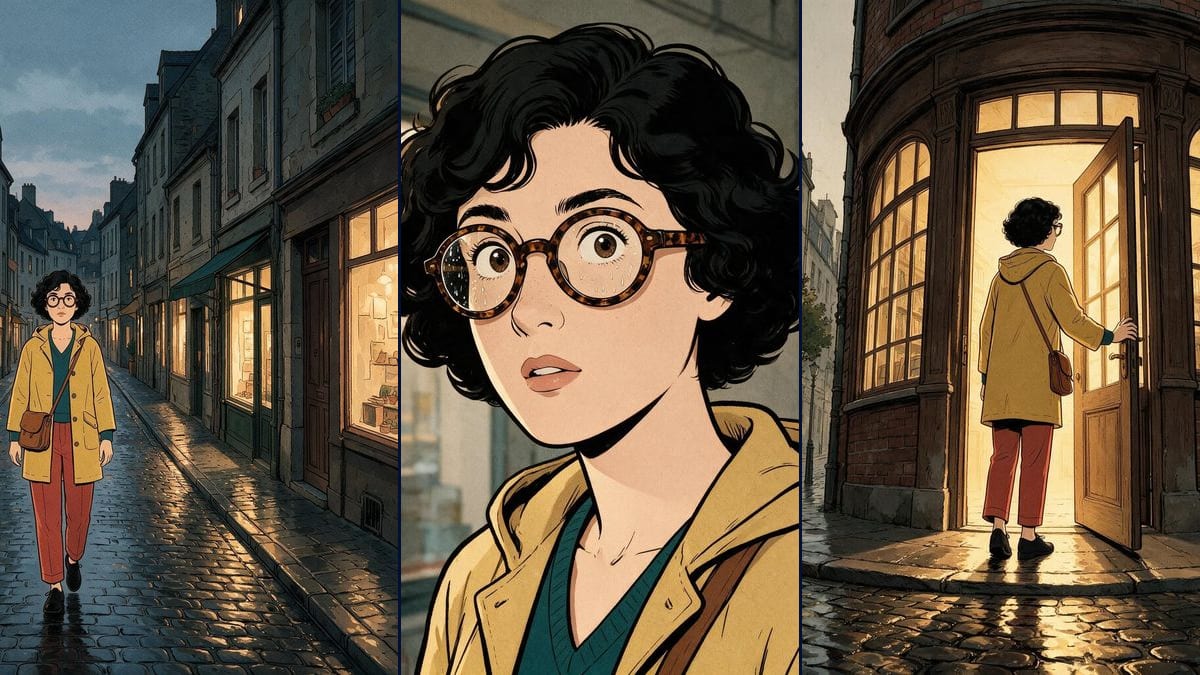
Four-panel page in clear line style
The template's setting: crisp linework, flat colour, no screentone. It is the style that forgives model flaws best, because it relies on readable shapes rather than rendering precision.
Four panels telling one scene, with the same face in all four. The reference sheet holds the character, the art direction holds the inking. The workflow is visible here, without an account.
The three angle character sheet and the art direction feed all four panels, and the synopsis runs into all four prompts. Pan, zoom, open the nodes to read the prompts.
At a glance
Generating one comic panel is easy. Generating four that follow each other is another job: by the third one the coat has changed colour, the glasses are gone and the face is no longer the same. This is where single prompt generators fail, because they have no memory from one image to the next.
The canvas answers with two nodes wired into all four panels at once. The reference sheet carries the character in three angles, front, profile and three quarter, and the model refers back to it for every panel. The art direction node carries the inking, the palette and the paper grain. The two stay separate, which lets you change style without losing the character, and the other way round.
The synopsis is wired into all four prompts: each panel knows what happens before and after it, so the eyelines fall the right way and the action moves forward. Seedream 5 Pro holds the clean line and the flat fills, Nano Banana and Flux 2 Pro are other options depending on the line you want. The guide keeping a character consistent covers the method.
These are the files of the workflow above, exactly as the models produced them, unretouched. The starting point is shown when there is one.
Starting point
Render
Fill the character sheet
Three views are enough, but take them front, profile and three quarter. Three images from the same angle say nothing about the other side of the head, and the model invents it.
Fix the inking
The art direction node describes line weight, flat fills, palette and grain. Explicitly ban speech bubbles and lettering: models add them spontaneously, and generated text is unreadable.
Write the synopsis
One sentence per beat, in order. This node runs into all four panels: it is what gives the page its continuity of gaze and direction.
Describe each panel
Each panel prompt only carries the framing and the action: wide, medium, close up, low angle. The rest comes through the cables, and is not repeated.
The same canvas, tuned for different needs: each variation is two or three lines of prompt away.
The template's setting: crisp linework, flat colour, no screentone. It is the style that forgives model flaws best, because it relies on readable shapes rather than rendering precision.
Switch the art direction to brush inking, mechanical screentones and a ban on lettering. Keep the character card: it is the card, not the style, that holds continuity from panel to panel.
Three panels, one punchline, square format. The synopsis wired into all three prompts acts as comic timing here: each panel knows what the previous one showed, so the punchline lands where it should.
The same canvas produces a storyboard you can show a client: four panels, one framing per panel, the film's art direction. See the ten-second video ad for moving from storyboard to shots.
The Reference card takes your own faces: family, team, club. The art direction handles the graphic translation, and the result stays recognisable without being a retouched photo.
Image models write badly, and failed lettering ruins a good panel. Ban text in the prompts and add bubbles afterwards in a layout tool.
Four descriptions give four neighbouring characters. The Reference card carries the character once, the prompts carry only framing and action.
Wide, medium, close-up, low angle: rhythm in the framing is what tells the story, not repeating the same viewpoint.
Not in the generation: image models write badly, and failed lettering ruins a good panel. The prompts therefore ban text, and bubbles are laid on afterwards in any layout tool.
As many as you want: each panel is one more image node, wired to the same sheet and the same art direction. Four are enough to show the mechanism, a full page often runs to six or nine.
The reference sheet accepts your own images. The art direction handles the graphic transposition: the face stays yours, the line becomes the one on the page.
As many as you need: each panel is one more Image node wired to the same card and the same art direction. A full page often runs six to nine, at about five credits per panel.
Yes, generated images are yours, commercial use included. Just avoid naming an existing series or author in the prompts.
Describe the location in the Art direction node rather than in each prompt, exactly as the character lives in the card. The setting then becomes a constant of the page.
Generate each panel in 3:4 or square, then compose the page in a layout tool: that is where gutters, bubbles and the final A4 format belong.
Create a comic strip page with AI
Use this workflowFree account, no card required. The workflow opens pre-filled in your canvas.
 Seedream 5 Pro
 Nano Banana
 Flux 2 Pro