The cat that didn't come home
Two nights without a sign. A lost cat poster with a photo of her on the sofa, her description and the neighbourhood, printed ten times for the bakery and the mailboxes.
Your pet's photo becomes a print-ready A4 poster: title, name, description, place and number spelled correctly, in two styles. Workflow visible here, no account needed.
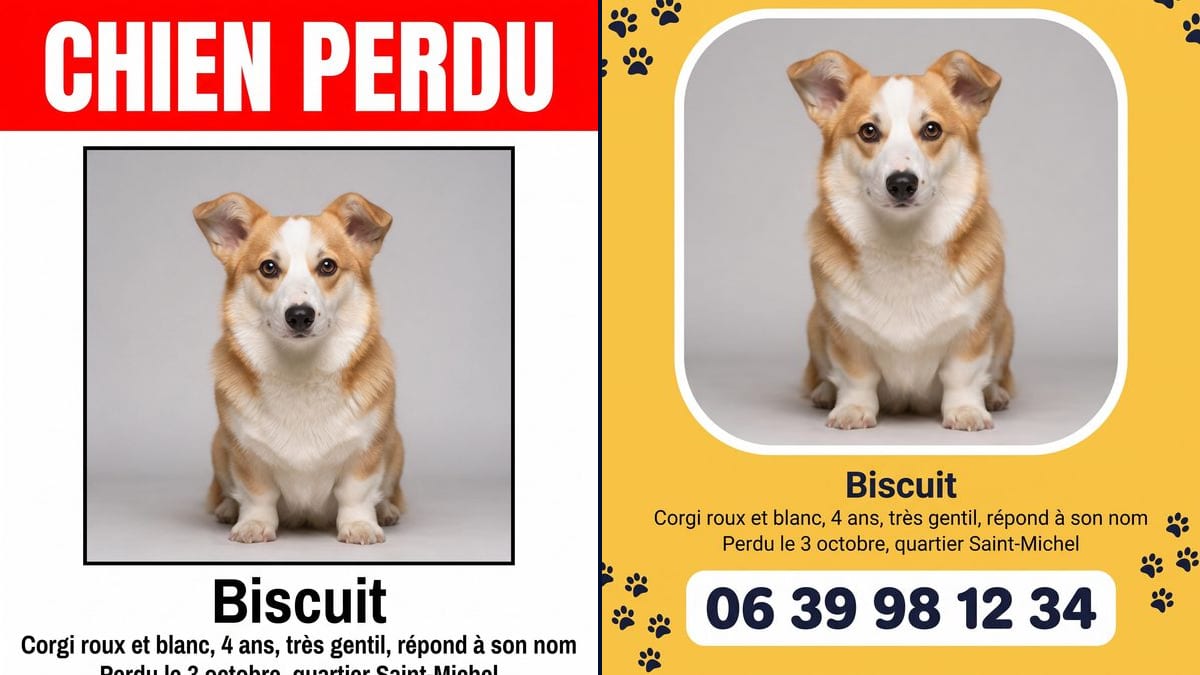
Real workflow: a photo of a red and white corgi, then two lost dog posters, one with a red banner, the other yellow with paw prints. Name, description, place and number match on both.
At a glance
When a pet goes missing, the first hours matter, and that is exactly when nobody has the head to lay out a poster. This workflow starts from a photo of YOUR pet and produces two print-ready A4 posters, a classic one with a red banner and a warmer one, with all the text in the right place.
Two things make a poster useful: people must recognise the animal at a glance, and the number must be right. The prompt asks for the real photo and names what sets the animal apart, then gives each line of text in quotes. Nano Banana Pro writes it letter for letter, digits included.
For something lighter to share once your pet is home, a portrait of it as a character will make the whole street smile. Both posters cost thirty-eight credits.
These are the files of the workflow above, exactly as the models produced them, unretouched. The starting point is shown when there is one.
Starting point
Render
Owners whose pet has gone missing, people who found an animal, charities, shelters and vet clinics.
A recent, sharp photo of the animal, and the lines to write in quotes: title, name, description, place, number.
Pick the photo
Recent and sharp, the whole animal or at least the head and markings clearly visible. This is what neighbours will compare against.
Replace the text
Name, short description, date and area, number: each line in quotes, in the prompt of each node.
Check the number
Digit by digit, on the image. A wrong number makes the poster useless, even if everything else is perfect.
Print and share
In A4 for shops and lamp posts, and the same image in local groups and lost pet websites.
The same canvas, tuned for different needs: each variation is two or three lines of prompt away.
Two nights without a sign. A lost cat poster with a photo of her on the sofa, her description and the neighbourhood, printed ten times for the bakery and the mailboxes.
He bolted into the woods during the walk. The poster goes up that evening on the trees by the car park and in the village group, with the area where he was seen.
You took in a dog without a collar. The same prompt makes a found dog poster to reach the owner, without giving every detail so fake owners can't claim it.
An animal welfare group prepares posters for pets reported lost by families in a few minutes, in one consistent style people recognise.
The clinic pins up the area's lost pets at reception, each poster made from the photo the owner sent, all readable the same way.
A bird is recognised by its colours. The poster shows the photo large, says that it talks or whistles, and asks people not to try to catch it.
A six-month-old puppy on the poster of a five-year-old dog, and nobody makes the connection. Use the most recent, sharpest photo.
Personality, habits, life story: from a distance, none of it reads. Name, two distinguishing marks, place and number are enough.
The model spells correctly most of the time, but one wrong digit is fatal. Compare the number on the image with yours before printing.
A number is enough. An exact address on a public poster also attracts reward scams. Give the area, not the street.
No: the prompt asks for the real photo, with its markings. In the demo, the corgi is identical, small brown spot on the muzzle included.
Yes: replace "dog" with the animal and describe what sets it apart, coat, collar, notched ear.
Yes: add a line in quotes, for example "Reward", and say where it goes on the poster.
Thirty-eight credits, nineteen per poster on Nano Banana Pro. One more version, say in black and white for a home printer, costs nineteen credits.
Because it spells correctly, accents and digits included, and keeps the original photo: it's your pet on the poster, not a stock dog.
In the demo, yes: all five lines and the number match on both posters. Always proofread before printing.
The render is 3:4, close to A4. Print in A4 on an office printer; for A3, run the render through the Enhance node first.
Yes: if your pet is microchipped, report it missing to the microchip database it is registered with. The poster comes on top of that.
Make a lost pet poster with AI
Use this workflowFree account, no card required. The workflow opens pre-filled in your canvas.
 Nano Banana Pro
 GPT Image 2.5 Sunburst
 Flux 3
 Seedream 5 Pro