A Christmas market poster to print, with your dates, your venue, your opening hours and what's on the stalls, all spelled right. Two styles: a village square at night or a felt-tip school poster. Workflow visible here, no account needed.
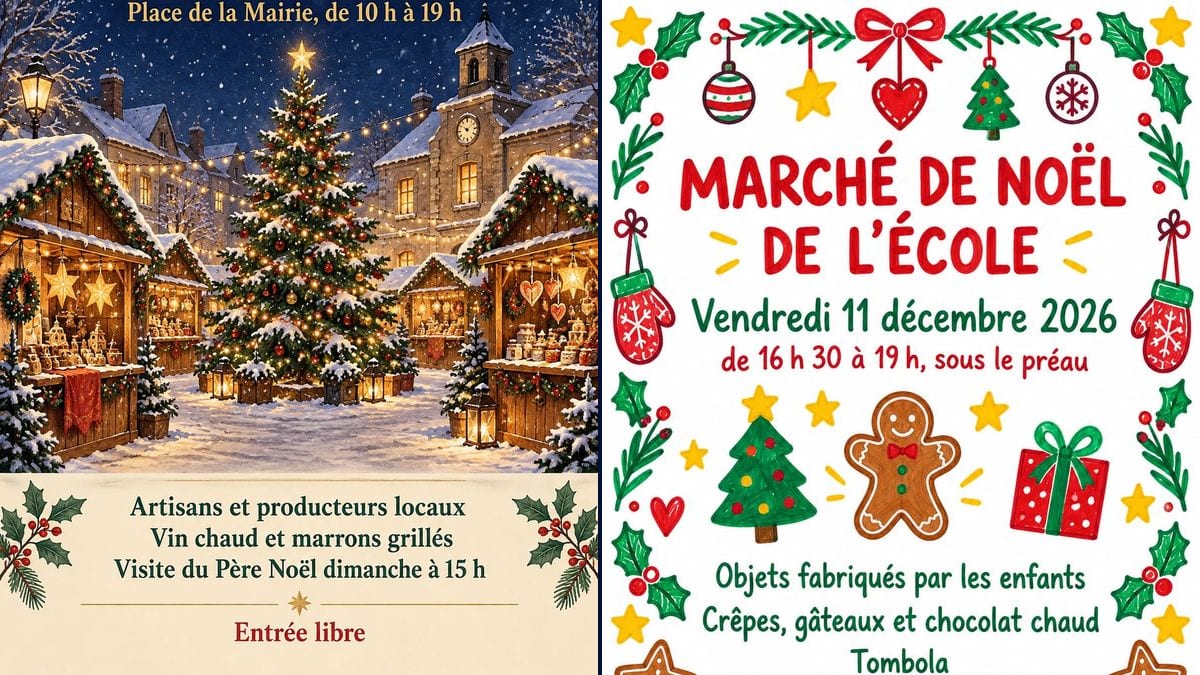
Real workflow (demo in French): "MARCHÉ DE NOËL" (Christmas market) in red and gold over a village square at night, with snowy chalets, a big tree and a cream band for the practical details, then "MARCHÉ DE NOËL DE L'ÉCOLE" (school Christmas market) drawn in felt-tip on white, framed with holly, mittens and gingerbread biscuits.
At a glance
You provide
a text or a brief
What the workflow produces
2 images in 3:4
Canvas structure
5 nodes wired by 2 connections
Models wired in
GPT Image 2.5 Sunburst
Cost of one full run
about 6 credits, roughly $0.07
Account
The demo is visible without an account; generating requires a free account, trial credits included
The committee has booked the square, the stallholders have said yes, and there are three weeks left to tell everyone. The poster has to say when, where, what time, and what people will find there. This workflow starts from your details, written the way you want them printed. You get two posters: a village square drawn at night, with chalets and a tree, for a town or village market, and a felt-tip poster on white for a school Christmas fair.
On a market poster, the picture catches the eye, but the practical details are what people read. A typo in the month or a "7 pm" that turns into "5 pm", and the poster is useless. So every line goes in quotation marks, in its place on the page, and no other words are allowed. GPT Image 2.5 Sunburst copied all seven lines on each poster correctly on the first try, accents included. The demo is in French: replace the lines with your own, in your own language.
These are the files of the workflow above, exactly as the models produced them, unretouched. The starting point is shown when there is one.
Render
A "MARCHÉ DE NOËL" poster in red and gold on a snowy night-blue sky, over a village square with wooden chalets under snow, a big lit-up tree, a town hall with a clock and a bell tower, "Samedi 5 et dimanche 6 décembre 2026", "Place de la Mairie, de 10 h à 19 h", then a cream band with "Artisans et producteurs locaux", "Vin chaud et marrons grillés", "Visite du Père Noël dimanche à 15 h" and "Entrée libre"Generated with GPT Image 2.5 SunburstA "MARCHÉ DE NOËL DE L'ÉCOLE" poster drawn in felt-tip on white, framed with holly, stars, mittens and gingerbread biscuits, with "Vendredi 11 décembre 2026", "de 16 h 30 à 19 h, sous le préau", a Christmas tree, a gingerbread man and a present in the middle, "Objets fabriqués par les enfants", "Crêpes, gâteaux et chocolat chaud", "Tombola" and "Au profit de la coopérative scolaire" at the bottomGenerated with GPT Image 2.5 Sunburst
Who it is for
Volunteers on village committees and in local associations, PTA parents, teachers and small-town councils organising a Christmas market or fair who need to advertise it without a designer.
Which files to provide
The market's practical details, each in quotation marks: title, date with the weekday, venue, opening hours, what's on the stalls, and if needed the name of the town, school or association.
How it works
1
Gather the practical details
The title, the date, the venue, the opening hours, then two to four lines on what's there: local makers, mulled wine, Father Christmas, a raffle. Add "Free entry" or the entry price if there is one.
2
Put every line in quotation marks
Write each one exactly as it should be printed, with its accents and capitals. Write the times the way your readers do, "10 am to 7 pm" or "10:00 to 19:00". Keep the "No other words" sentence at the end of the prompt.
3
Pick the style
The night-time square with its chalets suits a town, village or neighbourhood market. The felt-tip poster on white suits a school, a nursery or a parents' association, and it uses less ink.
4
Check it and print it
Make sure the weekday matches the date, then read every line. The render has the shape of an A4 or A3 sheet. On A4 it prints as it is; for A3, upscale the image first.
Variations and use cases
The same canvas, tuned for different needs: each variation is two or three lines of prompt away.
The village committee's market
Two days on the square, twenty or so chalets, Father Christmas on Sunday afternoon. The night-time poster goes up at the bakery, the town hall and the board at the edge of the village, with your street or square in quotation marks where "Place de la Mairie" was.
The school Christmas fair
A Friday after school, in the playground shelter, with things the children made. The felt-tip poster goes home in book bags as an A5 flyer, and an A3 copy is taped to the school gate.
A market for a good cause
The last line of the school demo says who the money goes to. Replace "Au profit de la coopérative scolaire" (for the school fund) with the name of your charity or the class trip, in quotation marks, spelled exactly as you want it read.
A market in the village hall
If it's indoors, change the venue in the text and the scenery in the prompt: stall tables under string lights, inside, instead of chalets in the snow. Otherwise people will go looking for chalets on the square.
The letterbox flyer
Print the same image at A5, two to an A4 sheet, for letterboxes in the area and the counters of local shops. Keep the lines few: at that size five or six lines of text stay readable, ten don't.
The post on the village Facebook page
The 1055 x 1491 pixel render posts as it is on Facebook or in the parents' WhatsApp group. Instagram crops tall images to 4:5, which trims a little off the top and bottom, so check that the title and the last line still show.
Common mistakes
A weekday that doesn't match the date
"Saturday 4 December" when the 4th is a Friday, and half the village turns up on the wrong day. The model copies what you write without checking it. Look the day up on a calendar before you run the render.
Too many lines of text
People read a poster as they walk past, from two or three metres away. Past seven or eight lines, the text shrinks and nobody reads the bottom. Keep the date, the venue, the hours and three lines about the stalls, no more.
Forgetting the quotation marks
Without them, the model rewords a line, adds a slogan or invents a website. Quote every line and keep "No other words, no website, no phone number" at the end of the prompt.
A film character or a famous logo
A reindeer or a snowman lifted from a film, on a poster stuck up all over town, is a copyright problem. The prompt rules out film characters and logos, so keep that sentence in.
In the demo, yes, first time: "MARCHÉ DE NOËL", "décembre", "marrons grillés", "Père Noël", "préau", "Crêpes, gâteaux" and "coopérative" are all right, and the times are written as asked. Still read every line before you print fifty copies.
Do I need to check the date?
Yes, and that part is up to you: the model copies what you write, it doesn't look at a calendar. In the demo, 5 December 2026 really is a Saturday and the 11th a Friday. For your own date, check the weekday on a calendar before you run the render.
How is this different from a bingo or yard sale poster?
The scenery and the details. A Christmas market poster shows chalets, a tree or holly, and lists what's on the stalls. The bingo poster announces prizes and the price of a card, the yard sale poster the pitch price and when sellers can set up.
How much do the two posters cost?
Six credits, three per render on GPT Image 2.5 Sunburst at medium quality. One more version, with another date or venue, costs three credits.
Can I print the poster at A3?
Yes, the shape is right, but the image is a bit small for it. The renders come out at 1055 x 1491 pixels: about 130 dots per inch on A4, fine for a poster seen from a metre away, and about 90 on A3, where the lines go soft up close. For A3, upscale the image before you print.
Can I put our town or school name on it?
Yes. The demo leaves names out on purpose. Put yours in quotation marks in the prompt, in place of "Place de la Mairie" or in the title, for example "OAKFIELD PRIMARY CHRISTMAS FAIR", spelled exactly right.
Does the model add things I didn't ask for?
In the scenery, yes. On the square, Sunburst drew a town hall with a clock and a bell tower behind the tree. On the school poster, it put a Christmas tree, a gingerbread man and a present in the middle. The text stayed exactly as written in the prompt, with no extra words.
Can I add our association's logo?
Not through the prompt: the model doesn't know your logo and would invent a fake one. Run the render as it is, then paste the real logo into a corner in a layout or photo editor. The cream band on the village poster has room for it.
 GPT Image 2.5 Sunburst
 Nano Banana 2.1
 Seedream 5 Pro