Choosing between two quotes
Two landscapers, two written proposals, and nothing to look at. Two renders from the same photo put both projects side by side and make the decision much easier.
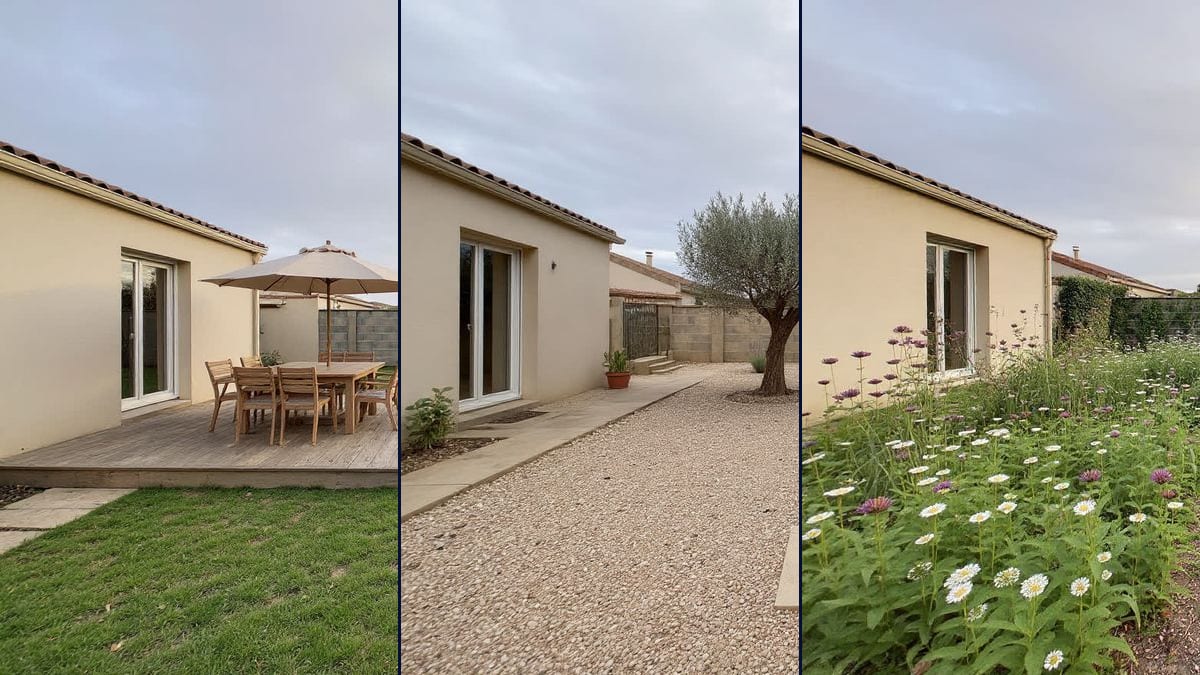
A photo of your garden enters the canvas and comes out as three landscaping projects: deck and dining area, mediterranean garden with no lawn, natural beds. The house stays put, only the ground changes. Visible without an account.
The real workflow: the photo of an ordinary back garden, three Image nodes on Flux Kontext receiving it through the image port, and three prompts landscaping it with a different trade-off each.
At a glance
A garden is decided in front of a photo, not in front of a plan. The trouble is that you cannot see it: the tired lawn and the concrete wall fill the frame, and you picture neither the deck, nor the olive trees, nor the beds. This workflow puts the three side by side, from the same viewpoint, with the same house in the same place.
The photo enters through the image port of three nodes set to Flux Kontext, the model already used to furnish an empty room. Its known flaw, it beautifies on its own, is exactly the quality you want when the instruction is to add. The useful half of each prompt is not what gets planted: it is what stays locked, the facade, the openings, the back wall, the ground level, the time of day.
Three trade-offs, not three tastes: living in the garden with a deck and a table, watering less with a mediterranean garden and no lawn, mowing less with natural beds and a path. Those are the three real arbitrations of a garden project, and they are visible in one image. The whole thing costs eighteen credits, six per project.
These are the files of the workflow above, exactly as the models produced them, unretouched. The starting point is shown when there is one.
Starting point
Render
Homeowners hesitating before works, and landscapers who want to show an intention to a client.
A photo taken from where you look at the garden most often, on an overcast day, with the house or the fence in frame.
Shoot from a high, fixed point
From the deck, an upstairs window or a step ladder, framing the house and the far end of the plot. That viewpoint is what gets compared three times: if it moves, the comparison means nothing.
Wait for an overcast sky
The flat late-afternoon light replaces well and casts no hard shadows contradicting the new garden. Low raking sunshine survives into the render and gives the addition away.
Lock the building down in the prompt
Same facade, same windows, same back wall, same fence, same ground level, same camera position. Without that list the model returns a beautiful garden, but it is no longer yours.
Compare, then dig into one project
The three renders are there to decide, not to decorate. Once the direction is chosen, duplicate its node and vary one detail at a time: the size of the deck, the trees, where the path runs.
The same canvas, tuned for different needs: each variation is two or three lines of prompt away.
Two landscapers, two written proposals, and nothing to look at. Two renders from the same photo put both projects side by side and make the decision much easier.
A wooden deck is hard to discuss on a dimensioned plan. The render from the living room viewpoint gets everyone to agree, or makes the disagreement surface straight away.
A bare plot sells badly in a photo. A landscaping render shows what could be done with it, as long as you state clearly that it is a proposal and not the current state of the property.
Take the same photo and change only the season in the prompt: beds in flower, russet foliage, bare branches under frost. It is the best test of a planting scheme.
The same workflow works at the front of the house: driveway, gate, hedge, lighting. Shoot from the street, lock the facade down, and propose three different entrances.
Once the ground is decided, furnish an empty room and declutter a room do the same job indoors, with the same rule about locking the building down.
A photo taken at eye height from the middle of the plot flattens everything: neither the depth nor the far end reads. Get two metres up and step back, and the project becomes legible.
Without the locks, the model shifts a window, straightens a wall or changes the orientation, and you are comparing three gardens that are not yours. That list is longer than the description of the project, and that is normal.
Deck, pool, vegetable patch, garage and pergola in the same sentence give a confused catalogue. One trade-off per node, three nodes, and the comparison becomes possible again.
The proportions are not measured: a deck can look like it fits where a metre is missing. The render picks a direction, the tape measure and the landscaper do the rest.
It can
It cannot
Yes, that is the job of the locked half of the prompt, and the demo shows it: the facade, the french window, the concrete wall and the neighbour's hedge are the same in all three projects. Only the ground and what grows on it change.
That is the right use: a render says what you want better than a description. Always make clear it is an image proposal, not a plan: the proportions are not measured and the plants are indicative.
The workflow assumes nothing about the size of the plot. On a courtyard or a balcony, swap the lawn for hard ground, the deck for planters, and keep the same list of locks on the walls and railings.
Eighteen credits in total, six per project on Flux Kontext, that is twenty-two cents. It is one of the cheapest workflows in the catalogue, because there are only three images and no video.
A landscape photo taken from a high point, under an overcast sky, showing the house, the ground and the far end of the plot. Avoid the very distorting wide angle of panorama mode, which curves the walls and confuses the model.
Yes, name it in the locked half: keep the cherry tree on the right exactly where it is. Everything named in that half of the prompt stays, everything else is considered replaceable.
Yes, the node lists every model that accepts an image input. Nano Banana Pro holds the straight lines of a deck better, GPT Image 2.5 Sunburst follows a very detailed prompt better, Flux Kontext stays the most natural on planting.
Yes, and it is the most common case: you are in the garden, you take the photo, you import it, you run. The create on mobile guide describes the canvas gestures.
Redesign your garden with AI
Use this workflowFree account, no card required. The workflow opens pre-filled in your canvas.
 Flux Kontext
 Nano Banana Pro
 Seedream 5 Pro
 GPT Image 2.5 Sunburst