All tools

Grade student papers with AI: right, wrong, and why

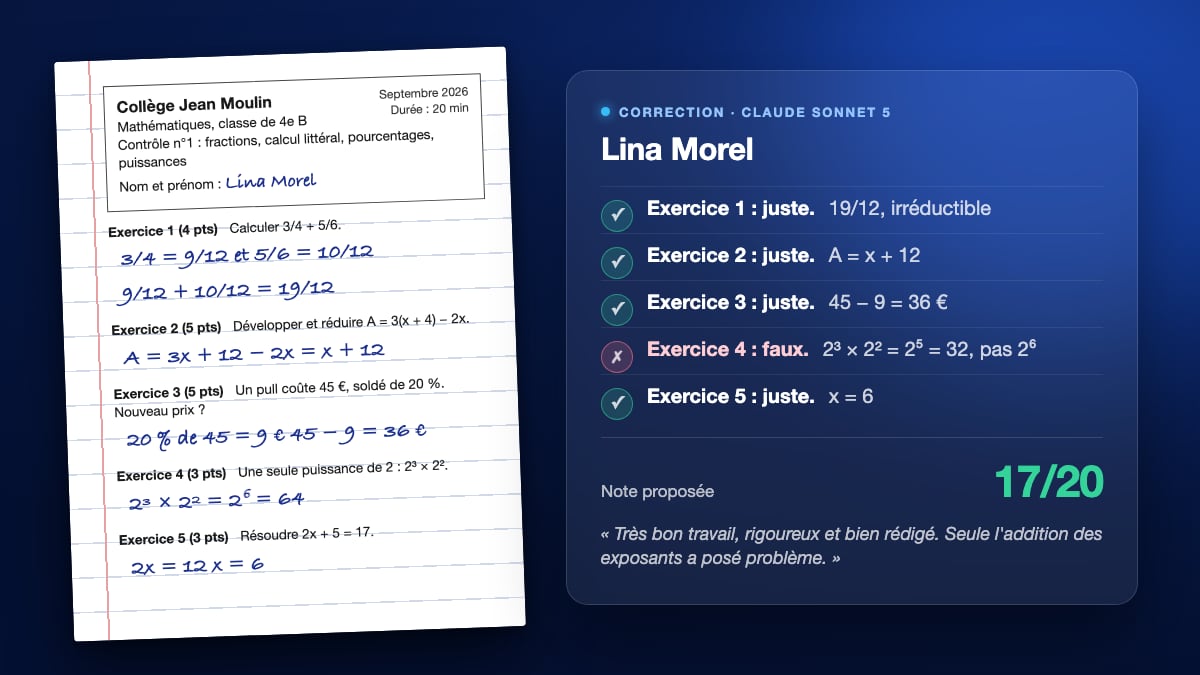
A PDF of student papers dropped on the canvas, two Text nodes that read it in full: one grades paper by paper, what is right, what is wrong, the mistake and a proposed mark; the other writes the class report with remediation exercises. The three demo papers are included. The whole workflow is visible without an account.

Interactive demo

Real workflow, real results. Pan and zoom freely.

Use this workflow

The real workflow: three papers from a year 8 maths test as a PDF in a Media node, wired to two Text nodes, Claude Sonnet 5 for the paper by paper correction, GPT-5.5 for the class report. The texts shown are the models' answers, untouched.

At a glance

Canvas structure
4 nodes wired by 2 connections
Models wired in
Claude Sonnet 5, GPT-5.5
Cost of one full run
about 10 credits, roughly $0.12

A pile of papers is an evening gone. The PDF of the papers, typed or scanned, goes into a Media node, and any Text node set to a model that reads documents receives it through its "Image or PDF to analyze" port. The instruction says what you expect, as you would to a colleague: the subject, right or wrong, the mistake made, the correction, a mark based on the marking scheme.

The demo starts from three papers of a year 8 maths test: fractions, algebra, percentages, powers, an equation. A first Text node on Claude Sonnet 5 grades paper by paper; a second on GPT-5.5 writes the class report, the most frequent mistakes and their cause, the notions to go over, three corrected remediation exercises. All six mistakes planted in the papers were found, including 2³ × 2² = 2⁶, and no correct answer was counted wrong.

The mark stays a proposal: the model applies the marking scheme printed on the test, and you decide. The price follows the size of the document, reserved on submission then adjusted on the tokens actually read. Up to three documents per node: the test, the answer key and the papers can come in separately. The same gesture works for a report to summarize or a course to turn into revision sheets.

How it works

  1. 1

    Drop the PDF of the papers on the canvas

    A Media node receives it. Typed papers or flat scans, one paper per page or several, it does not matter: the model reads the whole document. Up to three documents per node, so the test or the answer key can come separately.

  2. 2

    Wire it to a Text node that reads documents

    The "Image or PDF to analyze" port appears as soon as the chosen model can read a file. Write the instruction: the subject, what to judge, the marking scheme, the expected form. The demo asks for one line per exercise and one section per student.

  3. 3

    Generate the paper by paper correction

    The node returns one section per student: right or wrong exercise by exercise, the mistake and the correction when it is wrong, the proposed mark, a comment. The price, reserved on the file size, is settled on what was actually read.

  4. 4

    Then the class report

    The second node reads the same papers and pulls out what the next lesson needs: frequent mistakes and their cause, notions to go over first, remediation exercises with their solutions. Copy the text, or wire it into a Voice-over node to listen to it.

Variations and use cases

The same canvas, tuned for different needs: each variation is two or three lines of prompt away.

The maths test graded paper by paper

This is the demo: three papers, five exercises, the marking scheme on the test. One section per student, right or wrong on each exercise, the mistake named when it is wrong, the proposed mark and a one sentence comment. Add one Text node per batch of papers.

The essay or the dictation

For a student's text, ask for a judgement per criterion: spelling, syntax, structure, relevance to the topic, with two quotes from the paper per criterion. The model does not count mistakes word by word on a scan, but it picks out the most frequent ones and proposes a mark per criterion.

The multiple choice or the quick quiz

Wire the answer key as a second document and ask for the number of correct answers per student, the list of missed questions and, for each question, the share of the class that missed it. Three documents per node: test, key, papers.

Papers in French or Spanish

The instruction can be in English and the paper in the language taught: ask for feedback on grammar and vocabulary, then a corrected version of the student's text that keeps their ideas and their level.

The individual feedback sent to the student

A third Text node, wired to the output of the correction, rewrites each section as a message addressed to the student, in the second person, precise and encouraging. Copy, paste into the school platform or the email to the parents.

The remediation lesson read aloud

Wire the class report into a Voice-over node: the catch-up lesson can be listened to, or handed out as audio to absent students. The exercises and their solutions stay in the text for display.

Common mistakes

Leaving the marking scheme out of the instruction

Without points per exercise, the model invents a weighting and the mark no longer means anything. Write the scheme on the test or in the instruction, "exercise 1 out of 4, exercise 2 out of 5". On the demo, it is printed on the test.

A skewed, dark or blurry scan

The model reads the scan as an image: what you cannot decipher on screen, it cannot decipher either. Scan flat, at 150 dots per inch at least, one paper per page.

Picking a small model to mark

A fast, cheap model summarizes very well, but on the demo papers it counted a wrong answer as right and proposed 20/20. To judge, a first tier model: Claude Sonnet 5, GPT-5.5, Claude Opus 5.

Forty papers in a single PDF

The price follows the file size and the answer grows with it, until it becomes tedious to reread in the node. Make batches of ten papers, one node per batch, and one class report per batch or on the whole.

Frequently asked questions

Which models can grade a paper?

Those that read documents: the "Image or PDF to analyze" port says so. On the demo, Claude Sonnet 5 judged the fifteen answers of the three papers without a single error, and GPT-5.5 returned a short, accurate report. A small fast model, tested on the same papers, counted a wrong power as right and proposed 20/20: to mark, pick a first tier model.

Are scanned papers read?

Yes with Claude and Gemini, which read each page as an image: the three demo papers, scanned without a text layer, were graded identically. GPT models also read the scan but refuse to name the students in it and return anonymous papers. A sharp, straight, well lit scan reads like the original; handwriting you cannot decipher on screen, the model cannot decipher either.

Is the mark reliable?

It is a proposal based on the marking scheme printed on the test, with the points per exercise. On the demo, the three proposed marks hold up, but you decide: the model knows neither the student nor your expectations on the write-up. Reread the borderline papers.

How much does grading a batch of papers cost?

The price follows the size of the PDF and the model's rate: reserved on launch from the file's weight, then adjusted on the tokens actually read. The three demo papers cost 5 credits for the correction and 6 for the report. Thirty papers are graded in several PDFs, one node per batch.

Does the model see the students' names?

Yes on a text PDF, and on a scan read by Claude or Gemini. GPT models anonymize handwritten names on a scan and return "paper 1, paper 2". If you prefer anonymity, number the papers before scanning.

Can I provide the answer key?

Yes, as a second document on the same port: up to three PDFs per node. The instruction then says "judge each answer against the attached key", which matters for open questions where several wordings are accepted.

Are the students' papers kept?

The PDF is stored in your media library like an imported image, sent to the model's provider when you generate, and can be deleted whenever you want. For papers with names, follow your school's rules and, if needed, mask or number the names before scanning.

Which subjects?

Anything that can be read: maths, languages, history, sciences. The model judges an answer from what it knows and from the key if you attach one. For diagrams or hand drawn figures, image reading does the work: Claude and Gemini see them, with less certainty than text.

Can I get a table of marks?

Ask for it in the instruction: "end with one line per student, name then mark, separated by a semicolon", and paste the result into a spreadsheet. The Text node returns plain text, the spreadsheet does the rest.
Grade student papers with AI: right, wrong, and why

Use this workflow

Free account, no card required. The workflow opens pre-filled in your canvas.