The swim teacher at the end of term
Lucas, Ines and Noah all swam their 25 metres this week. The instructor duplicates the node, changes the name, and every child goes home on Friday with a little swimmer's diploma printed at reception.
A colourful diploma for a child or a clean training certificate, with the name, the achievement and the date written letter for letter, ready to print. Workflow visible here, no account needed.
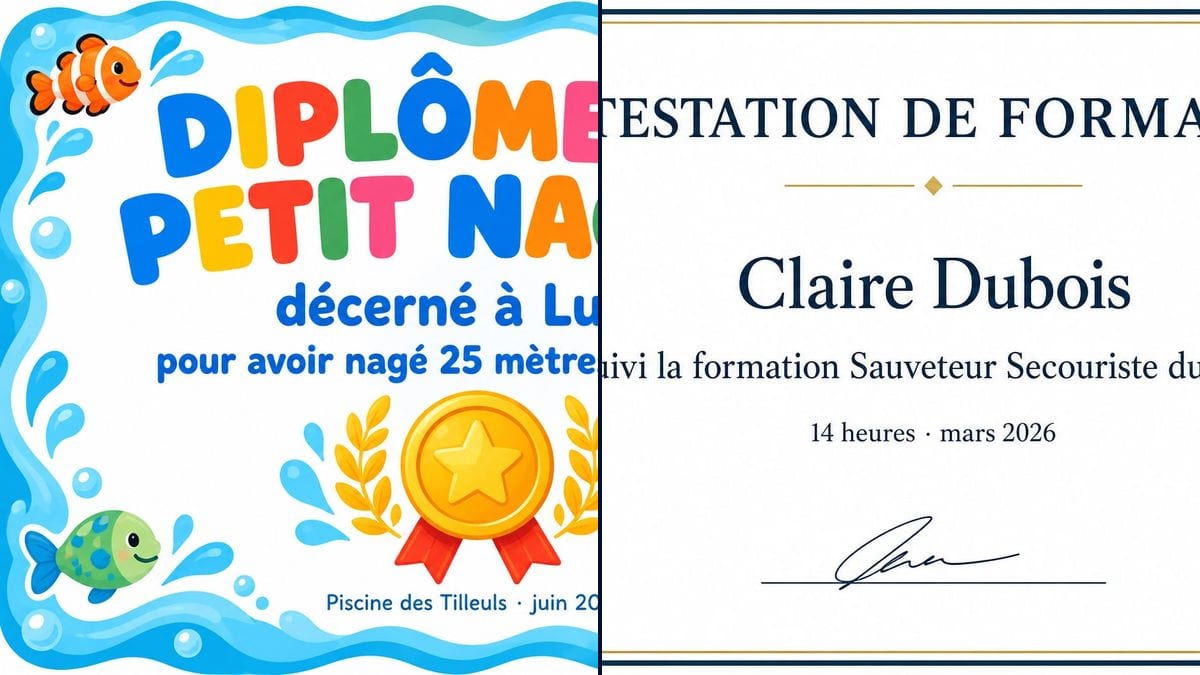
Real workflow (demo in French): two prompts, two landscape certificates. A little swimmer's diploma awarded to Lucas, framed with waves and fish around a gold medal, and a training certificate for Claire Dubois with a navy and gold double border and a gold seal.
At a glance
A child who just swam their first 25 metres, a club wrapping up its season, a team finishing a course: you want to hand over something on paper, and you end up in a word processor with a novelty font and the name off-centre. This workflow makes two print-ready certificates, a colourful one for a child and a plain one for adults, with your lines of text where they belong.
The hard part is the text. An image model left to itself writes a fake heading, adds a motto or mangles the name. The prompt gives each line in quotes and forbids the rest. GPT Image 2.5 Sunburst writes them letter for letter, accents included, and it is the cheapest model in the catalogue. The result is decorative: it carries no official weight.
For the party after the ceremony, use the birthday invitation; to give the winner a treat, the printable gift voucher. Both certificates cost six credits.
These are the files of the workflow above, exactly as the models produced them, unretouched. The starting point is shown when there is one.
Render
Swim teachers and youth leaders rewarding children, trainers, clubs, parents and teams marking a send-off.
The tone, playful or formal, and the lines to write in quotes: heading, name, achievement, place and date.
Pick the tone
Bright and illustrated for a child, classic serif for an adult. The decoration fits in one line: waves and fish, a football, music notes.
Write every line
Heading, name, achievement, place and date, each in quotes and in the order it appears. Four short lines are plenty.
Proofread the image
Name, numbers, accents: check letter by letter. If a word comes out wrong, rerun that node alone for three credits.
Print and sign
On heavy paper, A4 or Letter in landscape. Ask for a blank signature line if someone signs with a pen.
The same canvas, tuned for different needs: each variation is two or three lines of prompt away.
Lucas, Ines and Noah all swam their 25 metres this week. The instructor duplicates the node, changes the name, and every child goes home on Friday with a little swimmer's diploma printed at reception.
She runs spreadsheet workshops for companies and gives each trainee a tidy attendance certificate with their name, the course title and the hours, alongside the paperwork from her training provider.
The under-9s coach wants one certificate per player, a football as decoration, with "first goal of the season" or "best team spirit" depending on the child. One line changes, the rest of the design stays put.
A milestone at home deserves its own piece of paper too. A little cyclist's certificate in the child's name, stuck on the fridge, lands better than a quick "well done" shouted across the garden.
The HR manager hands a colleague a tongue-in-cheek "Spreadsheet Queen" certificate at her leaving drinks. Classic serif, gold seal, and the whole team laughs when it is read out loud.
At the end of the session, the teacher gives every participant a certificate with their name and the piece they made. A keepsake people hold on to, and a nudge to sign up again next term.
A motto, a paragraph of praise, a list of skills: the more text, the higher the risk of a typo and the harder the certificate is to read. Four short lines will do.
Without "no other words", the model happily adds a heading, a fake signature or a reference number. That closing sentence matters as much as the lines themselves.
In the demo, Sunburst drew a scribble on the line meant for signing. Write "blank signature line" if someone is going to sign it by hand.
A government logo, the words "state diploma", the stamp of a real organisation: don't. This workflow makes certificates for parties, clubs and workplaces, not qualifications that speak for someone else.
In the demo, yes: "Lucas", "Claire Dubois" and every other line are exact, accents and middle dots included. Still read it through before printing.
No. It is decorative or for internal use. A state diploma, a first aid qualification or a certificate an employer requires is issued by the accredited body, with its own wording.
Yes: duplicate the node and change the name in each copy. Each certificate costs three credits.
Six credits, three per render on GPT Image 2.5 Sunburst at medium quality. A third certificate, for another child say, costs three more.
Because it spells correctly on a light background, accents and punctuation included, and at three credits a render it is the cheapest model in the catalogue. A certificate is mostly well-placed text.
Landscape. The prompt asks for 4:3 and Sunburst returns 3:2, which prints on A4 landscape with a thin margin top and bottom.
Not in this canvas, which starts from a blank page. Add the logo when you print, or describe a simple emblem in the prompt, a football, a music note.
Write the lines in that language, still in quotes. Sunburst handles French, Spanish and others; proofread the same way before printing.
Make a custom certificate with AI
Use this workflowFree account, no card required. The workflow opens pre-filled in your canvas.
 GPT Image 2.5 Sunburst
 Nano Banana 2.1
 Recraft V4.1