The mum who posts family days out
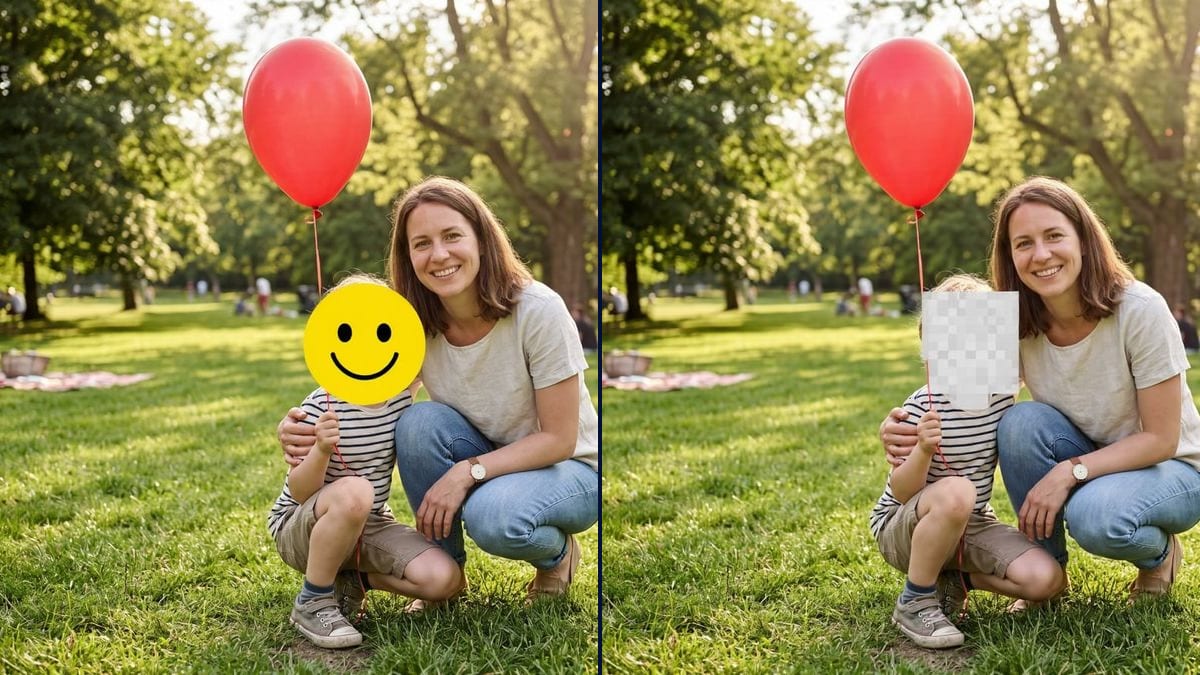
She shares Sunday outings with friends and family online, but decided not to show her son's face. The emoji keeps the photo cheerful and he stays anonymous to strangers.
Your family photo with the child's face hidden by a big emoji, then by a mosaic of large pixels, the adult left untouched. Workflow visible here, no account needed.
Real workflow: a mother and her little boy with a red balloon in a park, then the same photo with a yellow smiley emoji over the boy's face and with a pale mosaic of large pixels. The mother stays visible.
At a glance
Lots of parents like sharing family photos and would rather their child's face didn't travel around the internet. The child can't weigh in yet, and a posted photo sticks around. Cropping ruins the picture and editing by hand takes time. This workflow hides the child's face two ways: a big smiling emoji, then a mosaic of large pixels.
The tricky part is aiming at one face. Left alone, a model blurs everyone or stops at the nose. The prompt points at the child, goes from forehead to chin and keeps the adult sharp. Flux Kontext placed the emoji first time; the soft blur, on the other hand, blurred nothing, which is why it is now a mosaic.
To remove a passer-by or an object from the same photo, see object removal; to change the setting, background change. Both versions cost twelve credits.
These are the files of the workflow above, exactly as the models produced them, unretouched. The starting point is shown when there is one.
Starting point
Render
Parents sharing family photos, schools, clubs and childminders, photographers publishing scenes with children in them.
A photo where the child's face is visible, a marker to point them out and the kind of cover you want.
Pick the photo
One where the child's face is clearly visible, facing the camera or close to it. The smaller they are in the frame, the more clearly you need to point them out.
Point out the child
"The boy in the striped T-shirt", "the little girl on the left": a visible marker, especially when there are several children.
Choose the cover
Emoji, pixel mosaic, heart, star: describe its shape and say it covers forehead to chin.
Check the rest
A name on a bag, a school logo, a house number behind: a hidden face isn't enough if everything else says who it is.
The same canvas, tuned for different needs: each variation is two or three lines of prompt away.
She shares Sunday outings with friends and family online, but decided not to show her son's face. The emoji keeps the photo cheerful and he stays anonymous to strangers.
For the summer fair, the teacher has consent from nearly every parent, but not two. She hides those two faces in the group photo instead of binning it.
The club posts the under-10s team photo after a tournament. One child must not appear: the mosaic covers him, and the others keep their moment. The whole team stays in the picture.
The other parent doesn't want the child online. A weekend photo can still go to the grandparents with the face hidden, respecting that choice. It takes one argument off the table.
A child walked into frame during a market scene. The photographer hides the face before putting the shot in a portfolio. The rest of the scene, stalls and passers-by, stays exactly as it was shot.
She shows parents the day's activities in a shared group. Children whose parents said no have their faces covered; the others stay visible. Every child still gets their photo in the group.
In our tries, a soft blur blurred nothing at all. A coarse pixel mosaic, or an opaque emoji, actually covers the face.
A name stitched on a bag, a school logo, a street sign: the child can be found without a face. Look at the whole photo before posting.
"Hide the child's face" on a group photo lets the model choose. Give a marker: clothing, position, colour.
Both versions sit in the same folder on your phone. Rename the hidden one and only share that.
No: in the demo, the mother's face, her clothes, the red balloon and the park stayed as they were.
Yes: point each one out with a visible marker, "the two children on the left", "the girl in the yellow dress", and check the result face by face.
Yes: heart, sun, star, animal. Describe it plainly, colour and shape, rather than naming a specific emoji.
Twelve credits, six per render on Flux Kontext. A third version with another cover costs six more.
Because it edits a single area and leaves the rest as it is: the adult, the clothes and the background are not redrawn.
Because the soft blur asked for first did nothing: the face stayed sharp. A coarse pixel mosaic, like on TV, really covers it.
To a stranger, yes. To family, school or neighbours, outline, hair and clothes are often enough. The cover reduces exposure; it guarantees nothing.
The format of your photo, here 4:3, landscape like most day-out photos.
Hide a child's face in a photo with AI
Use this workflowFree account, no card required. The workflow opens pre-filled in your canvas.
 Flux Kontext
 Nano Banana 2.1
 GPT Image 2.5 Sunburst