The year-round holiday let
Every photo in the listing was taken in summer. The owner adds a snowy version for February bookings, clearly marked as an illustration. Guests booking for the ski season get an idea of the place under snow.
Your summer photo turns into autumn with fallen leaves and a russet hedge, then into winter under snow, while the house stays the same. Workflow visible here, no account needed.
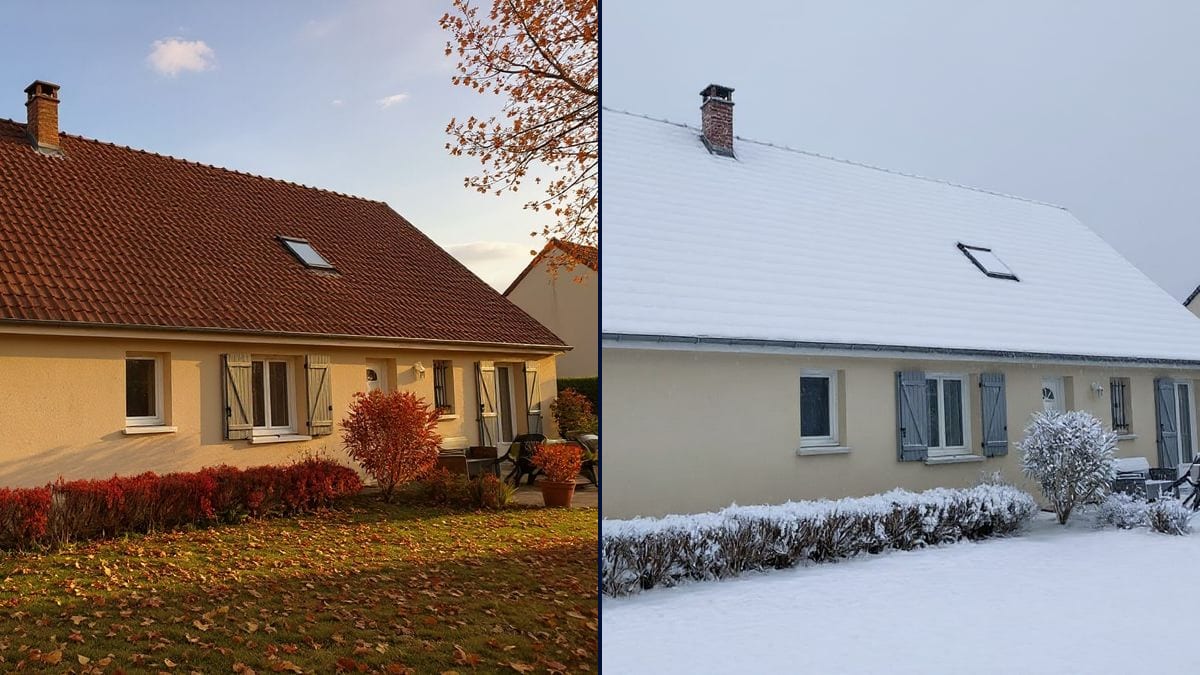
Real workflow: a house with orange clay tiles seen from the garden in summer, then the same house in autumn, with a red hedge and leaves on the lawn, and in winter under a thick layer of snow.
At a glance
You have a great photo of the house, the holiday cottage or the garden, but it was taken in July and what you need to show is winter. Waiting for snow to retake the same shot means waiting a year. This workflow takes your photo and turns it into autumn, then winter, with the same building and the same framing.
What makes it hard is that everything shifts at once: foliage, ground, sky, light. An image model left to itself redraws the house along the way. The prompt lists what the season changes and what it doesn't. Flux Kontext edits the photo rather than remaking it: winter is spot on, autumn added a tree.
To take the same photo from day to night, see the day to night tool; to replace just a grey sky, the sky replacement. Both seasons cost twelve credits.
These are the files of the workflow above, exactly as the models produced them, unretouched. The starting point is shown when there is one.
Starting point
Render
Holiday let owners, families making a Christmas card, garden designers, bloggers and estate agents.
A well-lit photo, ideally from summer, and the season you want with its signs: leaves, snow, sky, light.
Pick a summer photo
Well lit, with plants, roof and ground visible. That is where the season shows.
Describe the season
Leaves on the ground, shrub colours, snow on the roof, sky colour, low or cold light.
Name what stays
House, roof, windows, garden layout: list them, or the model may take the chance to redraw them.
Check against the original
Put the pictures side by side and look for anything added. In the demo, autumn grew a tree.
The same canvas, tuned for different needs: each variation is two or three lines of prompt away.
Every photo in the listing was taken in summer. The owner adds a snowy version for February bookings, clearly marked as an illustration. Guests booking for the ski season get an idea of the place under snow.
No snow this year, but the family wants their house snowed in on the card. The summer photo turns wintry and goes to the printer in December. Nobody has to stand in the cold waiting for a snowfall.
He recommends hedges that keep their leaves. He shows the client their garden in winter so they can see what stays green and what goes bare. It settles the laurel versus beech question quickly.
A blogger shot a village in July. For her piece on Christmas markets, she illustrates the winter mood and says plainly that the picture was edited. The real July shot stays in the summer post.
Twelve months, but every club photo was taken in spring. Two pictures turned into autumn and winter fill the gaps, with a note in the caption. Nobody has to go back out with a tripod.
The agency posts a seasonal shot of its best properties. Autumn leaves or snow on a house already sold give a seasonal post without a new shoot. The house stays exactly as photographed.
In the demo, autumn added a russet tree that does not exist. Always put the two pictures side by side before you publish.
A grey November shot gives the model little to work with. A bright summer picture makes cleaner seasons.
Snow under a July blue sky looks wrong. Describe the sky and the light too, not just the ground.
An edited picture that shows a property in a way it never looks is a problem in a listing. Label the illustration and keep the real photos next to it.
No: same roof, same windows, same chimney, same roof window. Plants, ground, sky and light change.
Yes: describe blossom on the trees, fresh green grass, young leaves and clear light, in one more node.
Yes: a forest, a street, a field. Replace the house with whatever must stay the same, path, rocks, buildings.
Twelve credits, six per render on Flux Kontext. Spring on the same photo costs six more.
Because it changes what is there instead of rebuilding the picture: the house keeps its windows, roof and chimney, and only the season changes around it.
The model added russet foliage on its own to push the mood. Add "do not add any trees" to the prompt if it happens to you.
Yes: add "falling snowflakes" to the prompt. For snow that actually falls, send the picture to a video node.
The format of your photo, here 4:3. Nothing is cropped.
Change the season of a photo with AI
Use this workflowFree account, no card required. The workflow opens pre-filled in your canvas.
 Flux Kontext
 Nano Banana 2.1
 GPT Image 2.5 Sunburst