Recover a style for a series
A successful illustration becomes a prompt whose style words you keep, then you change only the subject to get a whole series of consistent images.
An image becomes a detailed prompt and a keyword prompt, in English, then two models run them to check that they reproduce the subject and style. Workflow shown here, no account needed.
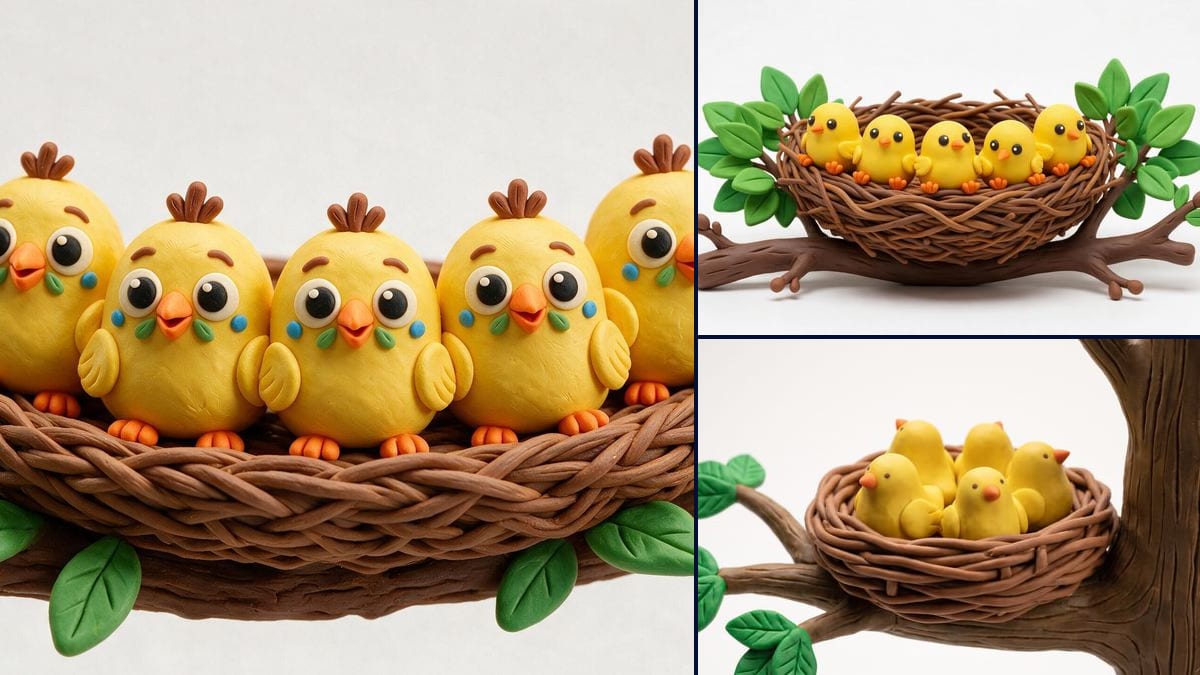
Real workflow: a nest of clay chicks becomes a one-paragraph prompt and a keyword list. Seedream 5 Pro and Nano Banana Pro, without seeing the image, turn them into two clay nests: subject and style found again.
At a glance
You found an image whose style you want, or you want to redo one of your images with another model: you need the prompt. This workflow gives the image to Gemini 3.8 Flash, which describes it as a prompt in two ways: a detailed paragraph and a keyword list.
The hard part is knowing whether the prompt works. Here, the proof is on the canvas: each prompt is sent to an image model that never sees the original. If the render finds the subject and the style, the prompt is good, and you can edit it to change the subject while keeping the style.
To keep the same character from one image to the next, see consistent characters; to write your prompts yourself, the method that works. The full workflow costs twenty-six credits, the two prompts alone two credits.
These are the files of the workflow above, exactly as the models produced them, unretouched. The starting point is shown when there is one.
Starting point
Render
AI image creators, designers and marketers who want to reproduce a style, redo an image with another model or learn to write their prompts.
An image you have the right to use, ideally sharp and fairly large.
Drop your image
An image you have the right to use: yours, or a free one. The prompt describes, it does not copy.
Run the two Text nodes
Gemini 3.8 Flash reads the image and writes a detailed prompt, then a keyword list, in English.
Check with an Image node
Each prompt goes into an image model that never sees the original. Compare: subject, style, light.
Edit and reuse
Change the subject in the prompt while keeping the style words, and you get a consistent series.
The same canvas, tuned for different needs: each variation is two or three lines of prompt away.
A successful illustration becomes a prompt whose style words you keep, then you change only the subject to get a whole series of consistent images.
An image made with an older model becomes a prompt you run on a newer model, to redo it in better quality without starting from scratch.
Comparing the image with the prompt that describes it shows which words carry the light, the material and the framing, and what you usually forget to write.
A reference image found on a moodboard becomes precise text to send, saying what you like in the image instead of a simple like this.
Once shortened, the detailed prompt also works as an image description for a website's accessibility or as a caption for a post.
The detailed prompt, with a camera move added, goes into a Video node to animate the same scene in the same style.
No tool recovers the exact prompt of an image. What you get is a description that works, to be checked with a render.
Without the material and rendering (clay, watercolor, film photo), the model keeps the subject but changes the whole style.
An artist or artwork name in a prompt raises rights issues and works poorly. The instruction forbids them, keep it that way.
A prompt does not reproduce a specific person. For a face, wire a reference photo to the Image node.
No, nobody can read the original prompt from an image. It is a description written to reproduce the image, and the Image node checks that it does.
Every image model understands it best. You can ask for a prompt in another language by changing the Text node's instruction.
Yes: subject, framing, lens, light and mood are described. A specific face cannot be recovered from a prompt: for a person, you need a reference image.
Twenty-six credits: one credit per prompt on Gemini 3.8 Flash, five for the Seedream 5 Pro image, nineteen on Nano Banana Pro. The two prompts alone cost two credits.
It reads images well, describes material and light precisely, and costs one credit. Claude Sonnet 5.5 does as well on complex scenes, at a higher price.
Yes, it is text: copy it from the Text node and paste it anywhere. The keywords suit tools that prefer lists.
Yes: add a camera move and an action to the detailed paragraph, then wire it to a Video node.
Describing an image for inspiration is common; reproducing someone's work to publish it is not. Start from your own images or free ones.
Image to prompt: get the prompt of an image with AI
Use this workflowFree account, no card required. The workflow opens pre-filled in your canvas.
 Gemini 3.8 Flash
 Seedream 5 Pro
 Claude Sonnet 5.5