The comic or graphic novel
The hero stays recognisable from the first panel to the last, as a realistic photo or in a drawn style described identically in every scene prompt.
A selfie becomes a four-view reference sheet, then the same character, face and outfit included, in as many scenes as you want. The workflow is shown here, no account needed.
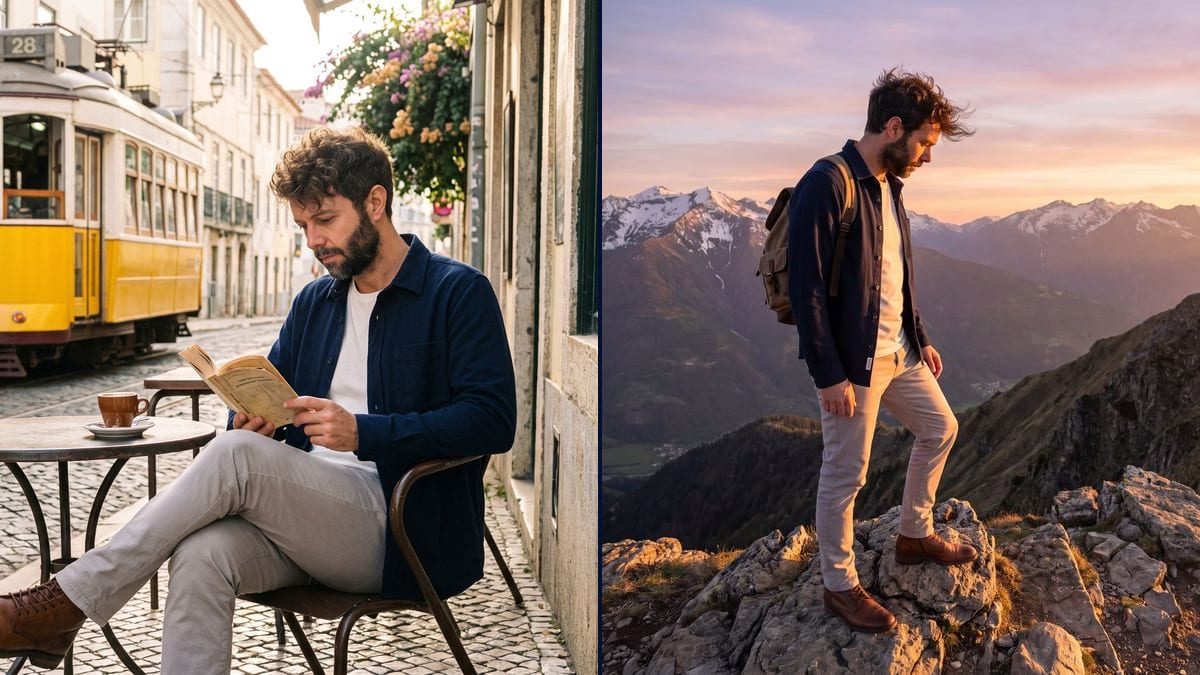
Real workflow: a selfie of Frank, his four-view sheet, then Frank at a cafe terrace in Lisbon and on a ridge at sunset. Same face, same overshirt, same boots in both scenes.
At a glance
A comic, an illustrated book, a campaign or a series of posts needs the same character from one image to the next. That is what AI does worst when you give it the selfie again each time: the face drifts, the outfit changes. This workflow first builds a reference sheet, then every scene starts from that sheet.
The sheet fixes the face from the front and in profile, the silhouette and a precise outfit. Scenes are wired to it, never to the photo, and each prompt repeats the outfit word for word. The face itself is not described: the model takes it from the image instead of rebuilding it.
The full guide is in our article on consistent characters. For a whole story, see the comic or the illustrated children's book. The sheet and two scenes cost fifty-seven credits.
These are the files of the workflow above, exactly as the models produced them, unretouched. The starting point is shown when there is one.
Starting point
Render
Comic and picture book authors, brands, content creators and storyboard artists who need the same character from one image to the next.
A sharp front selfie, and the character's outfit described once and for all.
Start from a sharp front selfie
The whole face, well lit, no sunglasses. It is the only time the photo is used: everything else starts from the sheet.
Make the sheet with a fixed outfit
Face close-up, then front, three quarter and profile, on a plain background. Describe a precise outfit: it is what links the scenes.
Wire every scene to the sheet
Not to the selfie. Each Image node receives the sheet, and its prompt repeats the outfit word for word.
Do not describe the face
Hair and beard, yes; the shape of the eyes or nose, no. A described face is a rebuilt face, so another one.
The same canvas, tuned for different needs: each variation is two or three lines of prompt away.
The hero stays recognisable from the first panel to the last, as a realistic photo or in a drawn style described identically in every scene prompt.
The same little character goes through every page of the children's book, with the same outfit, colours and cuddly toy, the face unchanged from one illustration to the next.
A human brand face or mascot appears in ten situations of the campaign, at the office, travelling, in a shop, without ten photo shoots or ten castings.
The content creator places themselves in travel, sport or work settings for a series of posts, always recognisable by their audience.
The lead actor appears in every shot of a storyboard sequence, with the same face and costume, before the shoot or before moving to video.
A role-playing character or an avatar is shown in several scenes for its profile, the presentation of its world and the campaign artwork.
One angle, reinterpreted each time: the face drifts. The sheet gives every view at once.
Without an outfit repeated word for word, each scene dresses the character differently, and you no longer recognise them from afar.
"Thin nose, green almond eyes" pushes the model to draw that face, not the one on the sheet.
For a real person other than you, ask for their permission before publishing images of them.
As many as you want: duplicate a Text node and an Image node wired to the same sheet. Each scene costs nineteen credits.
Yes, but make a second sheet for the new outfit. Changing the outfit in a single scene is what makes the character drift.
Yes: generate a portrait first, then the sheet from that portrait. The rest is the same.
Fifty-seven credits: nineteen for the sheet, nineteen per scene, on Nano Banana Pro.
It keeps a face from a reference image better than the other image models in the catalogue, and it holds the described outfit. Measured on the demo.
Yes: wire a scene as the first frame of a Video node. Wan 3.0 also accepts the sheet as a reference image.
Yes, by describing it in the sheet AND in every scene: watercolour, manga, comic line art. The style must be the same everywhere.
It is the safest. A profile or a photo in shadow lets the model invent half of the face.
Keep the same character across AI images
Use this workflowFree account, no card required. The workflow opens pre-filled in your canvas.
 Nano Banana Pro
 Seedream 5 Pro
 Flux Kontext
 GPT Image 2.5 Sunburst