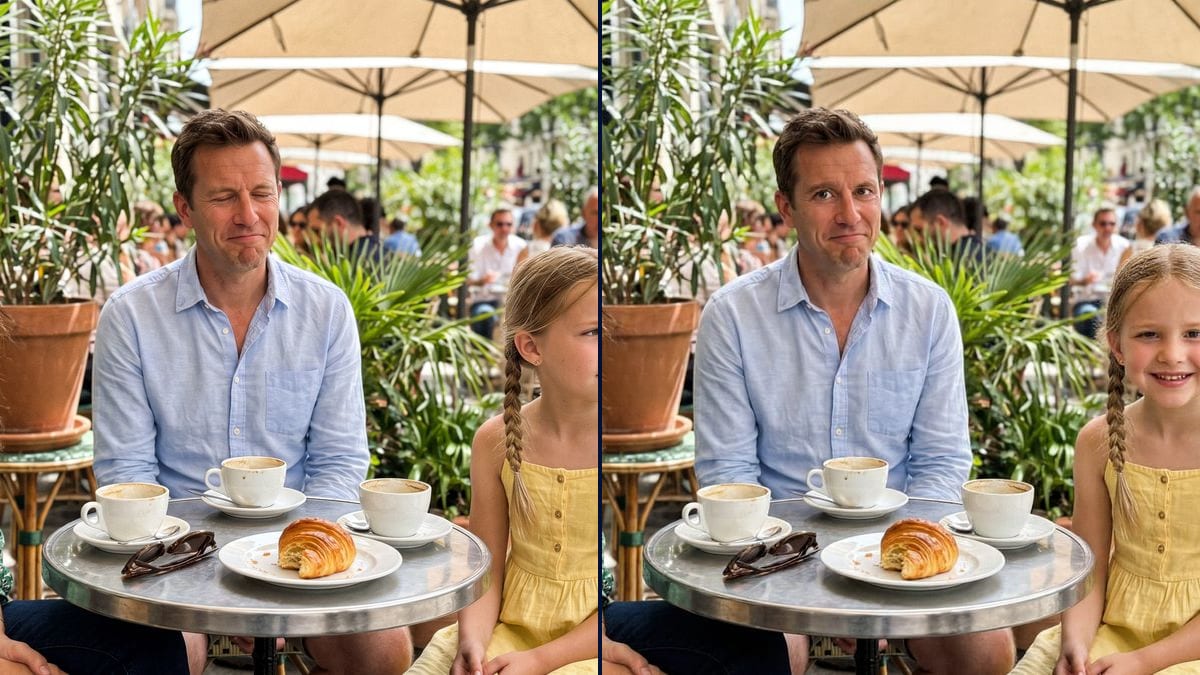
The family meal photo
Twelve people round the table, a single good photo, and the uncle blinked: his eyes are opened, everyone keeps their smile.
Someone blinked in the group photo? The AI opens their eyes and can turn whoever was looking away towards the camera, without retouching the others. Workflow visible here, no account needed.
Real workflow: a café terrace photo where the man in the middle blinks and the girl looks away, then his eyes opened, then his eyes opened and the girl turned towards the camera.
At a glance
The group photo is perfect, except for one person who blinked at the moment of the click, or a child looking elsewhere. This workflow opens that person's eyes and can turn another's gaze to the camera, without retaking the photo.
The hard part is touching only them. A model that rebuilds the picture also changes the others' smiles and the light. Flux Kontext only changes who you point to, by their place and clothes, and leaves the rest as it was.
To remove a passer-by from the photo, see object removal; for a blurry photo, sharpen a photo. Both fixes cost twelve credits.
These are the files of the workflow above, exactly as the models produced them, unretouched. The starting point is shown when there is one.
Starting point
Render
Families, wedding and event photographers, schools and companies who want to save a group photo.
The spoiled group photo, and each person to fix described by their place and clothes.
Load the spoiled photo
The group photo as it is, with the person whose eyes are closed clearly visible. The larger their face, the finer the fix.
Point to the person
By their place and clothes: the man in the middle in the light blue shirt. Give their eye colour if you know it.
Ask for a calm gaze
"Calm gaze, relaxed eyebrows, not surprised": without that, the reopened eyes come out wide open.
Add the other fixes
The child looking away, a smile: one sentence per person in the same prompt, the rest doesn't move.
The same canvas, tuned for different needs: each variation is two or three lines of prompt away.
Twelve people round the table, a single good photo, and the uncle blinked: his eyes are opened, everyone keeps their smile.
A pupil or player with closed eyes on the official photo of the year: it gets fixed instead of being retaken with the whole group.
The best group portrait of the wedding, with a witness blinking: the photographer fixes it before delivering the gallery to the couple.
Toddlers look everywhere but the lens: their head is gently turned towards the camera on the family photo of the year.
The only selfie at the viewpoint, and someone shut their eyes in the sun: it gets fixed before being shared.
The team photo for the website, taken just once, with a colleague blinking: fixed without getting everyone together again.
"Open the eyes" without saying whose, and the model retouches every face. Always their place and clothes.
The reopened eyes come out wide and startled. Ask for a calm gaze and relaxed eyebrows.
In a crowd photo, a face a few pixels wide is hard to fix. Crop first or pick a tighter photo.
The eyes are recreated: an ID photo or official document must stay a real, unretouched photo.
No, the model recreates them from their face. On a keepsake photo the result is convincing; for an official document it must not be used.
Yes, if the face is big enough. Restore it first with photo restoration if it is damaged.
Point to each one by place and clothes in the same prompt. Beyond three, do two passes.
Twelve credits, six per fix on Flux Kontext. A third version costs six credits more.
Because it only changes what you name and keeps the rest of the photo pixel for pixel: the other faces don't move.
In the demo, no: the woman keeps her laugh, the table, cups and terrace stay identical in both fixes.
The format of your photo, here 4:3. A vertical photo stays vertical.
Yes, in the same prompt: "make the girl smile slightly". Keep it subtle, a forced smile shows.
Open closed eyes in a photo with AI
Use this workflowFree account, no card required. The workflow opens pre-filled in your canvas.
 Flux Kontext
 Nano Banana Pro
 GPT Image 2.5 Sunburst
 Seedream 5 Pro