The gift you print afterwards
The base view comes out at a high enough resolution to be printed and framed. It is a birthday present that costs nineteen credits and lands better than a retouched photo.
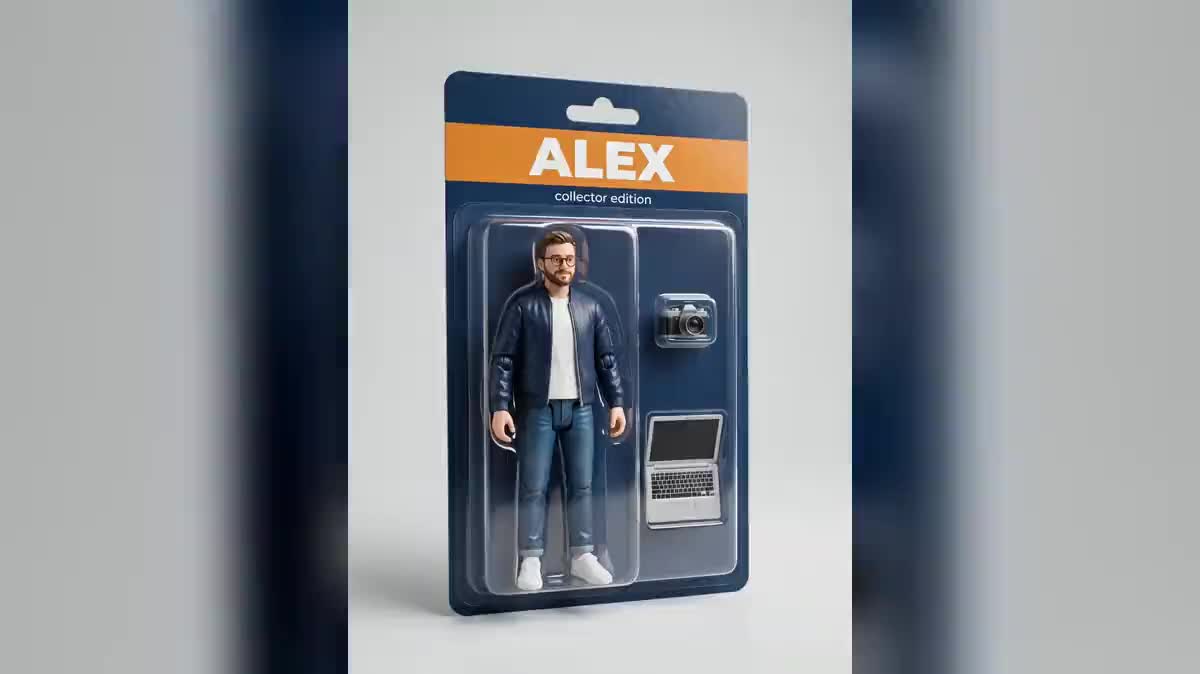
A photo of you enters the canvas and comes out as a collector action figure: the blister with your name printed on it, the figure on its base, the open box with its accessories, plus a full turn on video. The whole workflow is visible without an account.
The real workflow: a photo taken on a phone, three Image nodes on Nano Banana Pro receiving it through the image port, three prompts putting it on a shelf, and a Video node turning the blister.
At a glance
This format gets shared because it does not return one more portrait: it returns an OBJECT. A 15 cm figure, with ball joints at the shoulders, a seam line, a plastic bubble catching the light and your name printed on the cardboard. That packaging detail is what makes people say « that really is a figure », not the likeness of the face.
The photo enters through the image port of three nodes set to Nano Banana Pro. That model is here for two reasons at once: it holds the face from the starting photo, and it writes a short word cleanly on cardboard. Others do one or the other, rarely both, and a figure with no name on its card is no longer a collector item.
Three views because a figure is looked at in three ways: sealed in its blister like on a shelf, alone on its base like in a display case, and laid out flat with its accessories like in an unboxing. Then the blister turns a quarter turn on Wan 3.0, and that is the shot that gets posted. The whole thing costs one hundred and seventeen credits, nineteen per image and sixty for the video.
These are the files of the workflow above, exactly as the models produced them, unretouched. The starting point is shown when there is one.
Starting point
Render
Take a full-body photo, front on
Arms at your sides, plain background, daylight. A figure stands up: a headshot or a three-quarter angle gives an object that will not sit on its base. A phone is more than enough.
Replace the demo photo with yours
The Media node accepts an image imported from the phone. The three Image nodes are already wired to it: nothing to reconnect, and the three prompts apply to your photo at once.
Describe the material, not the character
Moulded plastic, visible joints, fifteen centimetres, clear bubble, cardboard backing card. That list is what makes the toy. Change the name on the card between quotes, and keep it short.
Generate all three, keep the one that posts
Three views side by side, only one ends up online, and it is almost always the blister. Rerun only that one if the cardboard printed badly: each node is paid separately.
The same canvas, tuned for different needs: each variation is two or three lines of prompt away.
The base view comes out at a high enough resolution to be printed and framed. It is a birthday present that costs nineteen credits and lands better than a retouched photo.
One photo per person, the same prompt, the same coloured band: the series holds together and reads like a product line. Perfect for a team page or a farewell.
The subject does not have to exist: start from a generated portrait, keep the same packaging prompt, and your hero gets a toy before getting a film.
Before quoting a real mould, the blister shows what the line would look like: cardboard colours, accessories, name, size. It is a shelf mockup, not a product photo.
The blister turn posts as is, vertically. Chain it with the flat view of the accessories in the Edit node and you have a ten-second unboxing without filming anything.
Take the base view into the product photo workflow to place it in a real studio set, or into expand an image to build a whole shelf around it.
A close-up face gives a bust, not a figure. The legs and shoes have to be visible for the model to know what to mould and how to stand it on its base.
The model then returns a slightly smooth portrait on a neutral background. What makes the toy is the material list: moulded plastic, visible ball joints, seam line, clear bubble, cardboard card.
A blister band carries a word, not a tagline. Past eight or ten letters the characters warp and the cardboard becomes unreadable. A name, possibly one short line under it.
No figure was manufactured: this is a generated image. If the render is used to sell merchandise, say it is a mockup, otherwise the buyer expects a toy that does not exist.
Yes, that is Nano Banana Pro's job: it reads the photo wired to the image port and carries the face onto the figure. The render stays a plastic object, so the features are simplified like on a real toy, but the person is recognisable.
Yes, it is built in: the name is written between quotes in the prompt, in large letters on the band. Three to eight letters print well, a whole sentence does not. A short second line, like collector edition, also holds.
Yes, the workflow assumes nothing about the subject: it needs a full-body photo and a prompt describing the packaging. For a pet, swap the accessories for its own, its bowl and its toy, and keep the display base.
One hundred and seventeen credits: nineteen per image on Nano Banana Pro, sixty for the five seconds of video on Wan 3.0. That is one dollar forty. Every node shows its price before you click.
Yes, they are two words in the prompt. A camera and a laptop for a creator, a guitar and a microphone for a musician, a trowel and a helmet for a builder: the moulded compartments follow the job.
Yes, wire the Video node to the base view instead of the blister: the cable moves from one port to the other. The render then turns around the bare figure, which shows off the paint and the joints.
Yes, the node lists every model that accepts an image input. GPT Image 2 prints beautifully on the cardboard but looks less like you; Seedream 5 Pro looks like you but prints badly. Nano Banana Pro is the compromise, which is why it is here.
Yes: take the photo, import it into the Media node, run. The create on mobile guide describes the canvas gestures on a narrow screen.
Turn a photo into an action figure with AI
Use this workflowFree account, no card required. The workflow opens pre-filled in your canvas.
 Nano Banana Pro
 GPT Image 2
 Seedream 5 Pro
 Wan 3.0