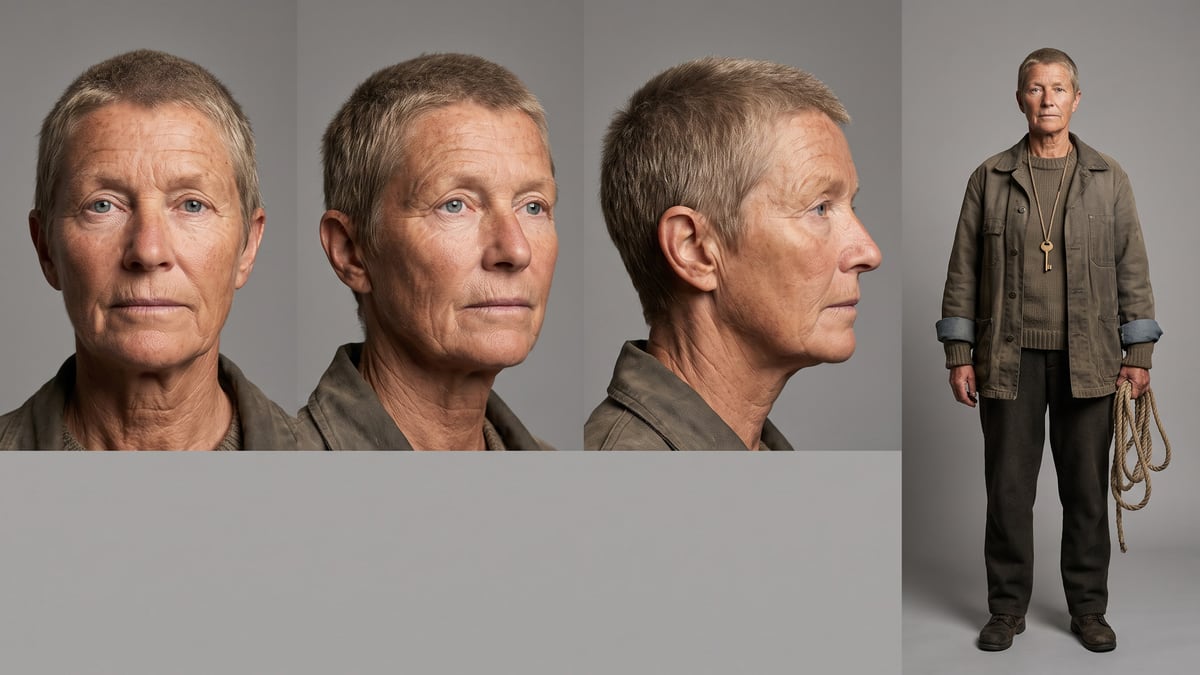
The characters of a novel
This is the demo: two characters, one sheet and one portrait each, from the first chapter. For a choral novel, add two nodes per character and ask the cast sheet for the six main ones.
The manuscript in PDF dropped on the canvas: one Text node writes the cast sheet, face, costume and bearing of each main character, then Nano Banana Pro draws for each one a four-view sheet and a tight portrait. About fifty credits for two characters, reusable in every other workflow. The whole workflow is visible without an account.
The real workflow: the first chapter of a novel in PDF in a Media node, Claude Sonnet 5 for the cast sheet, four Image nodes on Nano Banana Pro: two four-view sheets, two portraits. The texts shown are the models' answers, untouched.
At a glance
A character exists in the text by touches: a sentence about the hands, another about the coat, fifty pages later the colour of the eyes. The Text node reads the whole manuscript through its "Image or PDF to analyze" port and gathers everything into a cast sheet: the face, the age, the hair, the eyes, the build, the costume in this story, the way they carry themselves.
The sheet is wired to four Image nodes on Nano Banana Pro: for each character, a four-view sheet on a neutral background (front, three-quarter, profile, full body) and a tight portrait. The sheet serves as a reference everywhere: in a Reference node to cite the character @name, at the image port of a video to keep their face from one shot to the next.
The demo draws Maren and Elias, the two characters of "North of Silence", an original novel written for the example. Replace the PDF with your manuscript, put your names in the Image node prompts, and add two nodes per extra character. It is the first step of the series: the film, the storyboard and the trailer start again from these sheets.
These are the files of the workflow above, exactly as the models produced them, unretouched. The starting point is shown when there is one.
Render
Authors, screenwriters and series creators who want to see their characters before illustrating, animating or pitching.
A chapter or the manuscript in text PDF: the Text node reads the whole document and gathers what describes each main character.
Drop the manuscript PDF
A Media node receives it. A chapter where the characters appear is enough; the whole manuscript works too, the reading price following its size.
Let the Text node write the cast sheet
For each main character: the name, one line of face and build, one line of costume, one line of bearing. The instruction says "two here": change the number for your book.
Generate the sheets
Each Sheet node receives the cast and draws only one character, in four views on a neutral background. Regenerate if a detail is off: the prompt can specify a trait the text leaves vague.
Then the portraits, and reuse
The tight portrait gives the face in large. Save sheet and portrait in a Reference node: the character can then be cited @name in any prompt on the canvas.
The same canvas, tuned for different needs: each variation is two or three lines of prompt away.
This is the demo: two characters, one sheet and one portrait each, from the first chapter. For a choral novel, add two nodes per character and ask the cast sheet for the six main ones.
Draw each character in their season one costume, then duplicate the sheet with an instruction "same character, ten years later": continuity is visible before writing season two.
A screenplay in PDF gives characters less described than a novel: the cast sheet fills in with consistent choices that you validate. Add your casting notes in the Text node's instruction.
Ask the sheet for a white background and technical views (front, back, profile), and the portrait for a neutral expression: that is the character sheet you hand to an illustrator or a game team.
Once the sheet is generated, an Image node on Nano Banana Pro that receives it can render the same character at twenty or at eighty: the face holds, the age changes.
Each Image node must name a single character in its prompt. Wired to the whole cast sheet, a vague instruction draws both side by side, and the sheet is no longer usable as a reference.
Beyond two hundred and fifty words, the image model cherry-picks. Three lines per character are enough: face and build, costume, bearing. The rest, novelistic, does not help drawing.
Both prompts must cite the costume from the cast sheet. Without it, the portrait picks a shirt and the sheet a coat: repeat the costume line in both nodes.
Put them in a Reference node, with the description from the cast sheet: the character is cited @name in image and video prompts, and their face follows. Or wire them to the image port of an Image or Video node for a precise scene.
About fifty credits for two characters: the PDF reading (two to three credits) and four Nano Banana Pro images (around ten each). Two more nodes per extra character.
Yes, when it has to: the eye colour of a character never described will be chosen. The cast sheet shows it in black and white before drawing, fix it in the Text node and regenerate.
Yes: drop the photo in a Media node wired to the image port of the Sheet and Portrait nodes, and keep the cast sheet for the costume and the bearing. The face comes from the photo.
As many as the instruction asks for; the cast sheet stays readable up to six or eight characters. Beyond that, a second Text node for the secondary characters.
16:9 for the four-view sheet, 3:4 for the portrait. A neutral grey or white background makes the sheet usable as a reference; a set behind confuses the video model.
With Wan 3.0 from a first frame drawn with the sheet as input, yes. With Seedance 2.5, not for now: the model refuses photoreal faces as input.
Create the character sheets of a book with AI
Use this workflowFree account, no card required. The workflow opens pre-filled in your canvas.
 Nano Banana Pro
 Claude Sonnet 5.5
 Seedream 5 Pro
 Wan 3.0