The baker and her motto
She keeps telling her apprentices that good bread takes time. The line becomes a square post in her colours, shared on Monday morning, saying more about how she works than another baguette photo.
Your line becomes a square post for Instagram or LinkedIn, in two styles, with your signature and not one extra word. Workflow visible here, no account needed.
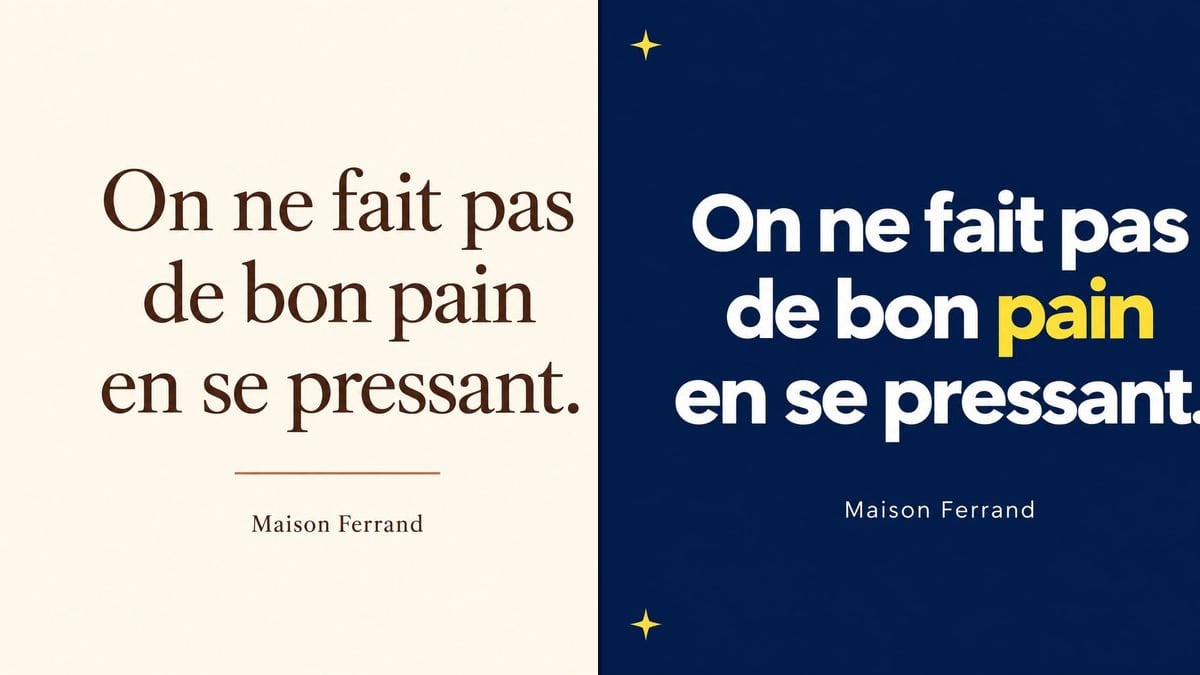
Real workflow (demo in French): a bakery's line about not rushing good bread, signed Maison Ferrand, in brown serif on cream with a terracotta rule, then in white on night blue with the word for bread in yellow and stars in the corners.
At a glance
A baker, a coach, a bookseller: everyone has one line that sums up how they work, and few have time to open a layout app to turn it into a post. This workflow takes your line and your signature and gives you two square posts ready to publish, a quiet one on cream and a punchier one on night blue.
The hard part is getting your exact words. An image model left to itself decorates: it adds an author, quote marks, a hashtag, or swaps a word so the line breaks nicely. The prompt puts each line in quotation marks and rules out everything else. GPT Image 2.5 Sunburst spells correctly, accents included, and it is the cheapest model in the catalogue.
For a series of slides, move on to the carousel; to post your opening times in the same style, use the opening hours poster. Both posts cost six credits.
These are the files of the workflow above, exactly as the models produced them, unretouched. The starting point is shown when there is one.
Render
Shop owners, tradespeople, coaches and charities who post on Instagram, Facebook or LinkedIn without a designer.
The line to post and the signature, each in quotation marks, plus the style you want: colours, lettering, the word to highlight.
Pick a short line
One or two lines, ideally your own. Something people take in within a second while scrolling.
Put it in quotation marks
In each node's prompt, the quote and then the signature, each in quotation marks, with "No other words" at the end.
Describe the style
Background colour, type of lettering, one ornament. If you want a word to stand out, say which one.
Proofread, then post
Check every letter on the image, then post the square as it is on Instagram, Facebook or LinkedIn.
The same canvas, tuned for different needs: each variation is two or three lines of prompt away.
She keeps telling her apprentices that good bread takes time. The line becomes a square post in her colours, shared on Monday morning, saying more about how she works than another baguette photo.
Every week, one line overheard during a session. Same night blue template with a yellow word, a new line each time, and his feed gets a recognisable look without a designer.
She quotes one sentence from the novel she is championing, signed with the author's name. The cream post sits next to the photo of the book in the window and on the shop's account.
A tradesman gets a message that means something to him. With the customer's permission, the line becomes a post signed with their first name, easier to read than a screenshot of a review.
A food bank sums up its collection drive in one strong line. The square post goes round Facebook and the local groups, with the charity's name as the signature.
For new year greetings or a company anniversary, the owner of a small business posts the line he wants his team to remember, in the brand colours, internally and on LinkedIn.
Three sentences on a square and the letters shrink to nothing on a phone. Cut until it fits on three or four lines.
Without "No other words", the model may add an invented author, giant quote marks or a hashtag. That closing line matters as much as the quote.
In the demo it chose the word for bread, which worked. On another line it may colour a word that means nothing. Name the one you want to stand out.
A line credited to Einstein or Maya Angelou online often comes from neither. Find the source before you put a famous name under it.
In the demo, yes: the line, the full stop and the signature are exact on both posts. Still read each version before you publish.
Yes, with the author's name as the signature. Check the exact wording and the source first: plenty of quotes going around are misattributed.
Yes: ask for a vertical format instead of a square, and leave room at the top and bottom for Instagram's buttons.
Six credits, three per render on GPT Image 2.5 Sunburst at medium quality. A third version, with another line or another background, costs three more.
Because it spells correctly, punctuation and accents included, and it is the cheapest model in the catalogue. In the demo it also held white text on the night blue background.
A square, 1254 pixels on each side, the standard size for an Instagram or Facebook post, and it works fine on LinkedIn too.
Yes: write them in the prompt, "forest green background, cream lettering", and keep the same style wording from post to post for a consistent series.
The model won't copy an existing logo exactly. Add it afterwards in the tool you already use, or keep the name written as a signature, as in the demo.
Make an Instagram quote post with AI
Use this workflowFree account, no card required. The workflow opens pre-filled in your canvas.
 GPT Image 2.5 Sunburst
 Nano Banana 2.1
 Recraft V4.1