The florist with new hours
She now opens on Sunday mornings and closes on Mondays. The new clean sign replaces the old one the same day, and the same image goes on her online business listing.
An opening hours sign for your shop door, clean in sage green or chalkboard style, with every day and time written letter for letter. Workflow visible here, no account needed.
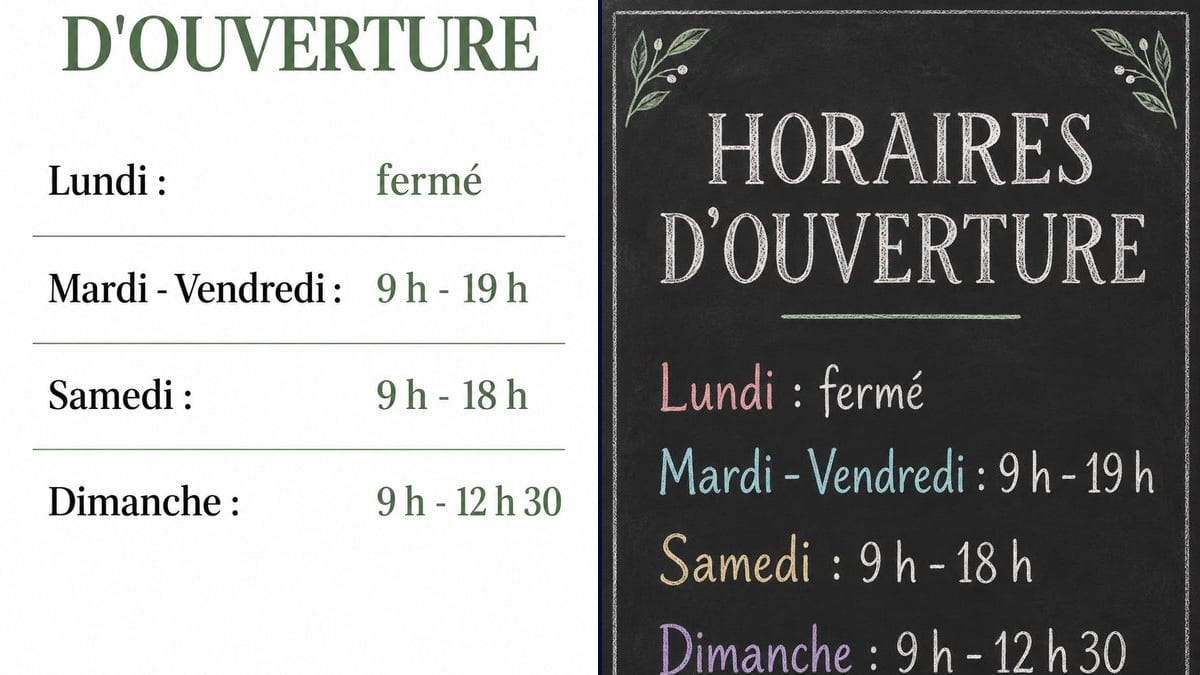
Real workflow: two French opening hours signs, one white with days in black, hours in sage green and a rule between lines, the other a black chalkboard with days in pastel chalk and leaves in the corners.
At a glance
The opening hours sign on most shop doors is a sheet printed three years ago, faded by the sun, with Wednesday crossed out in marker. This workflow redoes yours in two styles: a white and sage green sign with aligned columns, and a chalkboard version for a café or a deli.
The hard part is the numbers. A "7 pm" that turns into "6 pm" and customers find the door locked. The prompt gives every weekday line in quotes and forbids adding any. Sunburst writes them letter for letter, for three credits a sign.
To announce a summer closure, follow up with the holiday closure notice; for the lunch menu, with the daily menu chalkboard. Both signs cost six credits.
These are the files of the workflow above, exactly as the models produced them, unretouched. The starting point is shown when there is one.
Render
Shopkeepers, cafés, tradespeople, medical practices and professionals who post their hours on the door.
The heading and one line per day or group of days, in quotes, with one time format, plus the style you want.
List your slots
One line per day or group of days, "Tuesday - Friday" for instance. If you close at lunchtime, put both slots on the same line.
Stick to one time format
"9 am - 7 pm" or "09:00 - 19:00", but the same everywhere. The model copies what you write, inconsistencies included.
Pick the style
Clean for a pharmacy, a practice or a fashion shop, chalk for a café, a deli or a bakery.
Proofread and print
Digit by digit on the image, then on A4 or smaller for the door glass. Laminate it if it gets direct sun.
The same canvas, tuned for different needs: each variation is two or three lines of prompt away.
She now opens on Sunday mornings and closes on Mondays. The new clean sign replaces the old one the same day, and the same image goes on her online business listing.
The owner wants a sign that matches the chalkboard behind the counter. The chalk version, leaves and coloured days, hangs on the glass door and goes up on the café's Instagram.
A group practice posts the reception desk hours. The plain white version reads from the car park, and each practitioner can have a line of their own if needed.
In July and August the shop opens later and closes earlier. A "SUMMER HOURS" sign next to the usual one saves customers from finding the door shut at half past six.
The only shop in the village keeps irregular hours. A clear sign on the door and a copy on the parish notice board, and locals know when to come without phoning first.
A farm sells direct on Wednesdays and Saturdays. The chalk sign, with both days and the times, hangs on the gate and on the stall at the farmers' market.
"9am", "9.00" and "09:00" on the same sign, and it looks thrown together. Pick one way of writing times and keep it on every line.
If Thursday isn't there, customers can't tell whether you're closed or forgot it. Write every day or group of days, "Closed" included.
A full A4 sheet on a small pane hides the inside of the shop. Print on A5 if the door is narrow: it still reads from two metres.
The sign says one thing, your Google listing another, and customers trust their phone. Update both on the same day.
In the demo, yes: the heading and the four day lines are exact on both signs, half past twelve included.
Yes: write "Tuesday - Friday: 9 am - 12:30 pm · 2 pm - 7 pm" on one line in quotes. Keep lines short so they fit.
Yes, one more line in quotes at the bottom. Check every digit or letter of the address on the image.
Six credits, three per sign on GPT Image 2.5 Sunburst at medium quality. One more version, summer hours for instance, costs three credits.
Because it spells correctly on a light background, digits included, and it's the cheapest model in the catalogue. In the demo, the black slate background comes out typo-free too.
The render comes out at 2:3, 1024 x 1536 pixels, close to A4. Print on A4 or A5 depending on the door; for bigger, run it through the Enhance node.
Yes: duplicate the node and write the lines in the other language. Two signs side by side cost three credits more than one.
On the clean demo version, yes, days on the left and hours on the right. The chalk version aligns lines on the left with the time right after the day, closer to a real chalkboard.
Make an opening hours sign with AI
Use this workflowFree account, no card required. The workflow opens pre-filled in your canvas.
 GPT Image 2.5 Sunburst
 Nano Banana 2.1
 Recraft V4.1