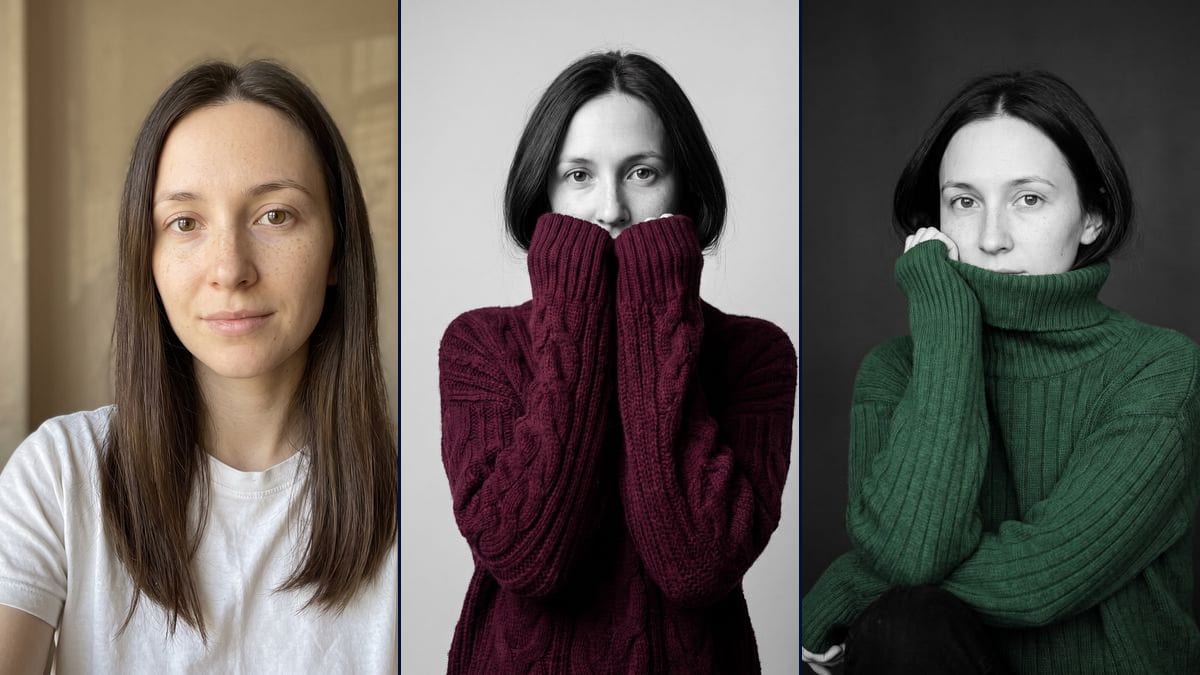
Real workflow: a woman with long dark brown hair in a white T-shirt against a beige wall, then the same woman in black and white in a chunky burgundy cable knit, sleeves over her mouth, and in a forest green turtleneck on a charcoal background. In both renders her hair looks much shorter than in the photo.
At a glance
You provide
1 photo · a text or a brief
What the workflow produces
2 images in 3:4
Canvas structure
6 nodes wired by 4 connections
Models wired in
Nano Banana Pro
Cost of one full run
about 38 credits, roughly $0.46
Account
The demo is visible without an account; generating requires a free account, trial credits included
The "ChatGPT Sweater Portrait Trend" fits in one picture: a black and white portrait where only the knit sweater keeps its colour, often burgundy, with the long sleeves pulled up over the mouth and a sharp gaze above them. According to the viralvideoai.app guide, which quotes MakeViral's notes, the first prompt post went up on TikTok on 9 November 2026. Here you upload your portrait and an image model remakes the photo, without going through ChatGPT.
You get two still pictures, as in the trend. The first follows the original recipe: chunky burgundy cable knit, both hands in the sleeves in front of the mouth, light grey background. The second is a variation in a forest green turtleneck, collar pulled up over the mouth, on a charcoal background. On the demo, the face and the freckles are faithful. The hair, long in the photo, comes out short in both renders, and in the green one a bare hand comes out of the sleeve to rest on the cheek.
These are the files of the workflow above, exactly as the models produced them, unretouched. The starting point is shown when there is one.
Starting point
Your portrait
Render
The same woman in black and white, only her chunky burgundy cable-knit sweater in colour, both hands in the pulled-up sleeves in front of her mouth and the lower part of her nose, eyes sharp and facing the camera, on a light grey background; the freckles and features are faithful, but the hair looks cut into a bob, much shorter than in the photo, she is framed down to the waist instead of from the chest up, and the fingertips of one hand poke out of the sleeveGenerated with Nano Banana ProThe same woman in black and white, only her ribbed forest green turtleneck in colour, the collar pulled up over her mouth, eyes turned to the camera, on a charcoal background; the hair is also shorter than in the photo, one bare hand rests against the cheek instead of staying in the sleeve, and the chin does not rest on the forearms: one arm lies on a knee, in black trousers visible at the bottom leftGenerated with Nano Banana Pro
Who it is for
People who want to try the sweater portrait trend on their own photo for a story, a post or an autumn profile picture, without going through ChatGPT.
Which files to provide
A sharp portrait of you or of someone who agrees, facing the camera with the eyes clearly visible, framed head and shoulders, and a description of their hair in the prompt (colour, length, texture). The photo is optional.
How it works
1
Upload a sharp portrait with your eyes clearly visible
The whole portrait rests on the gaze, since the mouth ends up hidden. Use a front-facing, well-lit photo with no sunglasses and no hair over the eyes. The demo starts from a plain white T-shirt against a beige wall.
2
Describe your hair in the prompts
Both prompts mention long dark brown hair, the demo woman's. Replace it with yours. If your hair is long, add "long hair falling over the shoulders, outside the collar": on the demo, without that line, it came out short.
3
Pick the sweater colour
The colour is a few words in the prompt: "deep saturated burgundy" for the burgundy one, "rich forest green" for the green one. Swap them for the shade you want, and keep the sentence that says only the knit is in colour.
4
Check the hands and the framing before you post
On the demo, fingertips poke out of one sleeve in the burgundy render, and a bare hand touches the cheek in the green one. If one render does not work for you, rerun only that one for 19 credits.
Variations and use cases
The same canvas, tuned for different needs: each variation is two or three lines of prompt away.
Another sweater colour
Replace "deep saturated burgundy" with the shade you want, for example "deep violet", "warm cream" or "bright red". A cream sweater will not stand out much on a light grey background, so use the charcoal one instead. Not tested.
A men's version
Replace "the woman" with "the man", "her" with "his", and describe his face instead of the long dark brown hair: beard or clean-shaven, glasses, haircut and hair colour. Not tested on the demo.
A couple portrait
Upload a photo where both people appear and write "the man and the woman in this photo", each in their own colour sweater, sleeves pulled up over the mouth. Describe each face in the prompt. Not tested.
A hoodie instead of a sweater
Replace "chunky cable-knit sweater" with "oversized hoodie" and keep the long sleeves over the hands. You lose the knit texture, which carries a good part of the trend's look. Not tested.
A coloured background instead of grey
Replace "light grey seamless studio background" with a colour, for example a pale blue, and remove "the background" from the list of things in black and white. The sweater will no longer be the only colour. Not tested.
Keeping your long hair
On the demo, both renders cut the hair into a bob. Add "long hair falling over the shoulders, outside the collar" right after the face description so the strands stay visible over the knit. Not tested.
The sleeves coming up, as a video
Start from the burgundy render and plug in a Video node: describe the hands slowly pulling the sleeves up to the mouth, eyes fixed on the camera. The template does not include this node. Not tested, and paid separately.
Common mistakes
Keeping "long dark brown hair" without changing it
The prompts describe the demo woman's hair. If yours is blonde, red, curly or short, change those words, or the model may give you someone else's hair.
Uploading a photo where the eyes are hard to see
With the mouth hidden by the knit, the gaze is almost all that is left to recognise you. With sunglasses, a strand of hair or a blurry starting photo, the model guesses your eyes.
Expecting the exact pose from the prompt
On the demo, the green render does not rest the chin on the forearms, a bare hand touches the cheek and a knee shows at the bottom left. The pose in the prompt is a direction, and the model follows it loosely.
Posting without checking the hair length
Both demo renders cut long hair down to a bob. If people know you with long hair, they will notice straight away. Look before you send, and rerun if needed.
No. The demo starts from a woman in a white T-shirt, and the model invented the cable knit, the turtleneck and the pose. What you wear in your photo does not matter, only the face and hair are used.
Will the pictures still look like me?
On the demo, yes for the eyes, eyebrows, nose and freckles, in both renders. The mouth is hidden by the knit, so you mostly judge the upper face. The hair, though, got much shorter. Compare at full size before posting.
Why does my hair come out shorter?
On the demo, both renders cut long hair down to a bob, despite "the same long dark brown hair" in the prompt. We do not know why. Add "long hair falling over the shoulders, outside the collar". We have not tested it.
How much do the two images cost?
38 credits, 19 per render on Nano Banana Pro at 2K. If one render does not work for you, rerun just that one for 19 credits.
Can I pay less?
Yes, by switching the node to Nano Banana 2.1 at 1K, which costs less per render and gives smaller pictures. We did not test it on this template. The demo runs on Nano Banana Pro.
How big are the images?
1792 x 2400 pixels, portrait, in a 3:4 ratio. Enough for a story, an Instagram post or a print of about 15 x 20 cm.
Where does the sweater portrait trend come from?
We do not know who started it. The "ChatGPT Sweater Portrait Trend" guide on viralvideoai.app, updated on 13 November 2026, quotes MakeViral's notes: a first prompt post on TikTok on 9 November 2026, then posts on 11 and 12 November. It is our only source. Imaginode has no link with the site.
Do I need a ChatGPT account?
No. The trend carries ChatGPT's name, but this template runs on Nano Banana Pro, right in the Imaginode canvas. Imaginode has no link with OpenAI.
Do I have to provide a photo?
The photo is optional in the canvas, but without it the model invents a person. For it to be you in the sweater, you need your portrait.
ChatGPT sweater portrait trend, made from your own photo
 Nano Banana Pro
 Flux Kontext
 Seedream 5 Pro