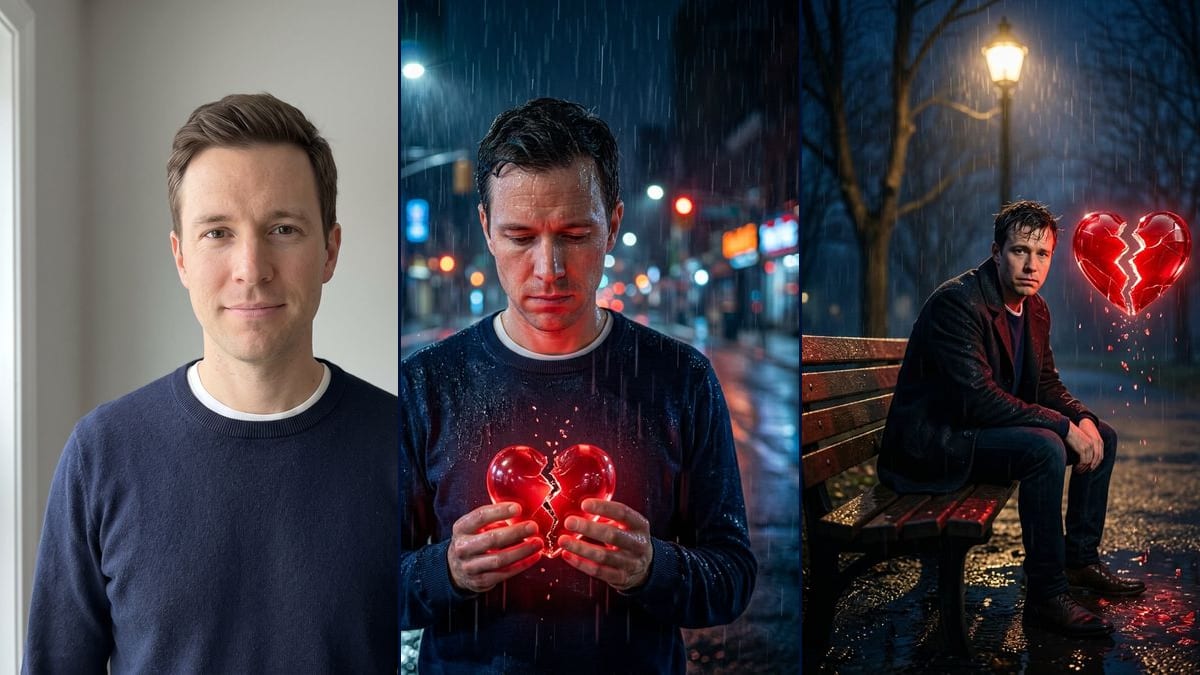
Real workflow: a clean-shaven man in a navy sweater against a grey wall, then the same man soaked in a street at night holding a cracked red glass heart, and sitting on a park bench under a streetlamp with the heart floating by his head. On the bench, his face is small and less faithful.
At a glance
You provide
1 photo · a text or a brief
What the workflow produces
2 images in 3:4
Canvas structure
6 nodes wired by 4 connections
Models wired in
Nano Banana 2.1
Cost of one full run
about 14 credits, roughly $0.17
Account
The demo is visible without an account; generating requires a free account, trial credits included
The broken heart photo is a sad portrait made from a single picture: night, rain and a glowing red heart with a crack down the middle. The videosi.io tracker added it on 9 November 2026 to its trends that are spreading (page seen on 11 November), and Dreamina, CapCut's image tool, has a prompt page for it. Here you upload your selfie and an image model builds the scene around your face.
You get two pictures. In the first, you stand in a wet street, sweater soaked, looking down at a split red glass heart held in both hands. In the second, you sit at the end of a park bench under a streetlamp, in a dark coat, and the heart floats by your head, shedding shards. On the demo, the street version keeps the face well, if a little more lined. On the bench, the face is small and has changed.
These are the files of the workflow above, exactly as the models produced them, unretouched. The starting point is shown when there is one.
Starting point
Your selfie
Render
The same man standing in a city street at night in heavy rain, navy sweater soaked, looking down at a glowing red glass heart split down the middle that he holds in both hands, blue and orange reflections on the asphalt; the face is still recognisable but looks a little more lined and wet, and the shards float above the crackGenerated with Nano Banana 2.1The same man sitting at the end of a wooden park bench under a streetlamp, at night in the rain, in a dark coat over his navy sweater, a large cracked red glass heart floating by his head and shedding shards into the puddles; the face is small in the frame and less faithful, with slightly changed features and messy hairGenerated with Nano Banana 2.1
Who it is for
People who want to try the broken heart trend on their own portrait for a story, an Instagram or TikTok post, creators looking for a mood picture for a song or a post about a breakup.
Which files to provide
A sharp selfie of you or of someone who agrees, ideally facing the camera, and a description of their face and outfit in the prompt (beard, glasses, hair colour and length, clothes). The photo is optional.
How it works
1
Take a front-facing, well-lit selfie
The model builds everything else from your face. A sharp photo, facing the camera, with no sunglasses and no hand over your mouth gives it enough to work with, especially for the bench, where the face ends up small.
2
Describe yourself in the prompts
The prompts describe a clean-shaven man with short hair and a navy sweater. Put in your beard, your long hair, your jacket or your glasses, or the model may drop them.
3
Keep the setting or change it
The street and the bench are two examples. A train platform, a car parked in the rain or a fogged-up window work too: change the start of the prompt and keep the glass heart and the rain.
4
Check the face at full size before you post
On the demo, the street aged the features a little and the bench changed them. Zoom in on the face, compare it with your photo, and rerun for 7 credits if you do not recognise yourself.
Variations and use cases
The same canvas, tuned for different needs: each variation is two or three lines of prompt away.
A woman or a couple instead
Change "the man" to "the woman" or "the couple" and describe each person in the prompt. With two people, say whether one holds the heart, both share it, or it floats between you, or the model picks for you. Not tested on the demo.
Another setting in the rain
Keep the night, the rain and the glass heart, but change the place: an empty train platform, the inside of a car with rain on the windscreen, a fogged-up window. One place per picture keeps the scene easy to read. Not tested.
A heart made of something else
The demo asks for glossy red glass. You can ask for a cracked ceramic heart, a flickering neon one or a paper heart tearing apart. Keep the crack down the middle and the glow: that is what makes the trend recognisable. Not tested on the demo.
A bigger face in the bench shot
On the demo, the bench shows the full body and the face is small and less faithful. Replace "full body visible" with "framed from mid-thigh up, face in the upper third of the picture" to give the features more room. Not tested.
The heart breaking on video
Start from the street picture and plug in a Video node: describe the crack slowly opening, the shards falling and the rain carrying on. With a short, slow movement, the face distorts less. Not tested on the demo, and paid separately.
Black and white with only the heart in red
Add to the end of the prompt: "the whole picture in black and white, except the heart, which stays bright red". The contrast makes the heart stand out, but the model may leave some red on the hands or in the reflections. Not tested.
Common mistakes
Forgetting to describe yourself in the prompts
The demo prompts describe a clean-shaven man in a navy sweater. If you wear a beard or glasses and do not say so, the model may remove them or dress you like the man in the demo.
Picking the bench for likeness
The bench shows the whole scene, and on the demo the face is small there, the features changed and the hair is messy. For a profile picture where people need to recognise you, use the street.
Starting from a blurry or side-on photo
The rain, the water on the skin and the red light already change the face a lot. With a blurry or three-quarter photo, the model has fewer cues and the likeness drops further.
No. On the demo, the man smiles slightly against a grey wall, and the model gave him the sad expression the prompt asks for. A neutral face changes more easily than a big smile.
Will the picture still look like me?
In the street, yes, with features a bit more lined by the rain and the light. On the bench, less so: the whole body is in frame, the face takes up little room and the model altered it. If likeness matters, go with the street version.
Can the rain and the heart be animated as a video?
Yes, by plugging a Video node into the picture and describing the rain falling and the heart splitting. We did not test it on the demo, and the video costs extra credits.
How much do the two images cost?
14 credits, 7 per render on Nano Banana 2.1 at 1K. If one face does not work for you, rerun just that render for 7 credits.
896 x 1200 pixels, portrait, in a 3:4 ratio. Enough for an Instagram story or post, a bit small for a print.
Where does the broken heart trend come from?
We do not know who started it. videosi.io added it to its tracker on 9 November 2026 with the "Spreading" status, and Dreamina has an undated prompt page called "Instagram User Heartbreak AI Photo Prompt". Imaginode has no link with these sites.
Do I have to provide a photo?
The photo is optional in the canvas, but without it the model invents a person. For it to be you in the rain, you need your selfie.
 Nano Banana 2.1
 Flux Kontext
 Seedream 5 Pro