The bakery and its staff
The owner wants caps for the counter staff and delivery drivers. Before ordering fifty, she compares a beige cap with burgundy thread and a navy one with cream thread, using her real logo.
Your logo embroidered on a beige cap in a product shot, then on a navy cap being worn, with the name spelled right. Workflow visible here, no account needed.
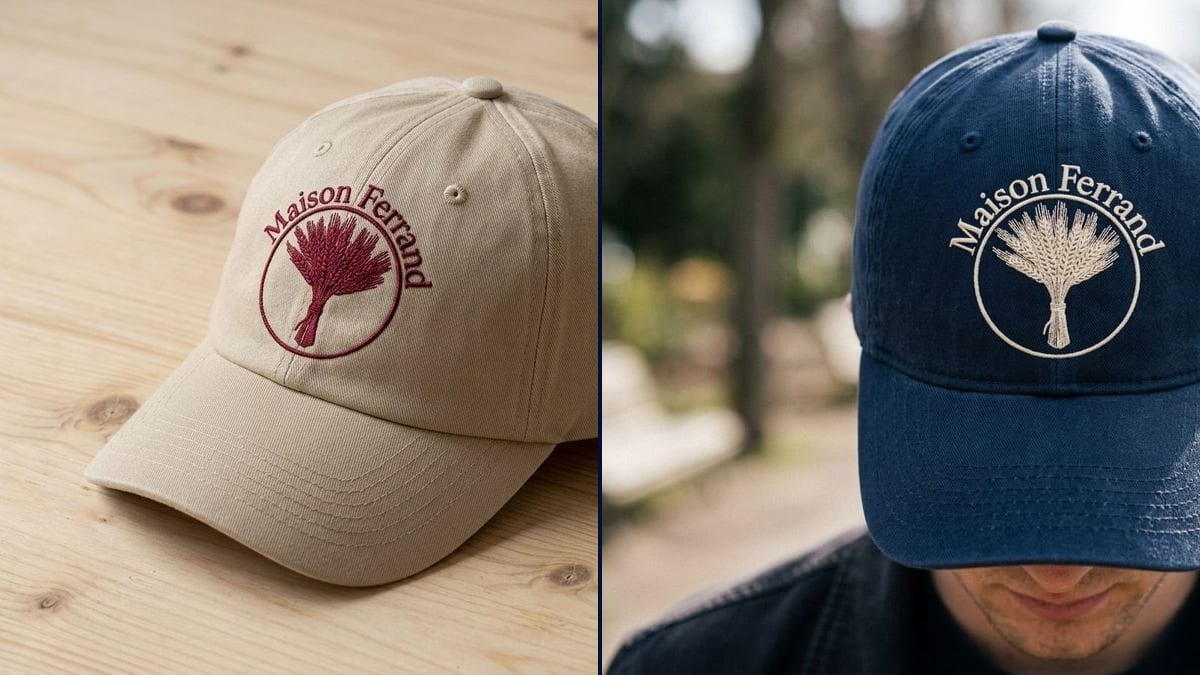
Real workflow: a bakery's burgundy logo, a wheat sheaf in a circle under the name "Maison Ferrand", then stitched in burgundy thread on a beige cap lying on wood and in cream thread on a navy cap worn outdoors.
At a glance
Ordering embroidered caps usually means a minimum quantity and a proof that shows your logo flat on a cap drawing. You can't tell whether burgundy will work on beige, or whether the name stays readable in thread. This workflow stitches YOUR logo onto two caps shot like real photos: one on a table, one being worn outside.
The hard part is getting real embroidery and correct text. An image model often pastes the logo on flat or warps a letter. The prompt describes the thread, the raised stitching and the size, and quotes the name. Nano Banana 2.1 reads the logo you supply and copies it, name included.
For a jacket or a bag, move on to the embroidered patch; for printed garments, the t-shirt mockup. Both caps cost fourteen credits.
These are the files of the workflow above, exactly as the models produced them, unretouched. The starting point is shown when there is one.
Starting point
Render
Shops, clubs, associations and small brands ordering embroidered caps, and embroiderers who attach a picture to their quotes.
A clean logo on a plain background, the cap and thread colours, and the logo's text copied in quotes.
Upload your logo
Sharp, on a plain background, at a decent resolution. A PNG file or a clean screenshot of the logo will do.
Pick cap and thread
Cap colour, thread colour, embroidery size. Six to eight centimetres wide is the usual size on the front.
Copy the logo's text
The name in quotes, letter for letter, plus the parts of the design. "No other text" stops the model adding anything.
Send the picture to the embroiderer
It shows the look you want. The embroiderer then digitises the stitch file and tells you what works in thread.
The same canvas, tuned for different needs: each variation is two or three lines of prompt away.
The owner wants caps for the counter staff and delivery drivers. Before ordering fifty, she compares a beige cap with burgundy thread and a navy one with cream thread, using her real logo.
The committee is planning the season's merch. They share the embroidered cap in club colours in a message to members and take pre-orders before anything goes into production.
A designer is launching a label and wants to test demand before paying for stock. Shots of the cap being worn fill his Instagram feed and his pre-order page.
The office manager has to choose a gift for the team. He shows the committee two cap colours with the company logo, so the decision is made on a picture rather than a catalogue.
An embroidery shop attaches a picture of the cap with the customer's logo to each quote. The customer approves thread colour and size before the shop digitises the design.
Volunteers want a souvenir cap for the annual fair. The picture helps settle the colour at the committee meeting and announce the price in the newsletter before the order goes in.
"Add the logo" often gives a flat print, like a heat transfer. Mention thread, stitches and raised texture to get embroidery.
Very thin lines and small text don't work in embroidery, on the render or in real life. If your logo has them, plan a simplified version.
Without the name copied letter for letter, the model may change a letter or add a slogan. Quote it exactly and rule out any other text.
Stitch count, thread choice and exact size are settled with the embroiderer. The picture is for choosing, not for production.
In the demo, yes: "Maison Ferrand" is right on both caps. Always check yours on the render.
Almost. The stitching simplifies fine detail, as a machine would: the wheat ears get fuller, and on the beige cap the arched text touches the circle.
Yes: say "on the left side" or "on the back, above the strap", with a smaller size.
Fourteen credits, seven per render on Nano Banana 2.1. A third colourway with the same logo costs seven more.
Because it picks up the logo you supply, spells the name correctly, and renders it as real raised embroidery. That is what matters when you show a product to your team or your customers.
The prompt asked for the face out of frame; the model had the person look down instead, and the mouth shows under the brim. To avoid it, frame "from the chest to the top of the cap, three-quarter view".
Yes, to present your own products, bearing in mind the manufactured cap may differ slightly. See the commercial-use rules.
4:3 landscape, which suits a product page, a quote or a social post.
See your logo embroidered on a cap with AI
Use this workflowFree account, no card required. The workflow opens pre-filled in your canvas.
 Nano Banana 2.1
 Flux Kontext
 GPT Image 2.5 Sunburst