Lens flare
Also calledSun flare, Flare artifact, Optical flare
Lens flare is the scattering and reflecting of light inside a camera lens when a bright source strikes the glass, producing streaks, halos, or hazy bright patches across the image. It reads to the viewer as raw, real light hitting the camera, adding warmth, glare, or a sense of unfiltered presence.
What it tells
Flare tells the audience the camera was physically there, catching real light rather than a controlled studio glow, so it reads as authentic, romantic, or nostalgic depending on context. Directors use it to soften a scene emotionally, suggest hope or divinity when light breaks through, or inject kinetic energy into futuristic and tech-driven imagery. Because it is an imperfection, it also humanizes shots that might otherwise feel too polished or artificial.
How it is shot
A bright practical source, usually the sun or a strong lamp, is positioned so it grazes the front element or sits just outside the frame at an angle. Light bounces between internal lens elements and imperfect coatings, scattering into streaks, ghost circles, or a hazy veil that travels toward the image center as the source moves. Aperture blade count and shape determine flare geometry: stopped-down apertures produce hexagonal or star-shaped flares, wide-open apertures give soft round ghosts. Vintage or uncoated lenses flare more readily than modern multi-coated glass. On set, crews sometimes remove the lens hood, mist the front element, or use a cross-screen filter to control intensity and direction.
When to use it
- A romantic or nostalgic scene shot near golden hour needs extra warmth and softness.
- A documentary-style sequence wants to feel handheld, raw, and unmistakably shot with a real camera in real light.
- A sci-fi or technology scene wants a sense of energy, glass, and forward motion.
- A character walks toward camera into low sun for a hopeful or triumphant reveal.
Not to be confused with

Halation is a soft overall bloom around highlights caused by light scattering in the film emulsion itself, while lens flare is a directional artifact from light bouncing between lens elements, producing distinct streaks or shapes.
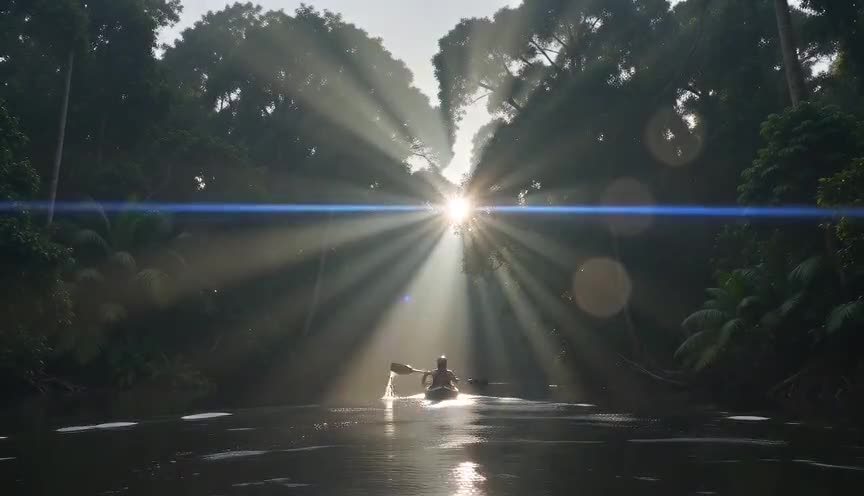
Anamorphic flare is a specific type of lens flare: the horizontal blue streak produced only by cylindrical anamorphic lens elements, whereas ordinary lens flare can appear as round, hexagonal, or hazy shapes on any lens.
In film
Star Trek (2009)
J.J. Abrams used dense, repeated lens flare across bridge and exterior shots, turning the effect into a signature stylistic device for the film's energy.
Easy Rider (1969)
Laszlo Kovacs embraced direct sunlight and visible flare in motorcycle road scenes, helping define the film's loose, immediate New Hollywood visual style.
Close Encounters of the Third Kind (1977)
Vilmos Zsigmond and Steven Spielberg used powerful backlights and UFO sources that flare into the lens during the climactic landing sequence.
The prompt
Name the light source and its position explicitly: sun grazing the lens, low sun behind the shoulder, or a bright practical just out of frame. Mention the flare shape you want, hexagonal, streaked, or hazy round ghosts, and the lens type, since anamorphic gives a stretched horizontal streak. Avoid vague words like 'flare' alone, which models often skip; instead describe the physical cause, the light hitting the glass directly, and let highlights bloom rather than asking for a filter effect.
The exact prompt that rendered the video on this page. Keep the description of the move, change the subject and the setting.
Lens flare shot in a sunlit Moroccan riad courtyard: a middle-aged woman in a flowing linen dress crosses the tiled floor toward an arched doorway as the low afternoon sun sits just behind her shoulder, striking the lens directly. Warm hexagonal flare spots and a soft golden streak sweep across the frame as the camera holds a slow handheld tracking shot at eye level, 35mm lens, highlights blooming and flickering with each small camera sway, tiled walls and a trickling fountain staying crisp in the midground. No text.
Common mistakes
Overusing the effect
Stacking multiple flares in every shot, a habit associated with certain blockbuster styles, makes the image feel gimmicky and can flatten contrast across the whole frame.
Centering the source
Placing the light source dead center in frame produces a flare that looks planted and artificial; a grazing angle near the edge reads as more natural and physically motivated.
Blowing out the image
Letting flare wash out highlights entirely loses texture and detail; expose for the midtones first and let the bloom sit on top rather than dominate the frame.
Frequently asked questions
What is lens flare?
Lens flare is the visible scattering of light inside a camera lens when a bright source hits the glass directly, creating streaks, halos, or hazy bright patches across the shot. It happens because light bounces between internal elements before reaching the sensor.
Is lens flare a mistake or an intentional choice?
It can be either. Cinematographers often treat unwanted flare as a technical flaw to control with hoods and coatings, but many directors deliberately shoot into the sun or use flare filters to add warmth, realism, or energy on purpose.
How do I get lens flare in AI generated video?
Describe the physical cause directly: a low sun or bright practical light grazing the lens, plus the flare shape you want, streaked, hexagonal, or hazy. Tools like Imaginode respond better to concrete light and lens description than to the single word 'flare.'
Does lens flare only happen with anamorphic lenses?
No. Any lens can flare when a bright source hits its elements at the right angle. Anamorphic lenses produce a distinct horizontal blue streak, while spherical lenses typically give round or hexagonal flare shapes instead.