A team pack
One sheet per colleague, same style and same prompt, and the team has its own reactions for the internal chat: far funnier than a generic downloaded sticker pack.
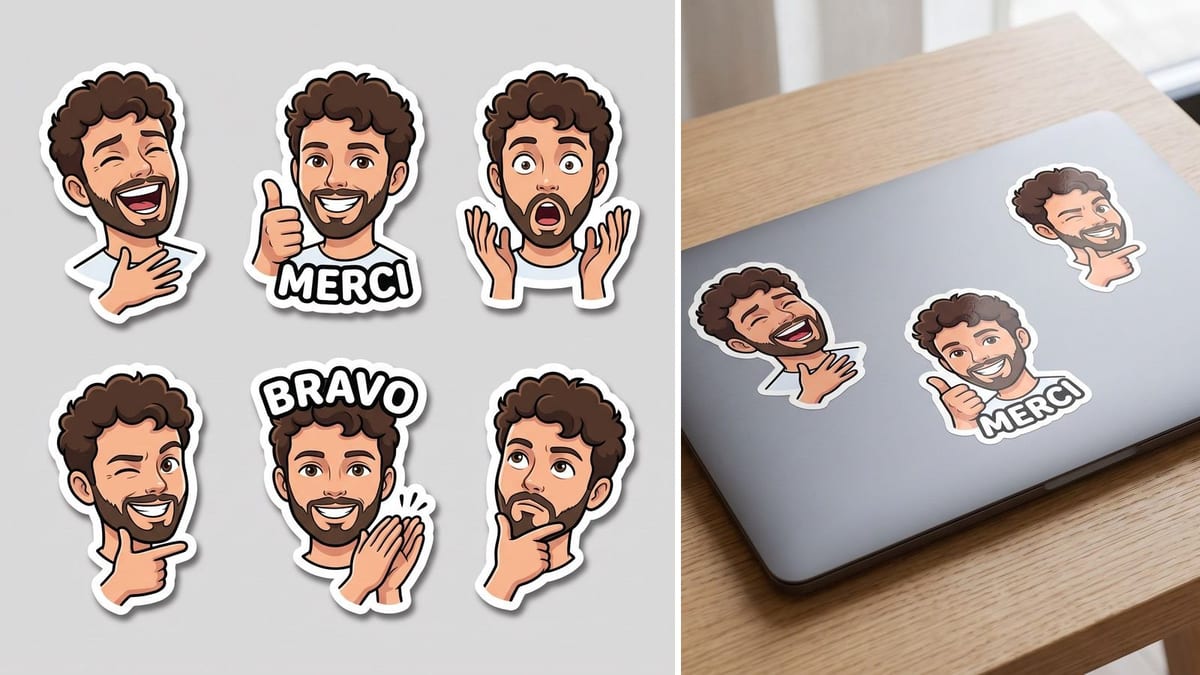
Your photo becomes a sheet of six stickers, six expressions of the same face with their cut border, then a mockup on a laptop. Workflow visible here, no account needed.
Real workflow: a photo from the front, the sheet of six die-cut stickers, then three of them stuck on a laptop. Both images come from the demo, the second starts from the first.
At a glance
A sticker of yourself is the team gift, a creator's merch, the reaction you drop into a chat. This workflow makes six at once: your photo becomes a sheet of six expressions, from a laughing fit to a wink, then a mockup shows three of them on a laptop.
The first hard part is the face. Six stickers generated one by one give six people who vaguely look alike. Here a single image carries all six, the prompt repeats face, hair and beard, and asks for expressions, not characters: that is what makes a sheet rather than a pile of strangers.
The second is the cut: a thick, even white border around each silhouette, the one the blade follows. The two words are written between quotes, the rule learned on the trading card. The sheet and the mockup cost thirty-eight credits.
These are the files of the workflow above, exactly as the models produced them, unretouched. The starting point is shown when there is one.
Starting point
Render
Teams, content creators, families and anyone who wants stickers of themselves without knowing how to draw.
A sharp photo from the front of a single person, plus the expressions and the two words you want on the sheet.
Give a sharp photo from the front
The drawing simplifies the features, it does not invent them: a blurry photo, a profile or sunglasses give six stickers that do not look like you.
List six expressions, not six scenes
Laughing, thumbs up, surprise, wink, applause, thinking. One expression per sticker, head and shoulders: that is what still reads at three centimetres.
Require the cut border
A thick, even white border that follows the silhouette. Without it the printer has to trace every sticker by hand, and the sheet costs more than planned.
Wire the sheet into the mockup
The image port of the second node receives the sheet, and its prompt says "exactly the stickers of the reference". Compare: if it invents one, redo the mockup, not the sheet.
The same canvas, tuned for different needs: each variation is two or three lines of prompt away.
One sheet per colleague, same style and same prompt, and the team has its own reactions for the internal chat: far funnier than a generic downloaded sticker pack.
A content creator prints their sheet and slips it into orders or hands it out at a fair: an object that ends up on a laptop and gets seen for months.
Six expressions of someone you know well, with their quirks and their own words between quotes, printed on a real sheet: thirty-eight credits and a gift nobody forgets.
The same workflow works with a pet photo: six attitudes of the same dog, who stays recognisable from one sticker to the next if the starting photo is sharp.
An existing mascot drawing, run through the workflow instead of a photo, comes out as six reactions for social media and customer support, in a consistent style.
A portrait made by photo to pixel art is used as the reference, and the prompt asks for six stickers in big pixels: retro reactions that own their grid.
Six separate generations give six different faces. One image carrying all six expressions is the only simple way to keep the same person across the whole sheet.
A sticker without an even white border cannot be printed as is: the blade does not know where to go, and tracing by hand costs more than the sheet.
Six sentences means six chances of a typo and stickers unreadable at small size. One short word on two stickers, between quotes, and nothing else.
Without the sheet as a reference, the laptop carries other stickers, pretty and false. The cable between the two nodes is what keeps the mockup honest.
Yes: the sheet comes out as a 2K square with an even cut border, which is what online sticker printing services ask for. Trace each sticker or send the whole sheet depending on the service.
Cut each sticker out of the sheet and export it as a square PNG: both apps accept custom sticker packs. The plain grey background comes off cleanly.
Yes, it is one sentence of the prompt: glossy cartoon here, but watercolour, manga or pixel art work too. Keep the white border and the six expressions, the rest is up to you.
Thirty-eight credits, nineteen per image on Nano Banana Pro. A second sheet with six other expressions costs nineteen more credits.
Because it keeps a face from a reference image to the next and writes a short word without mistakes, the two things the sheet asks for at the same time.
On the demo, all six stickers show the same man. The likeness depends mostly on the photo: sharp, from the front, no sunglasses and no hard shadow on the face.
The sheet comes out at 2048 pixels per side, enough for stickers of five to seven centimetres. For larger ones, run it through the sharpener.
With their consent, yes. A sticker travels fast and far: do not make one of a person who did not ask for it, nor of a public figure.
Make your own stickers with AI
Use this workflowFree account, no card required. The workflow opens pre-filled in your canvas.
 Nano Banana Pro
 GPT Image 2.5 Flare
 Seedream 5 Pro