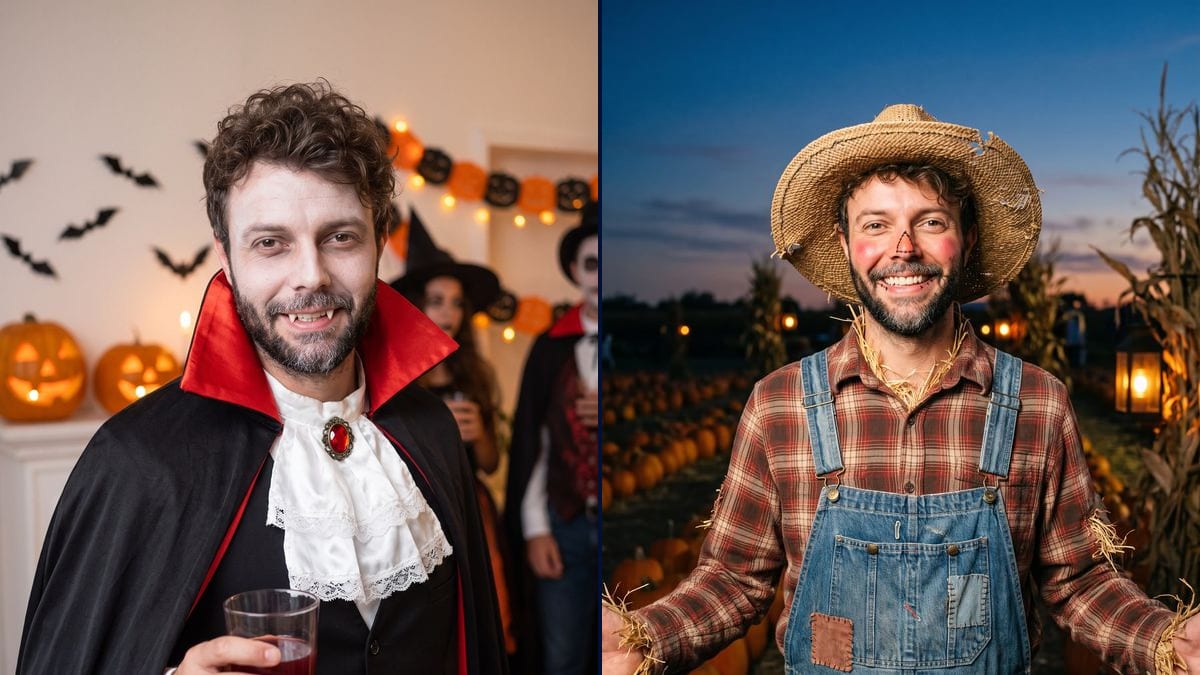
Torn between three ideas
Vampire, scarecrow or pirate: he can't tell which one suits him. Three nodes on the same photo, and the choice is made on his own face rather than on the photo on the packaging.
Your photo as an elegant vampire at a party, then as a scarecrow in a pumpkin patch, with your own face. Decide before October 31. Workflow visible here, no account needed.
Real workflow: a selfie of a man with curly hair and a salt and pepper beard, then the same man as a vampire in a black cape lined in red in front of pumpkins, and as a scarecrow in a straw hat in a field at dusk. The face stays recognisable on both.
At a glance
A Halloween costume often gets decided the night before, in front of a half-empty shop shelf. This workflow lets you try first: your photo comes back as an elegant vampire at a party, then as a scarecrow in a pumpkin patch, with your face, without buying or sewing anything.
The hard part is staying yourself under the make-up. The prompts describe the outfit, the make-up and the setting, ask for light make-up and never describe the face, otherwise the model builds someone else's. Nano Banana Pro holds a face from a single photo: in the demo, you recognise him at first glance on both renders.
For heavier make-up, see special effects make-up; for the house, holiday decorating. Both costumes cost thirty-eight credits.
These are the files of the workflow above, exactly as the models produced them, unretouched. The starting point is shown when there is one.
Starting point
Render
People looking for their costume before October 31, couples and groups of friends who want a shared theme, costume rental shops and content creators.
A sharp, well-lit front-facing photo, and the costume to try described piece by piece with its setting.
Take a front-facing photo
Sharp, in daylight, face clear: no sunglasses, no hood, no hand in front. A phone selfie is enough.
Describe the costume
The outfit piece by piece, the props, the setting of the photo. "A witch" on its own lets the model choose for you.
Keep the make-up light
Pale skin, painted cheeks, small fangs: yes. A mask or full face paint hides the very face you want to see.
List the pieces
The picture you pick becomes the reference: cape, hat, overalls, make-up. You know what to look for in your wardrobe before heading to a shop.
The same canvas, tuned for different needs: each variation is two or three lines of prompt away.
Vampire, scarecrow or pirate: he can't tell which one suits him. Three nodes on the same photo, and the choice is made on his own face rather than on the photo on the packaging.
Each puts their photo in their own node, with two costumes that go together: vampire and victim, farmer and scarecrow. You see whether the pair works before ordering anything.
For a themed party or the office, a front-facing group photo puts everyone in the same world. Handy for agreeing on a shared theme before the 31st.
To switch avatars for a few days in October, without putting on make-up or digging the costume out of the cupboard. The vertical framing fits a round profile picture.
The customer hesitates at the counter between two outfits. The shop takes a photo and shows both costumes on their face, which saves repeated fittings during Halloween week.
A series of costumes on their own face, posted in the days before the 31st, and followers vote for the one they will actually wear to the party.
Writing your eye colour or the shape of your nose pushes the model to rebuild a face from the text. Describe the outfit and the setting, the photo takes care of the face.
Rotting zombie, mask, full face paint: the costume may look great, but you no longer recognise yourself. Keep the make-up light or partial.
A franchise hero or the vampire from a specific film is protected. Describe a generic costume, cape, high collar, jabot, and the result stays yours.
Sunglasses, a cap, backlight, a three-quarter view: the model invents what it can't see. A front-facing photo in soft light gives the best render.
No: the prompt asks for the same face and the same hair as in the photo, recognisable under the make-up. In the demo, he is recognisable at first glance in both costumes.
Yes: duplicate a node and replace the outfit and the setting, witch, mummy, pirate, skeleton. One node per costume.
Yes: one photo per person, each in its own node with its costume. A group photo works too if everyone faces the camera.
Thirty-eight credits, nineteen per render on Nano Banana Pro. A third costume on the same photo costs nineteen more.
Because it holds a face from a single photo while changing the outfit, the make-up and the setting around it. In the demo, the face is recognisable on the first try on both renders.
Better not: those characters are protected. Generic costumes work very well, vampire, witch, mummy, pirate, and you can describe them as precisely as you like.
No, it is a picture to help you choose. Use it as a reference to put the outfit together from what you already own or what you find in a shop.
Yes: replace the party or the pumpkin patch with a haunted house, a misty graveyard or your own decorated living room. The setting goes at the end of the prompt.
Try on a Halloween costume on your photo with AI
Use this workflowFree account, no card required. The workflow opens pre-filled in your canvas.
 Nano Banana Pro
 Flux Kontext
 Seedream 5 Pro
 GPT Image 2.5 Sunburst