Wedding day makeup
She's getting married in June and hardly ever wears makeup. Before the trial with the makeup artist, she compares a light look and a dressier one to know which way to go.
Your portrait with natural makeup, then an evening look with bronze smoky eyes and matte red lips. To choose colours before you buy. Workflow visible here, no account needed.
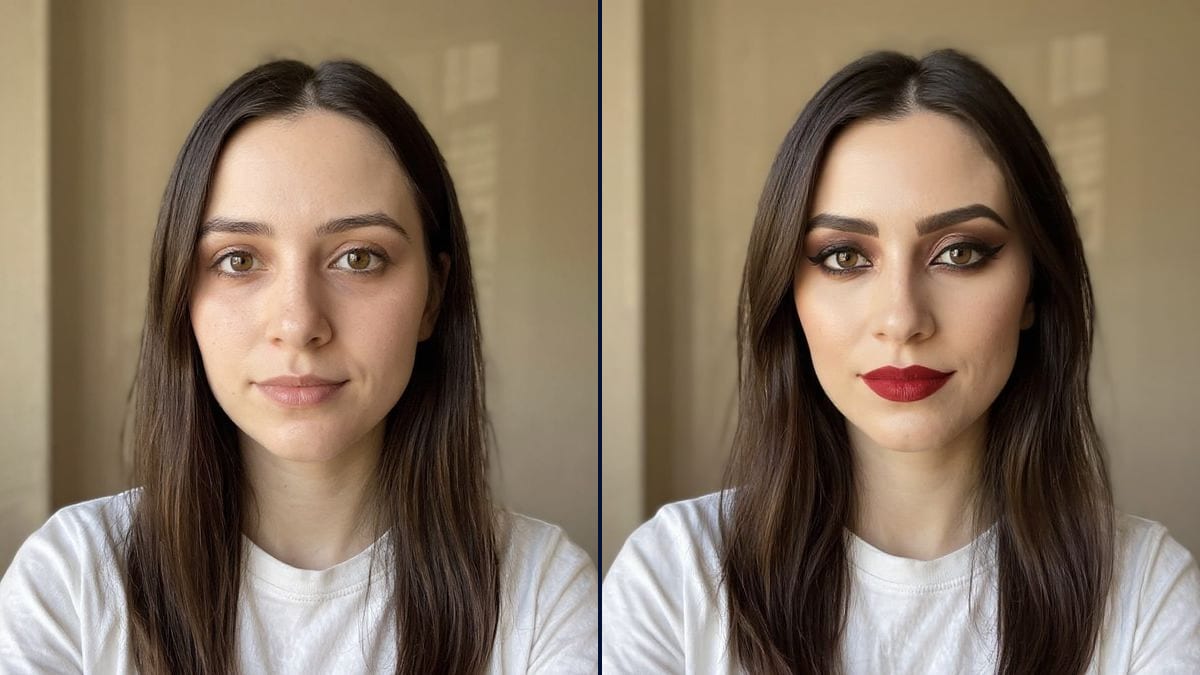
Real workflow: a portrait of a dark-haired woman with no makeup in a white T-shirt, then the same woman in natural makeup and in an evening look with bronze smoky eyes and matte red lips. The face is retouched: smoother skin, stronger brows.
At a glance
A lipstick swatched on the back of your hand says little about how it will look on your face, and an eyeshadow seen on an influencer says even less. This workflow starts from YOUR bare-faced portrait and shows two directions: natural everyday makeup, and a bolder evening look.
The hard part is applying makeup without transforming the face. Image models readily confuse makeup with retouching: smoothed skin, slimmer features, redrawn brows. The prompt describes each product and asks for the same face. Flux Kontext gets the colours right, but in the demo it also retouched the face, so read it as a colour idea.
To go further, try a different eye colour or a new hairstyle. Both looks cost twelve credits.
These are the files of the workflow above, exactly as the models produced them, unretouched. The starting point is shown when there is one.
Starting point
Render
Women weighing a wedding or evening look, makeup artists preparing a trial, small cosmetics brands.
A bare-faced front-facing portrait in daylight, and each product described with its colour.
Start bare-faced
Front-facing, no makeup, in daylight. The model adds better than it replaces.
Describe product by product
Base, eyes, lashes, cheeks, lips: one product and one colour per area. "Evening makeup" alone leaves too much to the model.
Protect your features
Add "same eyebrows, same freckles, no retouching of the face". Without it, the model smooths and redraws.
Compare with the photo
Put the render next to the original. Keep the colours you like, even if the face has shifted a little.
The same canvas, tuned for different needs: each variation is two or three lines of prompt away.
She's getting married in June and hardly ever wears makeup. Before the trial with the makeup artist, she compares a light look and a dressier one to know which way to go.
The makeup artist sends two directions on the client's portrait before the appointment. The trial starts from a colour they picked together instead of a blank page.
She has never dared wear red. A matte red on her own photo, and she knows whether to buy it or stick with nude, without testing ten tubes in the shop.
A dressy evening is coming up. She tries bronze smoky eyes and a deep red on her own face to see whether the two together are too much, before buying the palette.
A small brand shows its shades on portraits of volunteer customers for its social accounts, each render checked against the original photo before posting.
The character wears 1980s makeup. The actress and the production's makeup artist see the look on her own face before the first trial in the makeup trailer.
The model picks everything, and often too much. Name the eyeshadow, the liner, the blush and the lip colour.
The new look mixes with the old one and the colours blur. Take your makeup off for the photo.
In the demo, the model also retouched the features. Judge the colours, not the effect on your face shape.
A portrait under a yellow bulb throws every shade off. Take the photo by a window, in daylight.
It shouldn't, but in the demo it did: a fuller face, thicker brows, freckles almost gone. In the evening look especially, the likeness drops.
As an idea, yes: nude and peach on one side, bronze and deep red on the other. An exact brand shade can't be guaranteed in a picture.
The natural prompt asks for them, and the model still almost erased them. Insist in the prompt, and run it again if needed.
Twelve credits, six per render on Flux Kontext. A third look on the same photo costs six more.
Because it edits the image without rebuilding all of it, which keeps the hair, the T-shirt and the background. With makeup, it couldn't resist retouching the features: that is its limit on this template.
Yes, by describing it area by area. The model doesn't copy a reference photo; it follows the description.
Yes: describe shades that suit, a plum blush or a copper bronze for instance, and ask to keep the skin tone.
The format of your photo, here 3:4, a vertical portrait like the ones phones take.
Try on makeup on your photo with AI
Use this workflowFree account, no card required. The workflow opens pre-filled in your canvas.
 Flux Kontext
 Nano Banana 2.1
 GPT Image 2.5 Sunburst