Before buying the lights
You see on your own house whether the lights go along the gutter or around the windows, and how many metres you need, before reaching the till.
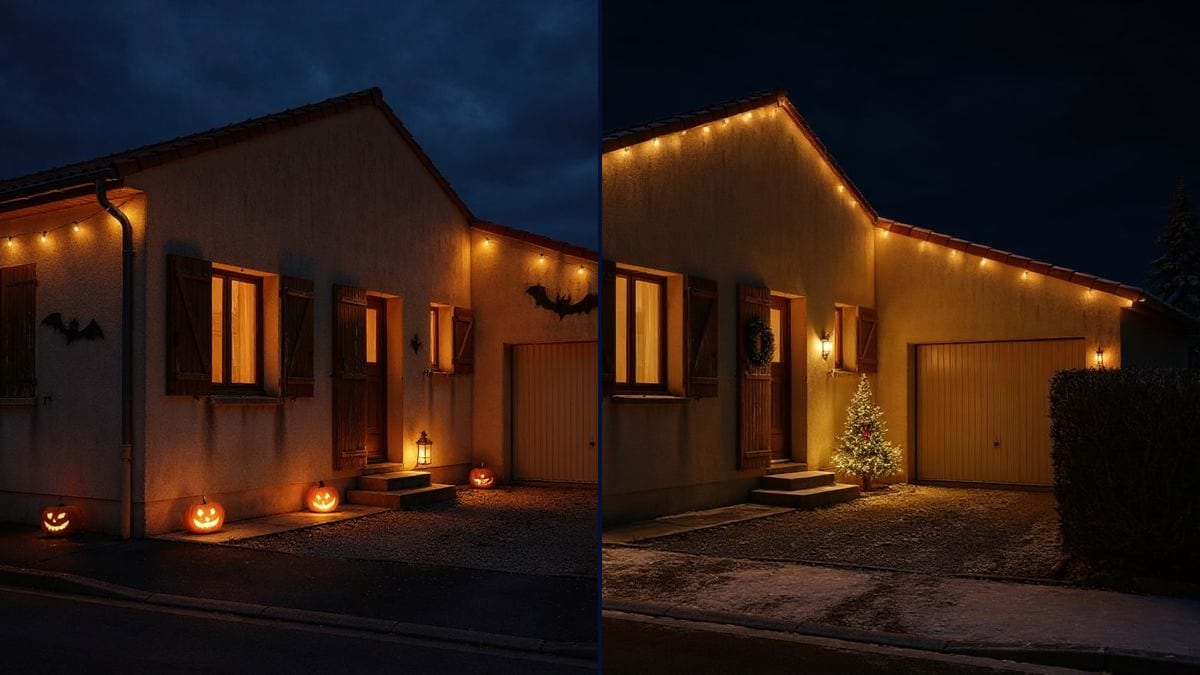
Your house front, decorated for Halloween and then for Christmas, the house unchanged. To choose lights and decorations before you buy. Workflow visible here, no account needed.
Real workflow: a daytime photo of a single-storey house, then the same house decorated for Halloween at dusk and for Christmas at night. Walls, shutters and garage don't move.
At a glance
Lights along the gutter or around the windows? Pumpkins on the steps or lanterns? This workflow starts from a daytime photo of your house front and shows it decorated twice, for Halloween at dusk and for Christmas at night, before you buy anything.
The hard part is keeping YOUR house. A model that rebuilds the picture changes the shutters or moves a window, and you judge the decorations on another house. Flux Kontext adds the decorations and changes the light while leaving walls, roof and garage as they are.
To renovate the front itself, see the house front simulation; for a video of night falling, day to night. Both decorations cost twelve credits.
These are the files of the workflow above, exactly as the models produced them, unretouched. The starting point is shown when there is one.
Starting point
Render
Homeowners and tenants, seasonal decorators and rental owners who want to see the decorations before putting them up.
A straight-on daytime photo of the house front, and the list of decorations wanted with their place.
Photograph the house by day
Straight on, the whole house in frame, no car in front of the door. The evening light is added afterwards by the model.
Describe each decoration and its place
Pumpkins on the steps, lights along the gutter, a wreath on the door. One place per item, or the model puts them everywhere.
Pick the time and the light
Blue dusk for Halloween, dark night for Christmas, warm light in the windows: that is what makes the lights glow.
Compare and buy the right amount
Two decorations on the same house: you see how many metres of lights you need and where. Add a node for a third look.
The same canvas, tuned for different needs: each variation is two or three lines of prompt away.
You see on your own house whether the lights go along the gutter or around the windows, and how many metres you need, before reaching the till.
A town or a neighbourhood runs its decorations contest: each family tries two or three ideas on its house front before getting started.
The professional who installs the lights shows the client the result on their house before pricing the job and climbing the ladders.
The owner of a cottage shows the listing decorated for Christmas, and sells the festive season with a picture that makes people want to book.
The house decorated in the snow becomes the photo on a greeting card, sent to family and friends in December.
A shop tries its Halloween decorations on a photo of its front, alongside the redone shop window for the rest of the year.
Without items or places, the model loads every surface with decorations. Name each item and where it goes.
At night the front is dark and the model guesses its shutters and door. Take it by day: the night and the lights are added afterwards.
A cropped house doesn't show where the roof lights or the garage go. The whole front in frame, with a bit of street in front.
Flux Kontext keeps the house and adds little snow. If you want a snowy landscape, accept that the scene will be rebuilt more.
No: walls, shutters, door, roof and garage stay those of the photo. Only the decorations and the light are added.
Yes: Easter, a birthday, a garden wedding. Describe the decorations and where they go, as for Halloween.
The snow stays light, mostly on the ground: Flux Kontext keeps the house and adds little snow on the roof. For a snowy landscape, another model rebuilds more of the scene.
Twelve credits, six per decoration on Flux Kontext. A third look on the same photo costs six credits more.
Because it adds things and changes the light while keeping the photo pixel for pixel: you decorate YOUR house, not one that looks like it.
In the demo, yes: same brown shutters, same door, same garage, same hedge in both looks. Only the decorations and the light change.
The format of your photo, here 4:3. A vertical photo gives a vertical picture.
Yes: photograph the balcony straight on and describe the decorations in place, lights on the railing, a tree in the corner.
Preview your house decorated for Halloween and Christmas with AI
Use this workflowFree account, no card required. The workflow opens pre-filled in your canvas.
 Flux Kontext
 Nano Banana Pro
 GPT Image 2.5 Sunburst
 Seedream 5 Pro