The maker's online shop
Each new piece photographed on the workbench with a phone becomes a packshot on white and a worn photo for the product page, without renting a studio or macro gear.
A phone photo of a jewel becomes a macro packshot on a white background and a worn photo, same setting and same stones. The workflow is shown here, no account needed.
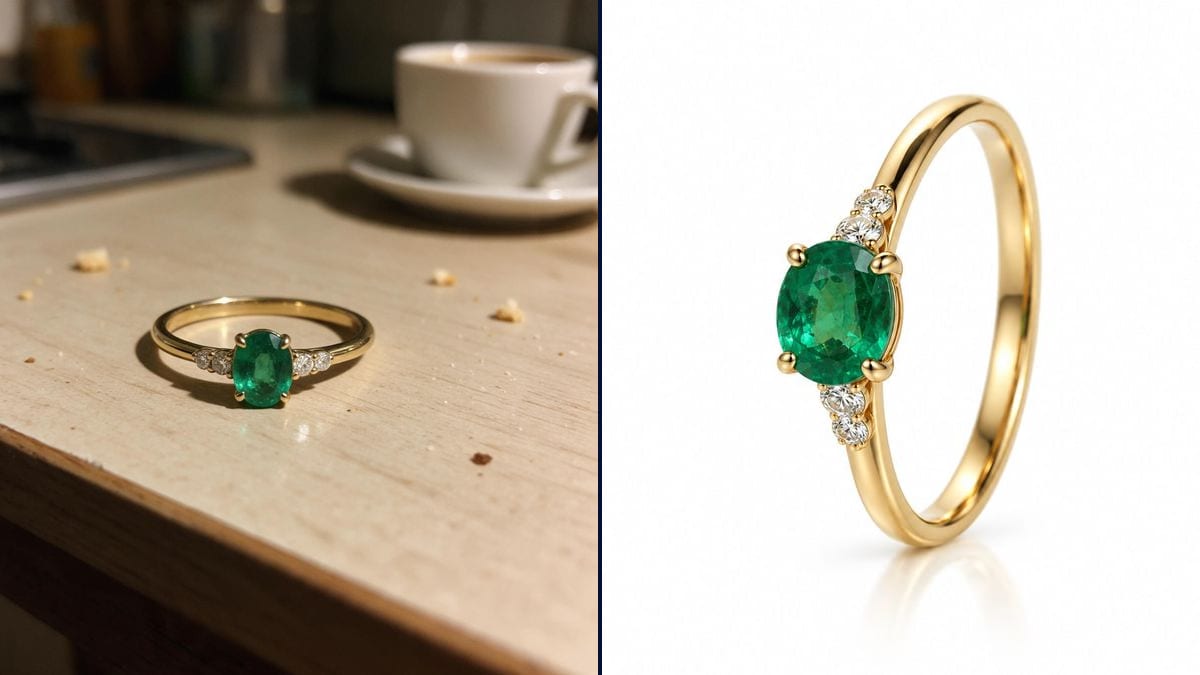
Real workflow: a gold emerald ring photographed on a kitchen table, then as a macro packshot on white and worn on a hand. Four claws, one oval emerald and two small diamonds on each side, as on the original.
At a glance
Jewelry photographs badly on a phone: gold turns yellow, the stone goes dull, the kitchen shows up in the metal. A real packshot needs a shooting table, reflectors and a macro lens. This workflow starts from the phone photo and returns the packshot on a white background, then the ring worn.
The hard part is faithfulness. A jewel for sale cannot gain a stone or change its setting in its photo. The prompt counts the claws and stones and describes the light. The packshot goes through GPT Image 2.5 Sunburst, which places the object alone on white: Nano Banana Pro kept the kitchen table of the photo.
For another object, see the product photo; for a video that turns around it, the 360° product video. The two photos cost twenty-eight credits.
These are the files of the workflow above, exactly as the models produced them, unretouched. The starting point is shown when there is one.
Starting point
Render
Jewelry makers, online shops, jewellers and second-hand sellers who photograph their pieces on a phone.
A sharp photo of the jewel, even badly lit, and the count of stones and setting.
Photograph the jewel sharp, even badly lit
On a phone, up close, stone and setting readable. The background does not matter: it disappears in the packshot.
Count the setting and the stones
Number of claws, shape and colour of the stone, small diamonds on each side: the prompt writes them down, the render keeps them.
Describe the light, not the gear
Warm polished gold, transparent stone, sparkling diamonds, lights outside the frame. Otherwise the model draws the light box.
Compare stone by stone
Put the render next to the photo and count. One stone too many on a product page misleads the buyer.
The same canvas, tuned for different needs: each variation is two or three lines of prompt away.
Each new piece photographed on the workbench with a phone becomes a packshot on white and a worn photo for the product page, without renting a studio or macro gear.
Etsy, Amazon or a Shopify store ask for a clean white background: the packshot comes out in the right format, and the worn photo serves as a secondary image.
An inherited or resold ring gets a photo worthy of its value for a listing, keeping exactly its setting and its stones.
The seller photographs the window display with a phone and posts the new arrivals on social media every week, without a photographer.
The chosen ring is shown worn on a hand, to picture it before buying or to prepare an announcement for family and friends.
A whole collection goes under the same light and on the same background, for a catalogue that stays consistent from piece to piece.
Nano Banana Pro kept the kitchen table of the photo three times. For a packshot on white, use GPT Image 2.5 Sunburst.
Writing "light box" makes the model draw the light box. Describe the effect you want and keep the lights outside the frame.
Without a count, the model happily adds a diamond or widens the setting. Name every stone.
A jewel whose photo does not match the piece delivered comes back, and trust with it.
The same recipe works: describe the chain, the clasp and the stones. For a worn necklace, specify the neckline and the length.
Yes: replace the white background with velvet or stone in the prompt. White remains the marketplace standard.
In the demo, yes, the emerald stays deep green. Give the exact colour in the prompt, a royal blue sapphire or a pigeon blood ruby.
Twenty-eight credits: nine for the packshot on GPT Image 2.5 Sunburst in high quality, nineteen for the worn photo on Nano Banana Pro.
Sunburst places the object alone on white without keeping the original background; Nano Banana Pro holds the hand and the ring together better in a scene.
In the demo, yes: thin band, oval emerald with four claws, two small diamonds on each side.
Yes, black velvet flatters gold. Describe the reflections you want: on a dark background, the metal must shine without drowning.
No: a sharp phone photo is enough. The sharpness and the light of the packshot come from the render.
Photograph jewelry with AI
Use this workflowFree account, no card required. The workflow opens pre-filled in your canvas.
 GPT Image 2.5 Sunburst
 Nano Banana Pro
 Flux Kontext
 Seedream 5 Pro