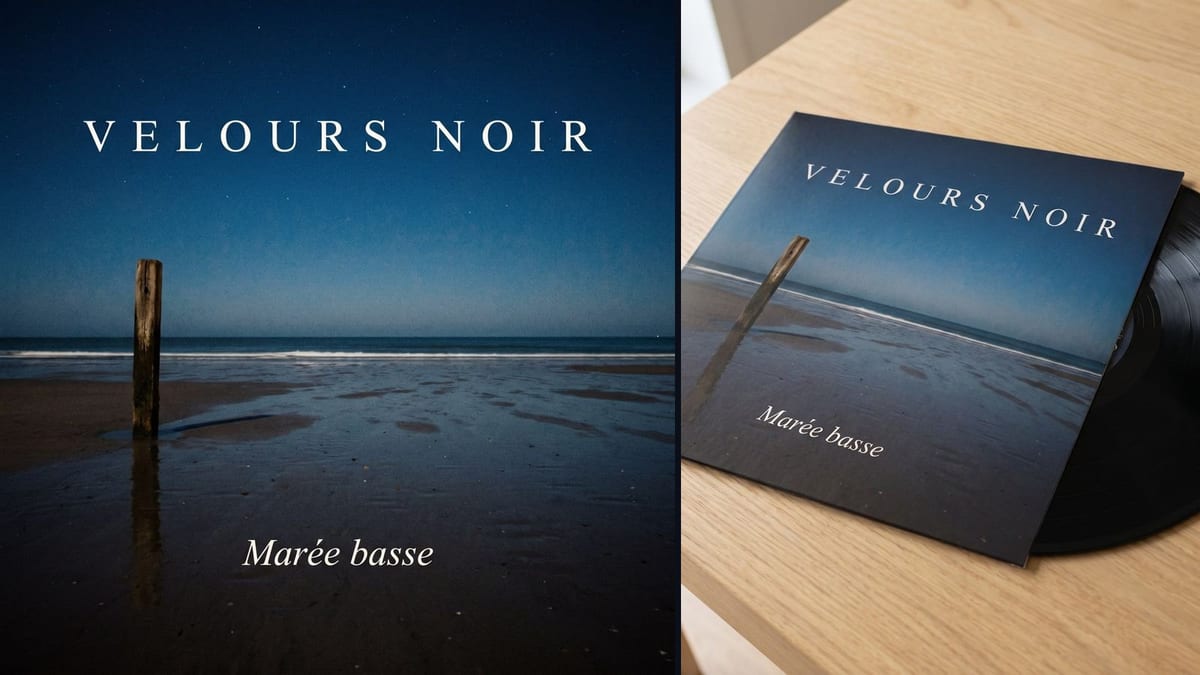
The single out on Friday
A cover for thirty-eight credits, the same afternoon, with a vinyl mockup for the announcement post, when the designer has no slot before the release.
Artist name, title and mood in a Text node, the square cover by Nano Banana Pro, then the vinyl that carries exactly that artwork. Workflow visible here, no account needed.
Real workflow: the square cover of an invented album, night beach and two lines of text, then the vinyl that carries it letter for letter. Both images come from the demo.
At a glance
A song without a cover is not an album yet. This workflow makes the artwork in two images: the square cover, with the artist name and the title written cleanly on the image, then the vinyl record that carries it, to see the object before pressing it or sending it to the platforms.
The first hard part is the text: name and title between quotes, in few words, and a ban on writing anything else, otherwise the model adds a label logo, a barcode and an invented tracklist. The background is dark, so Nano Banana Pro: on a dark flat area, Sunburst leaves black smears.
The second is the mockup's fidelity: the vinyl starts from the rendered cover, wired into its image port, and its prompt forbids redrawing the artwork. Both images cost thirty-eight credits, and the music is made with the Song node.
These are the files of the workflow above, exactly as the models produced them, unretouched. The starting point is shown when there is one.
Render
Independent musicians, labels, DJs and podcasters releasing a track without a designer at hand.
The artist name, the title and a one sentence mood, plus a photo if you want to be on the cover.
Write the name and title between quotes
Two short lines, capitals for the name if you want clean letters. Then a ban on writing anything else: that is what keeps the fake logo and the barcode away.
Describe one image, not a playlist
A cover is a scene: a place, a light, an object. Three moods in the same prompt give a collage nobody remembers.
Place the text with margins
Ask for generous margins and text over a quiet area of the image. A title sitting on the busiest detail becomes unreadable as a 300 pixel thumbnail.
Wire the cover into the mockup
The image port of the second node receives the cover, and its prompt says "exactly the reference image". Compare: if the vinyl carries another cover, redo the mockup, not the cover.
The same canvas, tuned for different needs: each variation is two or three lines of prompt away.
A cover for thirty-eight credits, the same afternoon, with a vinyl mockup for the announcement post, when the designer has no slot before the release.
One strong image, two lines of text, and a mockup that shows the object: that is what a pre-order needs, before knowing whether the pressing will happen.
The same square workflow makes the artwork of a new season, with the show name and the season number as text, in line with the podcast voice.
A song out of the Song node deserves a cover: title and mood copied into the Text node, and the album exists within the hour.
A first cover, then the next ones wired to it as a reference to share typography and framing, with a number that changes: a series recognisable in the first second.
The cover of an album that does not exist yet, with someone's name and a private title, printed on a real empty sleeve: a gift that stays on a shelf.
With no ban, the cover gets an invented label logo, a barcode and unreadable legal text. Name, title, and nothing else: the rest is added at print time.
It writes perfect text on a light background, and leaves black smears on a dark flat area, measured three times. Nano Banana Pro on a night cover.
Without the cover as a reference, the vinyl carries another image, pretty and false. The cable between the two nodes is the whole workflow.
Typography over the surf or over the face disappears as a thumbnail. A quiet area and margin: that is the rule of every cover, AI or not.
The image comes out square, in 2K, with no logo or stray text, which meets the usual distributor rules. Check the minimum size your distributor asks for, often 3000 pixels: the upscaler gets it there.
Yes, by adding a Media node and wiring it into the image port of the cover node with the prompt "the person from the reference". The rest of the workflow does not change.
A third node with the cover as a reference, which keeps the image and the typography and adds the tracklist, written in the prompt. Keep the list short, about ten lines is what an image model writes without mistakes.
Thirty-eight credits, nineteen for the cover and nineteen for the vinyl, on Nano Banana Pro. A back cover or one more variant costs nineteen credits.
Because a mockup sells the album before it exists: in a post, a pre-order or a press kit. And because it measures the model's fidelity: if it carries the artwork letter for letter, the rest will follow.
On the demo, both lines are exact on the cover and on the vinyl. A long title or an accented name can go wrong: proofread before sending the file to the distributor.
A square of at least 3000 pixels at most distributors. The cover comes out in 2K: run it through the upscaler before sending.
No, and the demo prompt does not: it describes a scene and a typography, not an existing cover. A famous cover is a protected work, like a label logo.
Make your album cover with AI
Use this workflowFree account, no card required. The workflow opens pre-filled in your canvas.
 Nano Banana Pro
 GPT Image 2.5 Flare
 Seedream 5 Pro