The food blog
Every recipe published with its printable card and its Pinterest pin, in the same layout: eighteen credits per recipe and a blog that looks edited.
Your dish photo becomes a recipe card with photo, ingredients and steps, then a Pinterest pin. Workflow visible here, no account needed.
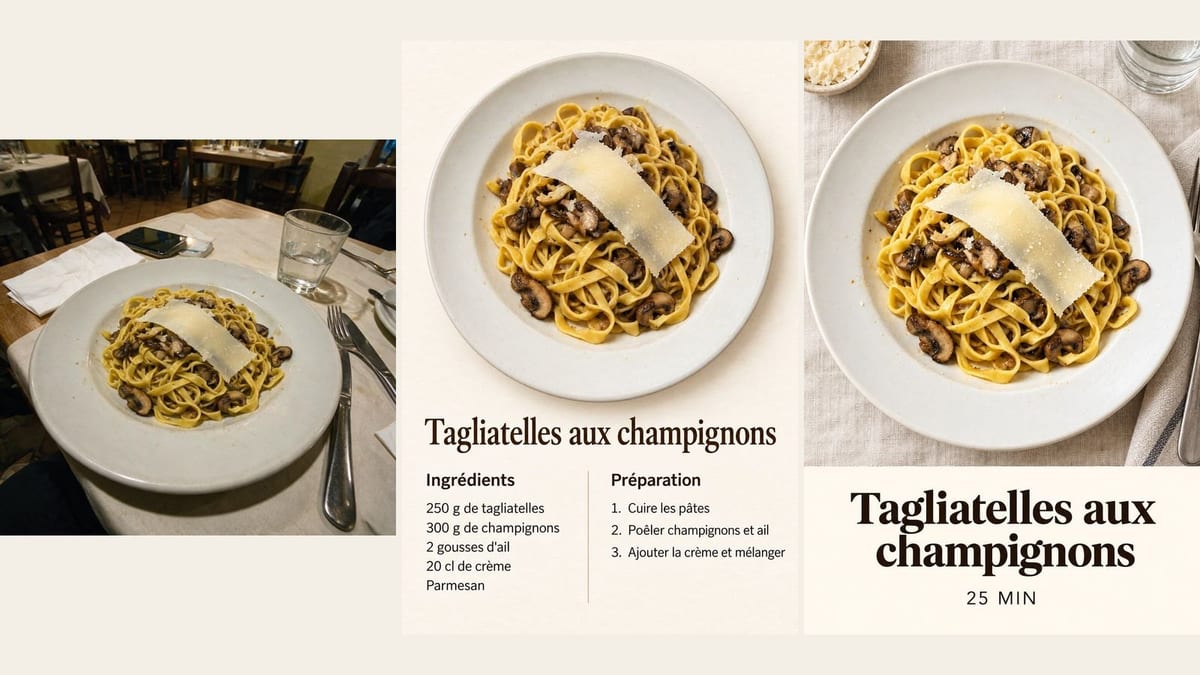
Real workflow: mushroom tagliatelle photographed at a restaurant, then the recipe card with eleven exact lines of text, and the vertical "25 MIN" pin. The dish is the same, better photographed.
At a glance
A food blog, a restaurant or a family keeping its recipes all need the same thing: a clear card with a nice photo of the dish, the ingredient list and the steps. This workflow starts from a phone photo and delivers the printable card, then the vertical Pinterest pin.
The first hard part is the text: it is the most text heavy card in the catalogue. A light background, where GPT Image 2.5 Sunburst writes without mistakes, and each line between quotes, nothing else. On the demo, all eleven lines are exact.
The second is the dish: it stays yours, rephotographed from above, same toppings and same plate. For the photo alone, see food photography; for a whole menu, the restaurant menu. The two images cost eighteen credits.
These are the files of the workflow above, exactly as the models produced them, unretouched. The starting point is shown when there is one.
Starting point
Render
Food bloggers, restaurants, food brands and families who want clean recipe cards without layout software.
A photo of the dish and the recipe in short lines: title, ingredients with quantities, steps.
Photograph the dish as it is
At a restaurant or at home, on a phone: the model rephotographs the dish from above. The toppings just need to be clearly visible.
Write the recipe in short lines
A title, five to eight ingredients with their quantity, three to five steps of a few words. Short lines get written without mistakes.
Put each line between quotes
The prompt gives each line exactly as it must appear, and forbids any other word. Otherwise the model adds a fake logo or a website address.
Proofread before printing
Every quantity, every unit. A "200 ml" turned into "20 ml" changes the recipe: that is the check that matters.
The same canvas, tuned for different needs: each variation is two or three lines of prompt away.
Every recipe published with its printable card and its Pinterest pin, in the same layout: eighteen credits per recipe and a blog that looks edited.
The dish of the week as a card slipped in with the bill or posted, so customers cook it at home and come back to eat it.
Grandmother's recipes photographed one by one and turned into cards, for a book to print and give to the whole family.
Every workshop leaves with the card of the day's recipe, its photo and its steps, without an evening spent in layout software.
A recipe featuring a product, as a card for the website and a pin for Pinterest, where recipes are among the most searched content.
The card split up becomes the pages of a carousel: photo, ingredients, steps, one page each.
A whole paragraph in an image multiplies mistakes and becomes unreadable. Three to five steps of a few words each.
Sunburst leaves black smears on dark flat areas. Cream or off-white background for the card, that is the rule.
An ingredient list without quantities is useless in a kitchen. Every line with its number and its unit.
A changed number changes the recipe. Proofread every line before printing or posting.
Beyond eight ingredients or five steps, the text gets small and mistakes more likely. Make two cards, ingredients and method, or one card per part.
Yes, the lines are words in the prompt: one card per language, same photo, same layout, nine credits each.
The model rephotographs the dish for the card. To keep your photo identical, place it next to the text in layout software.
Eighteen credits, nine per image on GPT Image 2.5 Sunburst at high quality. One more card, in another language, costs nine credits.
Because it writes long text without mistakes on a light background and keeps the dish recognisable, for less than Nano Banana Pro.
On the demo, the card's eleven lines and the pin's two are exact. Still proofread every quantity.
The card at 3:4, to print in A5 or A4, and the pin at 2:3, Pinterest's vertical format.
Yes on the demo: same tagliatelle, same mushrooms, same parmesan shaving, same plate, simply seen from above and better lit.
Make an illustrated recipe card with AI
Use this workflowFree account, no card required. The workflow opens pre-filled in your canvas.
 GPT Image 2.5 Sunburst
 Nano Banana Pro
 Seedream 5 Pro