The lunchtime slate
The format that gets photographed and posted every morning. The demo's render imitates real chalk, with its irregular strokes, which a computer typeface never manages convincingly.
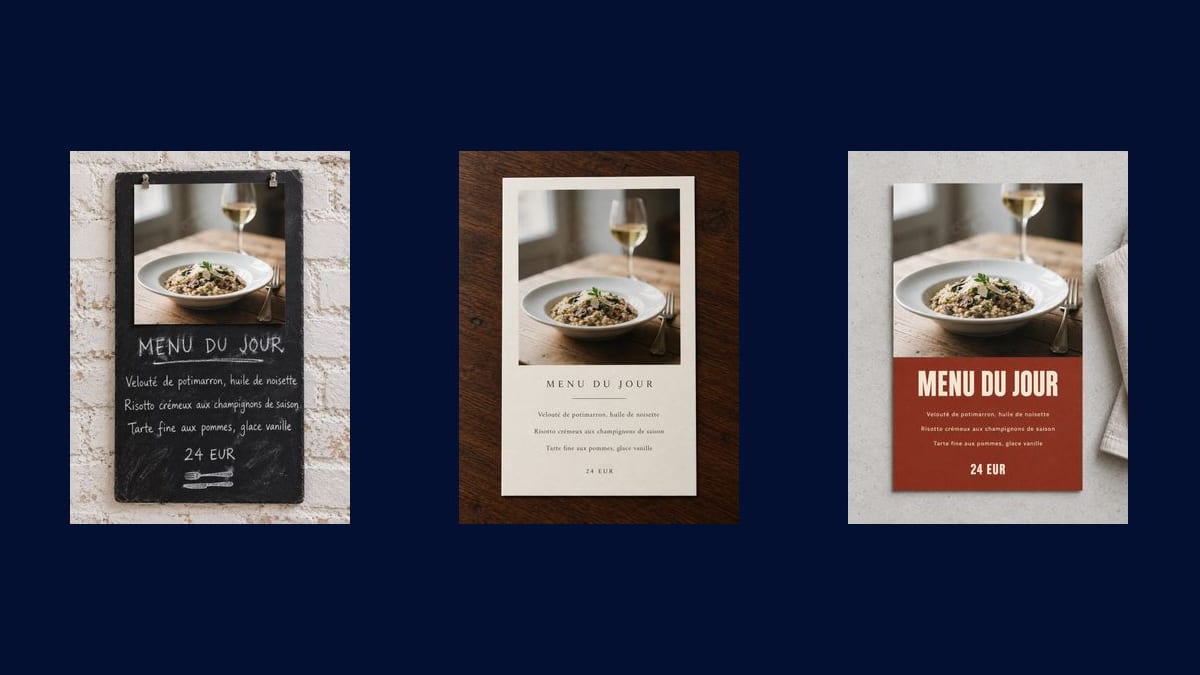
A photo of one of your dishes goes into three Image nodes that turn it into three daily menu cards, dishes and price written into the image: bistro slate, elegant card, modern card. The full workflow is visible here, no account needed.
The real workflow: the photo of the dish wired to three GPT Image 2.5 Flare nodes, one layout per node. The three cards are the demo's own, menu and price written into the image.
At a glance
The daily menu changes on Monday, and it is almost always done in a rush: a text file printed crooked, a slate scrawled in two minutes, a photo posted with no layout at all. This workflow starts from the photo of a single dish and comes back with three complete cards, dishes and prices included, ready to go in the window, on social media or on the tables.
The three layouts do not serve the same place: the bistro slate is photographed and posted, the elegant card sits on the table, the modern card with its colour block is read from across the street. All three start from your photo, which fills the upper half and stays exactly yours.
A daily menu is redone every week, and that rhythm decides the model. GPT Image 2.5 Flare at the standard tier writes the eight lines of the menu with their accents for three credits, where GPT Image 2 asks eight without doing better. The three cards cost nine credits.
These are the files of the workflow above, exactly as the models produced them, unretouched. The starting point is shown when there is one.
Starting point
Render
Restaurants and cafés that change their menu often and have no designer.
Photograph ONE dish
Not the whole table, not three plates: one dish, framed tight, in daylight near a window. It is what fills the upper half of all three cards.
Replace the menu between quotes
Starter, main, dessert, price: everything between quotes after the word "exactly" is copied as is. One line per dish, accents included.
Generate the three layouts
"Generate all" produces the slate, the elegant card and the modern card in one go. You pick the one that suits your room, not the one that suits the model.
Proofread before you display
Every dish name and the price are checked on the render, not on the instruction. A letter that falls badly is fixed by changing that text and rerunning that single node.
The same canvas, tuned for different needs: each variation is two or three lines of prompt away.
The format that gets photographed and posted every morning. The demo's render imitates real chalk, with its irregular strokes, which a computer typeface never manages convincingly.
Cream paper, a thin serif, plenty of white space. It is the layout that suggests a restaurant that looks after its service, even when the menu changes every day.
Colour block, massive lettering, photo edge to edge. It reads from the pavement opposite, which is exactly what you ask of a card taped to the glass.
The portrait format of the three cards is the one stories and reels use. You generate in the morning, you post at noon, and the evening menu follows the same route with no new layout.
Same mechanic, different content: replace the three lines with three cocktails or three desserts and keep the photo that goes with them. The series holds because the layout never moves.
A wedding, a company lunch, a festive set menu: the daily card becomes the menu of the evening, and your event poster takes care of the announcement.
Three plates, glasses and hands in frame give an unreadable photo once shrunk to a third of a card. One dish, framed tight, is enough and works better.
Starters, mains, desserts, drinks and allergens on a single image: the letters distort and nothing is readable. The workflow makes a daily menu, not a book.
A badly formed figure on a card displayed in the window is the kind of mistake that gets noticed at once. Read the price on the render before printing or posting.
Professional printing wants a vector file and a bleed margin. For a window, a story or a sheet printed at the counter, the render is enough as it is.
No, and that is the limit to know: past a dozen lines the letters distort. This workflow makes daily menus and short set menus. A full restaurant menu belongs in a word processor.
On short lines given between quotes, yes, and the demo's three cards show it in French. Read them anyway: an image model can always get a letter wrong, and a wrong price shows.
No. A phone near a window is enough, and food photography is the sheet to open if you want to improve the photo of the dish before laying it out on the card.
Nine credits for the three layouts, three per card. Redoing the only card you keep, every week, therefore costs three credits.
Yes, and that is the point: keep the canvas, change the photo and the three lines every week. The card is recognised from one week to the next without anyone laying it out again.
Yes, in any of the site's fourteen. Give the lines in the language you want and say so in the instruction, exactly as the demo does in French.
About a thousand pixels wide in portrait, which is enough for a story, a window or an A5 sheet. The Enhance node enlarges it without reinventing the text if you print bigger.
Yes, and the window format is made for it: one photo, three lines, one price. Nothing in the workflow assumes a restaurant dining room.
Design your restaurant menu with AI
Use this workflowFree account, no card required. The workflow opens pre-filled in your canvas.
 GPT Image 2.5 Flare
 Nano Banana Pro
 Seedream 5 Pro