Another colour or fabric
Replace "off-white cotton saree with small red polka dots and a plain red border" with the saree you want, for example "deep green Banarasi silk saree with a gold border" or "pale yellow cotton saree". Not tested.
Your selfie as a retro saree portrait: white cotton with red polka dots by a blue door, black silk with a gold border. 38 credits for both, flaws shown.
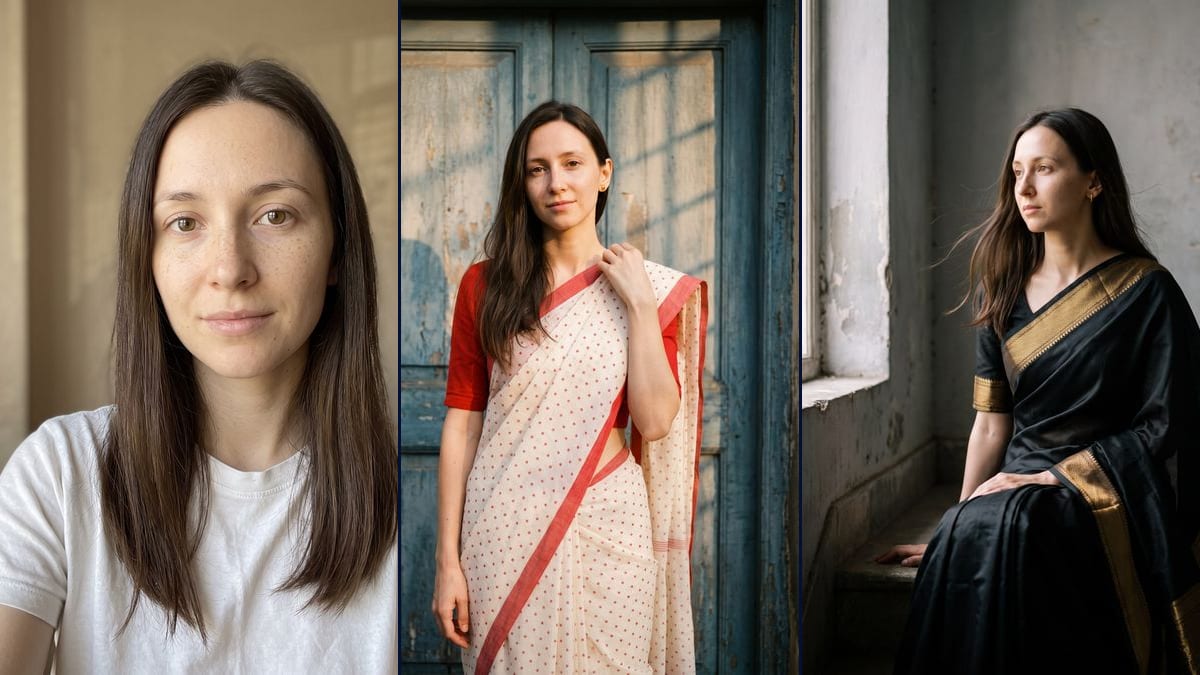
Real workflow: a woman with long dark brown hair in a white T-shirt against a beige wall, then the same woman in a white cotton saree with red polka dots in front of a peeling blue door, and in a black silk saree with a gold border, seated by a window. In both renders her freckles are fainter than in the photo.
At a glance
The "Saree Pose AI Photo Prompt" trend takes a front-facing selfie and turns it into a retro saree photoshoot: warm light from the side, natural skin, a soft blurred background, and simple poses like adjusting the pallu, the loose end of the saree draped over the shoulder, or sitting against a wall. According to the page videosi.io gives it, our only dated source, a first wave ran around Gemini from 13 to 18 September 2025, and the trend has been back since 6 November 2026. Here you upload your selfie and an image model remakes the photo, without going through Gemini.
You get two still pictures. The first follows the trend's recipe: an off-white cotton saree with small red polka dots, a red blouse, one hand on the pallu, in front of an old blue door in late afternoon light. The second is a variation in a black silk saree with a wide gold border, seated on a step by a window. The prompt leaves out the bindi and any religious mark, for neutrality. On the demo the face is faithful, but the freckles fade in both renders, and the stud earrings turn into hoops in the black one.
For another portrait session, see the AI photoshoot or the professional portrait. To try on one specific garment from its product photo, use the virtual try-on. For more trend portraits there is the colour sweater portrait and the 1920s Gatsby toast, and to act in a scene rather than pose, put yourself in a film. Both renders cost 38 credits, see pricing.
These are the files of the workflow above, exactly as the models produced them, unretouched. The starting point is shown when there is one.
Starting point
Render
People who want to try the saree photoshoot trend on their own selfie for a story, a post or a profile picture, without going through Gemini.
A sharp selfie of you or of someone who agrees, facing the camera, well lit, framed head and shoulders, and a description of their hair in the prompt (colour, length, texture). The photo is optional.
Upload a well-lit, front-facing selfie
The trend starts from a selfie taken straight on, and that is what the model picks up best. Avoid sunglasses, hair over the eyes and blurry photos. The demo starts from a white T-shirt against a beige wall.
Describe your hair in the prompts
Both prompts mention long dark brown hair, the demo woman's. Replace it with yours: colour, length, texture. If you want to keep your freckles, add "keep her freckles": on the demo they faded. This addition is not tested.
Pick the saree
The saree is one line of the prompt: "off-white cotton saree with small red polka dots" for the first, "black silk saree with a wide gold woven border" for the second. Change the colour or the fabric, and keep the sentence about realistic pleats.
Check the face and the jewellery before you post
On the demo the freckles are lighter, and the small studs turn into hoops in the black render. If one render does not work for you, rerun only that one for 19 credits.
The same canvas, tuned for different needs: each variation is two or three lines of prompt away.
Replace "off-white cotton saree with small red polka dots and a plain red border" with the saree you want, for example "deep green Banarasi silk saree with a gold border" or "pale yellow cotton saree". Not tested.
If the person really wears a bindi, remove "No bindi or religious mark" and describe theirs, for example "a small red bindi". The prompt leaves it out by default so it adds nothing to someone who does not wear one. Not tested.
Replace the saree description with "a lehenga with a fitted blouse and a dupatta" or "a salwar kameez with a dupatta over one shoulder". The gesture on the pallu then becomes a gesture on the dupatta. Not tested.
Describe a richer silk saree, for example red and gold, and replace "no heavy jewellery" with the jewellery you will wear on the day. Keep the face sentence as it is. Not tested.
Upload a photo where both people appear and write "the man and the woman in this photo", her in a saree, him in a "plain cotton kurta". Describe each face in the prompt. Not tested.
Replace the blue door with "a sunlit courtyard decorated with marigold garlands" and the saree with a light pastel saree. Keep the warm light and the shallow depth of field. Not tested.
Replace "at most small plain gold stud earrings" with "gold jhumka earrings and a few thin gold bangles". On the demo the model already swapped the studs for hoops in the black render, so look closely at the ears. Not tested.
The prompts describe the demo woman's hair. If yours is black, curly, short or tied back, change those words, or the model may give you someone else's hair.
On the demo the freckles are almost gone in the black render, and hoops replaced the studs the prompt asked for. The people who know you will notice that kind of detail. Look at full size before you send, and rerun if needed.
On the demo the polka dot render cuts at mid-thigh instead of the knees, and in the black one the pallu stays still though the prompt lifts it, only the hair moves. The prompt sets a direction, and the model follows it loosely.
A bindi or a religious mark is not a costume accessory. Only add one if the person really wears it, and then describe theirs rather than a generic one.
No. The demo starts from a woman in a white T-shirt, and the model invented both sarees, the poses and the settings. What you wear in your selfie does not matter, only the face and hair are used.
On the demo, yes for the face shape, eyes, eyebrows and nose, in both renders. The freckles, though, are lighter in the polka dot render and almost gone in the black one. Compare at full size before posting.
A bindi or a religious mark means something to the people who wear it. For neutrality, the model does not add one. If you wear one, remove that sentence and describe yours: see the variations below.
38 credits, 19 per render on Nano Banana Pro at 2K. If one render does not work for you, rerun just that one for 19 credits.
Yes, by switching the node to Nano Banana 2.1 at 1K, which costs less per render and gives smaller pictures. We did not test it on this template. The demo runs on Nano Banana Pro.
1792 x 2400 pixels, portrait, in a 3:4 ratio. Enough for a story, an Instagram post or a print of about 15 x 20 cm.
We do not know who started it. The "Saree Pose AI Photo Prompt" page on videosi.io, published on 14 November 2026, dates a first wave around Gemini from 13 to 18 September 2025, and says its radar saw the trend come back on 6 November 2026. It is our only dated source. Imaginode has no link with the site.
No. The trend's first wave went through Gemini, but this template runs on Nano Banana Pro, right in the Imaginode canvas. Imaginode has no link with Google.
The photo is optional in the canvas, but without it the model invents a person. For it to be you in the saree, you need your selfie.
AI saree photoshoot, made from your own selfie
Use this workflowFree account, no card required. The workflow opens pre-filled in your canvas.
 Nano Banana Pro
 Flux Kontext
 Seedream 5 Pro