A woman's version
Change "the man" to "the woman" and the outfit to a beaded fringe dress, a feather headband and long gloves. Replace "clean-shaven" with a description of your face as well. Not tested on the demo.
One portrait is enough: you in a tuxedo with a champagne coupe in an art deco ballroom, then as a 1925 sepia print. 38 credits for both, flaws shown.
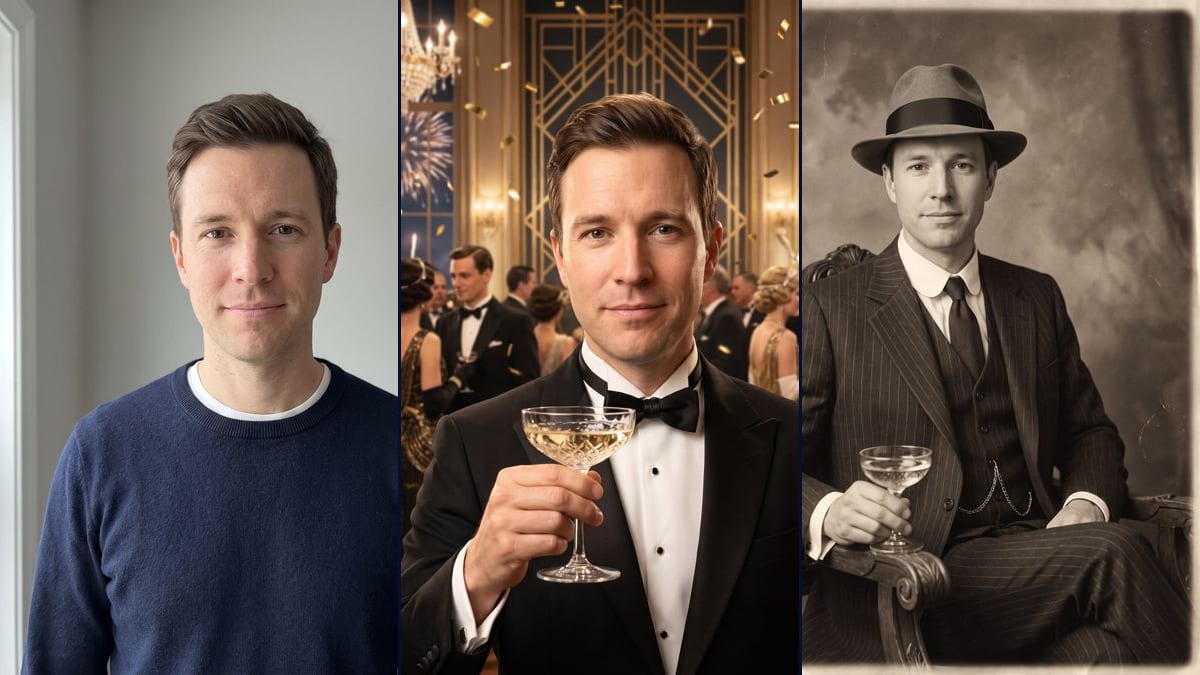
Real workflow: a clean-shaven man in a navy sweater against a grey wall, then the same man in a tuxedo with a champagne coupe in an art deco ballroom full of confetti and fireworks, and as a sepia portrait in a pinstripe suit and felt fedora. The coupe stays at chest height, and the sepia shot is framed down to the knees.
At a glance
The "Great Gatsby Toast AI" is a reaction video: a man in a tuxedo raises his champagne coupe toward the camera with a knowing smile, to say cheers, congratulations or welcome to the party. The videosi.io tracker added it on 12 November 2026 with the "Just starting" status. Here you upload your portrait and an image model dresses you for a Roaring Twenties party.
You get two still pictures, no video. In the first, you are in a tuxedo in an art deco ballroom, coupe in hand, with chandeliers, gold confetti and fireworks behind you. In the second, you sit in a carved armchair in a three-piece pinstripe suit and felt fedora, on a grainy sepia print. On the demo, the face stays faithful in both. The coupe is not raised toward the camera as in the trend, and the sepia portrait goes down to the knees.
For another dressed-up night, see the red carpet photo or the New Year photo. For another era, there is the 90s photo, and to try on formal wear, the wedding suit try-on. Both renders cost 38 credits, see pricing.
These are the files of the workflow above, exactly as the models produced them, unretouched. The starting point is shown when there is one.
Starting point
Render
People who want to try the Gatsby toast trend on their own photo for a story or a post, and hosts or guests of a Gatsby party or a 1920s New Year's Eve looking for an invitation or profile picture.
A sharp portrait of you or of someone who agrees, ideally facing the camera and framed head and shoulders, and a description of their face in the prompt (beard or clean-shaven, glasses, hair colour). The photo is optional.
Upload a front-facing, well-lit portrait
The model keeps your face and makes up the rest, tuxedo, suit and setting included. A sharp head-and-shoulders photo with no sunglasses and no cap is enough. The demo starts from a navy sweater over a white T-shirt.
Describe yourself in the prompts
The prompts describe a clean-shaven man. If you have a beard, a moustache or glasses, write that instead of "clean-shaven", or the model may take them away. For a woman, change the outfit too.
Push the toast gesture
On the demo, the coupe stayed at chest height. If you want the gesture from the trend, add something like "arm stretched out, the coupe raised to eye level, held toward the camera".
Check the face at full size before you post
Zoom in on the face and compare it with your photo. On the demo, the forehead lines are a little deeper in the toast. If one render does not look like you, rerun only that one for 19 credits.
The same canvas, tuned for different needs: each variation is two or three lines of prompt away.
Change "the man" to "the woman" and the outfit to a beaded fringe dress, a feather headband and long gloves. Replace "clean-shaven" with a description of your face as well. Not tested on the demo.
On the demo, the coupe stays at chest height. Replace "raising a crystal champagne coupe toward the camera" with "arm stretched toward the camera, the coupe raised to eye level in the foreground". Not tested.
On the demo, the portrait goes down to the knees, legs crossed. Add "medium close-up, cropped at the waist, legs out of frame" so the face takes up more of the print. Not tested.
The toast picture works well for an invitation to a Gatsby party or a 1920s New Year's Eve. The prompts rule out any text: add the date and address yourself in a layout tool. Not tested.
The sepia portrait makes a period profile picture for a Roaring Twenties group or event. Crop it square around the face, the 1792 x 2400 pixel image leaves enough room. Not tested for this use.
Describe two people and upload a photo where both appear: "the man and the woman in this photo raise their glasses together toward the camera". Describe each face in the prompt. Not tested on the demo.
Start from the toast picture and plug in a Video node: describe the arm coming up, the coupe held out to the camera and the smile, over a few seconds. The template does not include this node. Not tested, and paid separately.
Both prompts ask for a clean-shaven face, because the demo man is. With a beard or a moustache, replace those words with your own facial hair, or the model may shave you.
The trend goes around as a video, and this template makes two stills. For the toast movement, you have to add a Video node yourself, which is untested and costs extra credits.
The model needs to see your hair and eyes to keep them. With a cap or sunglasses in the starting photo, it guesses what is hidden, and the face drifts away from yours.
On the demo, the coupe is not raised toward the camera and the sepia shot is framed down to the knees, despite the prompts. Look at both renders before you send them, and rerun the one that does not work for you.
No. The demo starts from a man in a navy sweater over a white T-shirt, and the model invented the tuxedo, the three-piece suit and the hat. What you wear in your photo does not matter, only the face does.
On the demo, yes: the same features in both renders, with slightly deeper forehead lines in the toast. In the sepia portrait the hat hides the hair, so you mostly judge the face. Always compare at full size before posting.
The template only makes two pictures. You can plug a Video node into the toast picture yourself and describe the arm raising the coupe toward the camera. We did not test it, and the video costs extra credits.
38 credits, 19 per render on Nano Banana Pro at 2K. If one render does not work for you, rerun just that one for 19 credits.
Yes, by switching the node to Nano Banana 2.1 at 1K, which costs less per render and gives smaller pictures. We did not test it on this template. The demo runs on Nano Banana Pro.
1792 x 2400 pixels, portrait, in a 3:4 ratio. Enough for a story, an Instagram post or a printed invitation of about 15 x 20 cm.
We do not know who started it. videosi.io added it to its tracker on 12 November 2026 as "Great Gatsby Toast AI", with the "Just starting" status and a date of 9 November 2026. It is the only dated source we have. Imaginode has no link with the site.
Yes, it is a natural fit for a Gatsby party or a 1920s New Year's Eve: the toast for the invitation, the sepia shot for the profile picture. The images contain no text, you add your own afterwards. We have not tested these uses.
The photo is optional in the canvas, but without it the model invents a person. For it to be you raising the glass, you need your portrait.
Gatsby toast AI photo trend from your own portrait
Use this workflowFree account, no card required. The workflow opens pre-filled in your canvas.
 Nano Banana Pro
 Flux Kontext
 Seedream 5 Pro