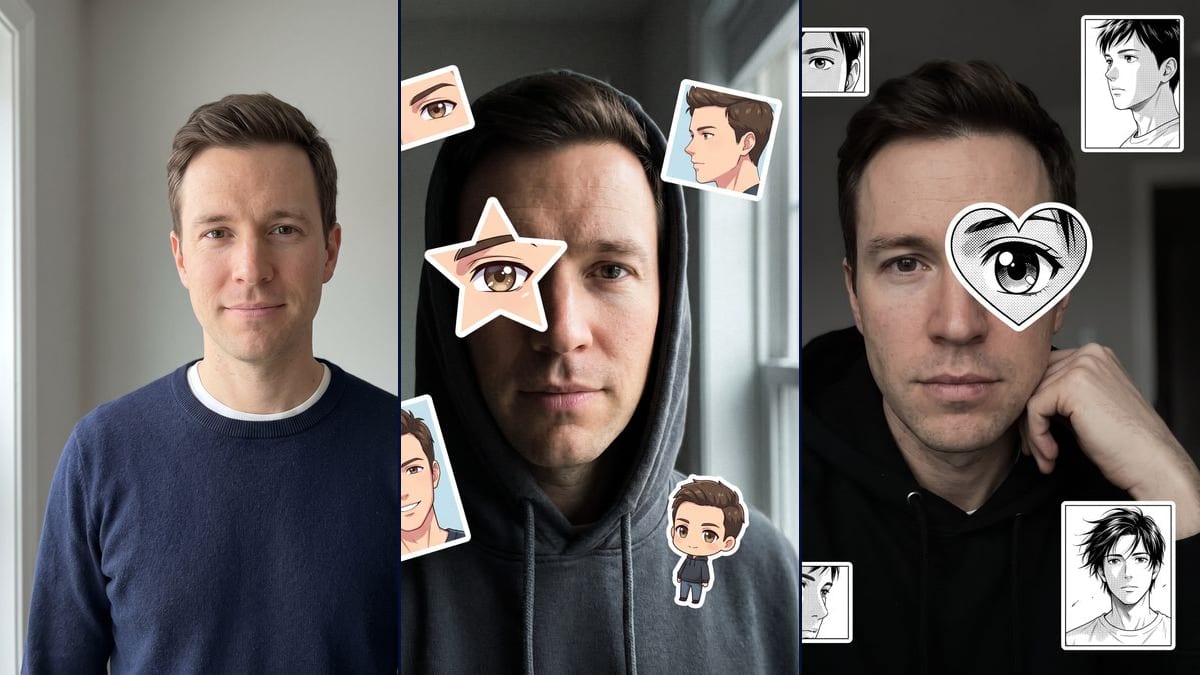
The star or the heart
The trend started with the star, the heart came right after. Only one line of the prompt changes, the shape of the sticker; everything else, the hood, the light and the panels, is described the same way.
The anime eye trend on your own selfie: a white-bordered star over one eye, small panels around your face, and a manga version. Workflow visible, no account.
Real workflow: a portrait of a clean-shaven man in his thirties with short brown hair, in a navy jumper over a white t-shirt, then the same man as a moody selfie in a grey hoodie with a star over one eye and four colour anime panels, and in a black hoodie with a manga heart over his left eye. He is recognisable in both, with stubble he doesn't have, and the star landed on the other eye from the one asked for.
At a glance
The anime eye trend has been running on TikTok since mid-October: a moody selfie, the face half hidden, a star sticker over one eye with an anime eye inside, and a few panels of "the anime that looks like me" stuck around it. According to a guide from the effects editor Viberot dated 20 October 2026, a CapCut template launched on the 18th was reportedly used more than 80,000 times in two days. This workflow makes the same image without lining up a mask: one selfie goes in, two images come out, the star version in colour and a black and white manga version with a heart.
The whole effect hangs on one detail: the drawn eye has to sit on the same line as your real eye, or the face seems to have three. The prompt says so, and in the demo both anime eyes land at the right height. The model took liberties elsewhere: stubble on a clean-shaven man, and the star on the right eye instead of the left. The panels are drawings made up for the occasion. Keep them that way: a screenshot of an existing anime stuck on your photo is someone else's picture.
To turn the whole portrait into a drawing, see photo to anime, and for stickers to print, make your own stickers. If it's the colour of your eyes you're after, there is change your eye colour. Both renders cost thirty-eight credits.
These are the files of the workflow above, exactly as the models produced them, unretouched. The starting point is shown when there is one.
Starting point
Render
People who want to do the TikTok anime eye trend on their own selfie without lining up a mask in CapCut, anime and manga fans, content creators who follow trends.
A sharp, front-facing selfie with eyes wide open, of you or of someone who agreed, plus the sticker shape, the eye to cover and the panels you want.
Take a front-facing selfie
Sharp, both eyes open and clearly visible, no glasses. The model redoes the light and the hood, so an ordinary daylight photo is enough. Your face, or one of someone who said yes.
Pick the eye and the shape
Star or heart, and which eye to cover. Write it two ways, "his left eye, on the right of the image": the demo still put the star on the other eye, so check before keeping it.
Describe the panels
How many, which shots (eyes, profile, portrait, chibi), colour or black and white, and the words "original drawings". Without an exact number, the model often adds one, as in the manga version.
Check the eye line
Draw an imaginary line between the drawn eye and the real one. If one is clearly higher, or if a beard showed up, rerun that node on its own: nineteen more credits.
The same canvas, tuned for different needs: each variation is two or three lines of prompt away.
The trend started with the star, the heart came right after. Only one line of the prompt changes, the shape of the sticker; everything else, the hood, the light and the panels, is described the same way.
The manga version keeps the photo in colour and only turns the stickers into ink with screentone. The contrast between skin and black and white drawing makes the eye stand out more than in the colour version.
Replace "the man from the photo" with "the woman from the photo" and adapt the list of features: hair length, fringe, makeup or none. A strand of hair hiding part of the face works just as well as the hood.
They make the image here, then edit it into their video with the trend's sound. A Video node connected to the image can move the head or the light, but this page has no video demo.
Three, four, or a single large one next to the face. Give the exact number and the list of shots: without that, the model adds one, and the photo fills up until the panels crowd the face.
The trend calls for a dim room, but a selfie in the street at night or under a neon sign works too. Keep the light low: on a photo that is too bright, the white sticker stands out less.
An actor, a singer, a streamer: no. This workflow is for putting yourself in the trend, or someone who agreed and will see the picture.
Images from a series belong to its studio, and a well-known character on your photo is no longer "the anime that looks like you". Leave the words "original drawings" in the prompt.
A drawn eye higher or lower than the real one gives you a three-eyed face. The manga demo sits a little low, and it shows. Write "on exactly the same horizontal line as the other eye".
The model takes the colour and shape of your eye for the drawing. A squinting eye, one in shadow or behind glasses gives it little to copy, and the anime eye comes out generic.
Because then the eye reads as yours. Moved a few millimetres up or down, you see a third eye stuck on the forehead or the cheek, and the effect falls flat. In the demo, the star sits at exactly the right height, the manga heart a little lower.
No. The star was meant to cover the left eye and covers the right. The manga version was meant to have three tilted panels and has four placed straight. Both renders added stubble to a clean-shaven man.
No, on purpose. The prompt asks for original drawings that don't reuse any existing anime, manga or character. On the trend, many people paste screenshots from a series: those belong to their studio, and this workflow avoids them.
Thirty-eight credits, nineteen per render on Nano Banana Pro in 2K. Rerunning a single image costs nineteen more.
Because it holds a face from a single photo and can place drawn elements on a photo without repainting everything. Flux Kontext, which costs less, retouches the features, and you no longer recognise yourself under the star.
1792 x 2400 pixels, vertical 3:4: for a 9:16 format, crop while keeping the panels in the frame. Both renders in the demo came out on the first try, neither was redone.
The prompt already said "clean-shaven", and both renders ignored it. Add "smooth skin, no beard, no stubble shadow" and rerun the image.
No. The model places the star and the panels itself. You don't adjust anything by hand, but you don't pick the position to the pixel either: the prompt guides it, then you check.
Do the anime eye trend on your selfie with AI
Use this workflowFree account, no card required. The workflow opens pre-filled in your canvas.
 Nano Banana Pro
 Seedream 5 Pro
 Flux Kontext